
App Freezer
Contains adsIn-app purchases
3.9star
4.77K reviews
1M+
Downloads

Everyone
info
About this app
App Freezer helps you freeze (disable) unwanted apps and pre-installed bloatware on Android devices. By disabling unused apps, you can reduce background activity, save battery, free RAM, and keep your device cleaner and more organized.
The app supports many Android devices including Samsung, Sony, Xiaomi, Huawei, LG, HTC, Asus, and more.
It works on ROOTED and NON-ROOT devices (using Android Device Administrator mode).
🔑 Important Permission Notice
Root access or Device Administrator permission is required to freeze or unfreeze apps.
Without these permissions, App Freezer works only as a package information viewer.
All permissions are used only for core app functionality and are clearly explained.
⭐ Key Features
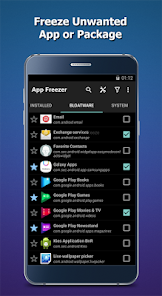
✔ Freeze / Unfreeze apps or packages
– Disable unwanted system apps, pre-installed apps, and bloatware
✔ One-tap Freeze / Unfreeze
– Quickly manage supported bloatware packages with a single tap
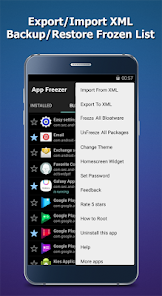
✔ Export / Import (XML)
– Backup and restore frozen app lists via external storage
✔ Favorites list
– Save frequently used packages for faster access
✔ Smart filters
– View frozen apps, running apps, or favorite packages
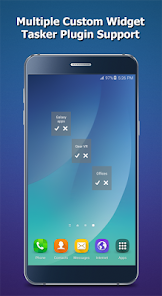
✔ Custom widgets
– Freeze or unfreeze selected apps or groups directly from the home screen
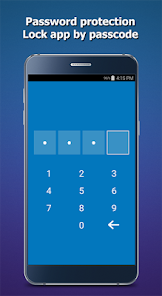
✔ Fingerprint authentication
– Protect the app from unauthorized access
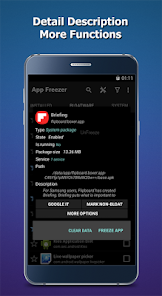
✔ Advanced options (Root only)
– View app details, launch apps, or uninstall packages (Root required)
📱 Non-Root Device Setup (Advanced Users Only)
For Android 5.0+ devices without Root, App Freezer can operate in Device Administrator mode.
Requirements:
1. Basic knowledge of ADB commands
2. A computer with ADB installed
Steps:
1. Temporarily remove/logout all accounts from device settings
2. Enable USB Debugging
3. Connect your device to a computer
4. Run one of the following commands:
"adb shell dpm set-device-owner com.wakasoftware.appfreezer/.receiver.DPMReceiver"
or
"adb shell dpm set-profile-owner com.wakasoftware.appfreezer/.receiver.DPMReceiver"
Restart the app, then add your accounts back
📘 Detailed guide:
http://wakasoftware.com/app-freezer-setup
🔐 Special Permissions Explained
WRITE_EXTERNAL_STORAGE → Used to export/import XML files and backup APKs
BIND_DEVICE_ADMIN → Required to enable freeze/unfreeze functionality on non-root devices
App Freezer does not misuse permissions and does not access personal data.
🗑️ How to Uninstall
Open App Freezer → Menu (⋮) → Uninstall this app
Or run the ADB command:
"adb shell dpm remove-active-admin com.wakasoftware.appfreezer/.receiver.DPMReceiver"
⚠️ Important Notes
- Unfreeze all apps before Android system updates (OTA)
- Be cautious when freezing system-critical apps
- Rooting your device may affect warranty status
- Always back up your data before using this tool
- The app does not collect personal data, except anonymous crash logs (Google Crashlytics)
📩 Support & Feedback
For questions or support, please contact:
koffeeteam@gmail.com
EULA:
http://wakasoftware.com/eula-app-freezer
Privacy Policy:
http://wakasoftware.com/app-freezer-privacy-policy
The app supports many Android devices including Samsung, Sony, Xiaomi, Huawei, LG, HTC, Asus, and more.
It works on ROOTED and NON-ROOT devices (using Android Device Administrator mode).
🔑 Important Permission Notice
Root access or Device Administrator permission is required to freeze or unfreeze apps.
Without these permissions, App Freezer works only as a package information viewer.
All permissions are used only for core app functionality and are clearly explained.
⭐ Key Features
✔ Freeze / Unfreeze apps or packages
– Disable unwanted system apps, pre-installed apps, and bloatware
✔ One-tap Freeze / Unfreeze
– Quickly manage supported bloatware packages with a single tap
✔ Export / Import (XML)
– Backup and restore frozen app lists via external storage
✔ Favorites list
– Save frequently used packages for faster access
✔ Smart filters
– View frozen apps, running apps, or favorite packages
✔ Custom widgets
– Freeze or unfreeze selected apps or groups directly from the home screen
✔ Fingerprint authentication
– Protect the app from unauthorized access
✔ Advanced options (Root only)
– View app details, launch apps, or uninstall packages (Root required)
📱 Non-Root Device Setup (Advanced Users Only)
For Android 5.0+ devices without Root, App Freezer can operate in Device Administrator mode.
Requirements:
1. Basic knowledge of ADB commands
2. A computer with ADB installed
Steps:
1. Temporarily remove/logout all accounts from device settings
2. Enable USB Debugging
3. Connect your device to a computer
4. Run one of the following commands:
"adb shell dpm set-device-owner com.wakasoftware.appfreezer/.receiver.DPMReceiver"
or
"adb shell dpm set-profile-owner com.wakasoftware.appfreezer/.receiver.DPMReceiver"
Restart the app, then add your accounts back
📘 Detailed guide:
http://wakasoftware.com/app-freezer-setup
🔐 Special Permissions Explained
WRITE_EXTERNAL_STORAGE → Used to export/import XML files and backup APKs
BIND_DEVICE_ADMIN → Required to enable freeze/unfreeze functionality on non-root devices
App Freezer does not misuse permissions and does not access personal data.
🗑️ How to Uninstall
Open App Freezer → Menu (⋮) → Uninstall this app
Or run the ADB command:
"adb shell dpm remove-active-admin com.wakasoftware.appfreezer/.receiver.DPMReceiver"
⚠️ Important Notes
- Unfreeze all apps before Android system updates (OTA)
- Be cautious when freezing system-critical apps
- Rooting your device may affect warranty status
- Always back up your data before using this tool
- The app does not collect personal data, except anonymous crash logs (Google Crashlytics)
📩 Support & Feedback
For questions or support, please contact:
koffeeteam@gmail.com
EULA:
http://wakasoftware.com/eula-app-freezer
Privacy Policy:
http://wakasoftware.com/app-freezer-privacy-policy
Updated on
Safety starts with understanding how developers collect and share your data. Data privacy and security practices may vary based on your use, region, and age. The developer provided this information and may update it over time.


Ratings and reviews
3.9
4.62K reviews

Bootiful Duk
- Flag inappropriate
October 14, 2025
Perfection. Been using this app on multiple Android devices throughout the years. After the app is properly configured via ADB on my non-rooted devices, it always 'just works' for preventing system apps and bloatware from actively running in memory. Helps keep the operating system 'lean'. Just be careful which apks or services you freeze, as some are crucial/necessary. Super handy tool!
36 people found this review helpful

A Google user
- Flag inappropriate
- Show review history
December 1, 2019
App Freezer does not break the backups of Google and Samsung IF YOU KNOW WHAT YOU ARE DOING. Kiddies shouldn't play with dangerous tools. You must know what you are doing before disabling everything listed as bloatware. It's not straightforward like that at all. I have both BKmanager and App Freezer running on dozens of Android phones that I manage for my family and backups run without fail. Most of my family is scattered throughout the US. I literally get their phone, fine tune it with this app, send it back to them, and it just works and works without fail. If you are afraid of breaking your phone, you shouldn't be running this or any other software like it. If you know what you are doing, this is the only way to turn off lots of crud without voiding warranties in order to gain back battery life and keep the battery from overheating. It's also great for disabling problematic apps that affect performance and/or security in such situations that the app cannot be uninstalled. I would give it 100 stars if I could!
1,480 people found this review helpful

Private Quadrilateral
- Flag inappropriate
August 28, 2025
Does what it says. Two very pesky apps had for some time, been starting themselves on boot up tying my system up in knots and stopping me from getting on - you know the score... To my utter delight, two clicks with this very simple to use app cured the problem instantly. Check the "About This app" to make sure its right for you. Otherwise, recommended!
26 people found this review helpful
What’s new
Improve performance and fix bugs
App support
About the developer
Vũ Đan Hoài Vũ
kunkunsoft@gmail.com
Cự Khê, Thanh Oai
Hà Nội 13513
Vietnam


