Galaxy Watch Face 3D
500+
Downloads

Everyone
info


About this app
Galaxy 3D Time – Animated Cosmic Watch Face for Wear OS by Galaxy Design
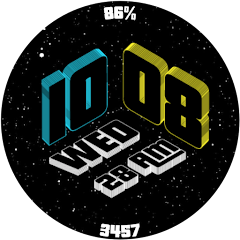
Experience the universe on your wrist with Galaxy 3D Time, a premium animated watch face that blends deep-space visuals with practical everyday features. With its swirling 3D galaxy, shimmering stars, and bold numerals, every glance feels immersive, vibrant, and alive.
STUNNING 3D COSMIC DESIGN
• Fully animated galaxy with layered 3D depth
• Shimmering star field that moves seamlessly
• Bold, high-contrast numerals for instant readability
• A perfect mix of visual art and daily function
EVERYDAY ESSENTIALS AT A GLANCE
• Battery percentage
• Step counter*
• Day & date display
• AM/PM indicator
• Smooth, fast performance with zero animation lag
ALWAYS-ON DISPLAY (AOD) READY
• Refined dim mode that preserves the galaxy’s beauty
• Optimized to save power without losing style
• Clear time visibility day and night
BUILT FOR PERFORMANCE
• Lightweight and battery-friendly
• Smooth animations optimized for Wear OS
• Designed to stand out on AMOLED smartwatch screens
PERFECT FOR:
• Astronomy lovers
• Fans of animated and futuristic watch faces
• Anyone who wants a premium, eye-catching design
COMPATIBILITY
• Samsung Galaxy Watch Series
• Google Pixel Watch Series
• All Wear OS 5.0+ smartwatches
• ❌ Not compatible with Tizen OS
HOW TO USE
1. Install Galaxy 3D Time from Google Play.
2. Ensure your smartwatch is running Wear OS 5.0 or later.
3. Touch and hold your current watch face, then choose Galaxy 3D Time by Galaxy Design.
NOTE
• Steps and activity data are provided by your watch’s sensors and system services.*
ABOUT GALAXY DESIGN
Galaxy Design creates premium animated and digital watch faces crafted for clarity, beauty, and smooth performance. Search “Galaxy Design Watch Face” on Google Play to explore more.
Bring the universe to your wrist — activate Galaxy 3D Time today.
Experience the universe on your wrist with Galaxy 3D Time, a premium animated watch face that blends deep-space visuals with practical everyday features. With its swirling 3D galaxy, shimmering stars, and bold numerals, every glance feels immersive, vibrant, and alive.
STUNNING 3D COSMIC DESIGN
• Fully animated galaxy with layered 3D depth
• Shimmering star field that moves seamlessly
• Bold, high-contrast numerals for instant readability
• A perfect mix of visual art and daily function
EVERYDAY ESSENTIALS AT A GLANCE
• Battery percentage
• Step counter*
• Day & date display
• AM/PM indicator
• Smooth, fast performance with zero animation lag
ALWAYS-ON DISPLAY (AOD) READY
• Refined dim mode that preserves the galaxy’s beauty
• Optimized to save power without losing style
• Clear time visibility day and night
BUILT FOR PERFORMANCE
• Lightweight and battery-friendly
• Smooth animations optimized for Wear OS
• Designed to stand out on AMOLED smartwatch screens
PERFECT FOR:
• Astronomy lovers
• Fans of animated and futuristic watch faces
• Anyone who wants a premium, eye-catching design
COMPATIBILITY
• Samsung Galaxy Watch Series
• Google Pixel Watch Series
• All Wear OS 5.0+ smartwatches
• ❌ Not compatible with Tizen OS
HOW TO USE
1. Install Galaxy 3D Time from Google Play.
2. Ensure your smartwatch is running Wear OS 5.0 or later.
3. Touch and hold your current watch face, then choose Galaxy 3D Time by Galaxy Design.
NOTE
• Steps and activity data are provided by your watch’s sensors and system services.*
ABOUT GALAXY DESIGN
Galaxy Design creates premium animated and digital watch faces crafted for clarity, beauty, and smooth performance. Search “Galaxy Design Watch Face” on Google Play to explore more.
Bring the universe to your wrist — activate Galaxy 3D Time today.
Updated on
Safety starts with understanding how developers collect and share your data. Data privacy and security practices may vary based on your use, region, and age. The developer provided this information and may update it over time.

No data shared with third parties
Learn more about how developers declare sharing

No data collected
Learn more about how developers declare collection
App support
About the developer
Irma Yusnita, S. P.
galaxywatchdesign@gmail.com
Alam Tirta Lestari Blok D8 / 12
003/014, Pagelaran Ciomas
Bogor
Jawa Barat 16610
Indonesia


