WeMacro rail control
4.7star
27 reviews
1K+
Downloads

Everyone
info
About this app
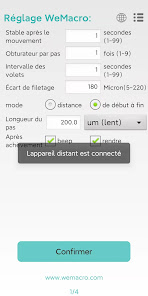
Use this app to control WeMacro focus stacking rail by Bluetooth communication. Provide 2 working mode:1 distance mode and 2 from start to end mode.
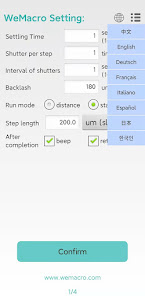
Upgrade to display eight languages: English, Chinese, German, French, Italian, Spanish, Japanese, Korean.
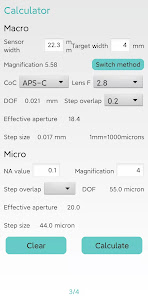
On the third page of the APP, there is a DOF calculator for the macro lens and the microscope objective lens.
The micron step size is upgraded to one decimal place,and 2 demical place in mm unit.Such as 1.25mm or 0.25mm.
Please press "confirm" when you turn on the controller and app.
1 Distance mode :Means you can input the total distance you want to move and single step length.The program will calculate how many steps it will take automatically.If you change single step length,the step number will change accordingly.
Press “confirm”to save setting to control box after every time you change settings.
2 Start to End mode:Means you can set starting position and ending position,step length.The rail will run automatically.First,press confirm after setting the first page.
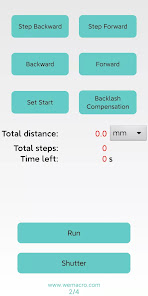
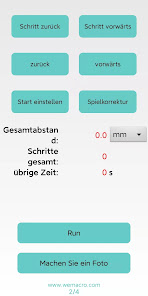
Then in second page you can adjust the position to close to the starting point.
Press “As start”to set starting point.Then press step forward or forward to find the ending point.More coverage at the beginning and ending point will make it safer to complete the whole stacking.In other words,set the beginning point few steps more than the real starting point and ending point of focus stacking.
Then press“Run”
After done,please press "Stop"to switch the status to Run again.
The app can save or load configuration as MPE65.wm.The file must end as .wm.
Upgrade to display eight languages: English, Chinese, German, French, Italian, Spanish, Japanese, Korean.
On the third page of the APP, there is a DOF calculator for the macro lens and the microscope objective lens.
The micron step size is upgraded to one decimal place,and 2 demical place in mm unit.Such as 1.25mm or 0.25mm.
Please press "confirm" when you turn on the controller and app.
1 Distance mode :Means you can input the total distance you want to move and single step length.The program will calculate how many steps it will take automatically.If you change single step length,the step number will change accordingly.
Press “confirm”to save setting to control box after every time you change settings.
2 Start to End mode:Means you can set starting position and ending position,step length.The rail will run automatically.First,press confirm after setting the first page.
Then in second page you can adjust the position to close to the starting point.
Press “As start”to set starting point.Then press step forward or forward to find the ending point.More coverage at the beginning and ending point will make it safer to complete the whole stacking.In other words,set the beginning point few steps more than the real starting point and ending point of focus stacking.
Then press“Run”
After done,please press "Stop"to switch the status to Run again.
The app can save or load configuration as MPE65.wm.The file must end as .wm.
Updated on
Safety starts with understanding how developers collect and share your data. Data privacy and security practices may vary based on your use, region, and age. The developer provided this information and may update it over time.

No data shared with third parties
Learn more about how developers declare sharing

No data collected
Learn more about how developers declare collection
Ratings and reviews
4.7
25 reviews

aWildTomAppeared
- Flag inappropriate
March 7, 2025
Works fairly well, it would be a lot nicer if it were possible to input values below 1 like 0.5 for the settle time and shutter interval because I can do that on the computer program without issues and it's much faster. Also it would be better if when you switch from fast to slow it converts the distance values from mm to um vica versa, because atm if I have say 150um steps and change to fast so I can navigate then that's 150mm which it won't allow so I have to change that too just to move quick

Bob Mahar
- Flag inappropriate
March 5, 2022
WeMacro rails are a great way to do focus stacking. The app is decidedly utilitarian. Having to switch screens and save configs to change the step size for slewing the rail manually. It's also unclear from the UI what the time delay options do without experience with it. Again, the rails themselves are 5 stars, the app is a bit clunky, but understandably so. Usable, but wish it were a bit more polished.
1 person found this review helpful

Brian Bourassa
- Flag inappropriate
March 7, 2023
UI not "over-the-top" but it's functionality is very good.
1 person found this review helpful
What’s new
Optimised the display of remaining distance and step length during runtime. Added an automatic compensation feature for backlash. Introduced a quick movement function for 10x and 20x step lengths. A reminder function will activate when the multiple exceeds 10mm. This makes fine position adjustments more convenient.
App support
About the developer
顾晓春
william@wemacro.com
China
undefined


