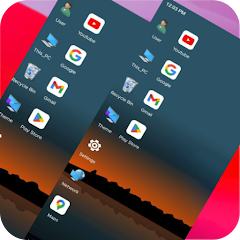
Computer Launcher Win 10
বিজ্ঞাপনযুক্ত
৩.৪star
৩৩৪ টা পৰ্যালোচনা

সকলো
info
১ লাখ+
ডাউনল’ড

সকলো
অধিক জানক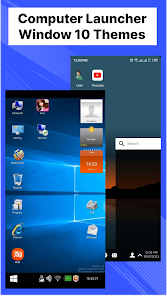
এই এপ্টোৰ বিষয়ে
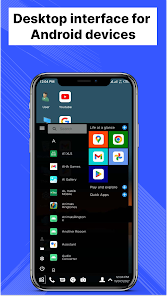
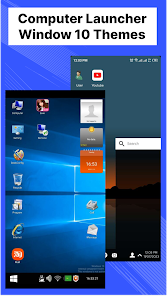
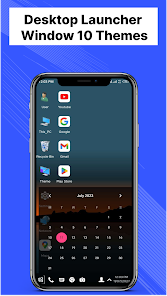
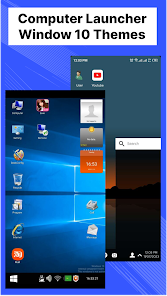
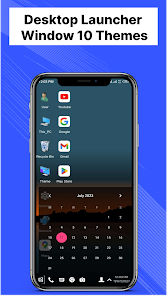
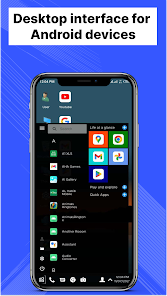
Computer Launcher - Win 10 is a desktop launcher app that transforms your Android phone into a desktop computer. This Window Launcher gives you a familiar Window 10 like experience with icons, menus, and a taskbar. You can also use your phone's keyboard and mouse to control your apps and files with this win 10 launcher.
✒️ Main Features : Computer Launcher - Win 10
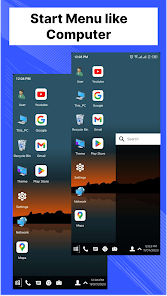
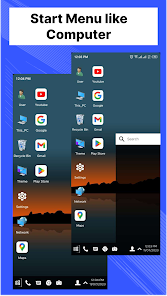
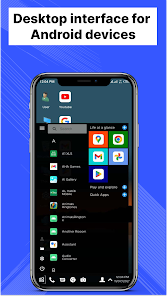
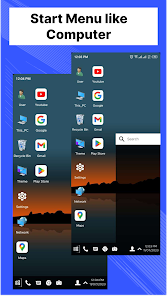
✓ Start Menu like Computer
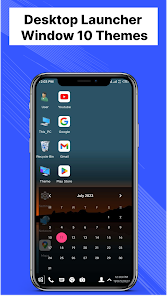
✓ Window 10 tile look
✓ Create shortcuts on desktop
✓ Create contacts on desktop
✓ Place apps on desktop
✓ Drag and Drop
✓ Most used apps list
✓ Easy access and search to the Apps
✓ Get details of all of your drives, SD Card, Storage, audio and video files and pictures in PC style
✓ Computer Launcher Taskbar exact look
✓ Get notify when a notification comes by using Computer Launcher app with number counter
✓ Place Widgets on desktop , resize , drag drop
✓ Add home page
✓ Drag and drop for all actions
✓ Clock Widget on desktop and taskbar
✓ Weather Widget
✓ News Widget
✓ Rename desktop folders
✓ Live Premium Wallpapers and Themes
✓ Weather, Calendar and Photos tiles Added
✓ Unlimited Themes
✓ Lock Screen Feature
✓ Hide App Feature
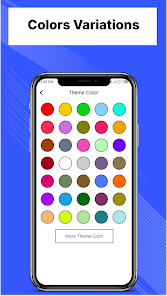
✓ Multi Color Support for Desktop , Start Menu and Task bar
✓ Themes and Icon Pack
✓ Change applications in Taskbar
🖥️ Desktop Experience - Desktop Launcher : Immerse yourself in the seamless desktop launcher app, desktop like environment, allowing for effortless multitasking, window management, and application navigation.
🗄️ File Management - Computer Launcher : Organize and manage your files in this computer launcher with the ease and precision of a desktop computer, utilizing intuitive file management tools right at your fingertips.
🔗 Quick Access Toolbar - Window 10 Launcher : Enjoy the convenience of a customizable toolbar that grants you instant access to frequently used applications, files, and settings.
⚙️ Customization - Win Launcher : Tailor your desktop experience to match your preferences, choosing from an array of themes, wallpapers, icons, and layouts.
🌐 Web Browsing : Browse the internet with unparalleled convenience using a browser that replicates the desktop experience, complete with bookmarks, tabs, and navigation tools.
📂 Widget Integration : Personalize your desktop with widgets that mirror the functionality of a computer, providing live updates and easy access to vital information.
🔄 Taskbar Functionality: Enjoy the familiarity of a taskbar, granting you instant access to running applications, system settings, and notifications.
🔍 Search Efficiency: Harness the power of a robust search feature that quickly locates files, applications, and settings, streamlining your workflow.
🎮 Gaming Integration: Play your favorite mobile games with the advantage of a larger screen and desktop controls, enhancing your gaming experience.
🖱️ Mouse and Keyboard Support: Enhance your interaction with the computer launcher app by connecting external peripherals, creating a truly desktop-like experience.
Elevate your productivity, creativity, and organization to new heights – it's time to experience the future of mobile computing with the Computer Launcher App.
Thank you for your support.
✒️ Main Features : Computer Launcher - Win 10
✓ Start Menu like Computer
✓ Window 10 tile look
✓ Create shortcuts on desktop
✓ Create contacts on desktop
✓ Place apps on desktop
✓ Drag and Drop
✓ Most used apps list
✓ Easy access and search to the Apps
✓ Get details of all of your drives, SD Card, Storage, audio and video files and pictures in PC style
✓ Computer Launcher Taskbar exact look
✓ Get notify when a notification comes by using Computer Launcher app with number counter
✓ Place Widgets on desktop , resize , drag drop
✓ Add home page
✓ Drag and drop for all actions
✓ Clock Widget on desktop and taskbar
✓ Weather Widget
✓ News Widget
✓ Rename desktop folders
✓ Live Premium Wallpapers and Themes
✓ Weather, Calendar and Photos tiles Added
✓ Unlimited Themes
✓ Lock Screen Feature
✓ Hide App Feature
✓ Multi Color Support for Desktop , Start Menu and Task bar
✓ Themes and Icon Pack
✓ Change applications in Taskbar
🖥️ Desktop Experience - Desktop Launcher : Immerse yourself in the seamless desktop launcher app, desktop like environment, allowing for effortless multitasking, window management, and application navigation.
🗄️ File Management - Computer Launcher : Organize and manage your files in this computer launcher with the ease and precision of a desktop computer, utilizing intuitive file management tools right at your fingertips.
🔗 Quick Access Toolbar - Window 10 Launcher : Enjoy the convenience of a customizable toolbar that grants you instant access to frequently used applications, files, and settings.
⚙️ Customization - Win Launcher : Tailor your desktop experience to match your preferences, choosing from an array of themes, wallpapers, icons, and layouts.
🌐 Web Browsing : Browse the internet with unparalleled convenience using a browser that replicates the desktop experience, complete with bookmarks, tabs, and navigation tools.
📂 Widget Integration : Personalize your desktop with widgets that mirror the functionality of a computer, providing live updates and easy access to vital information.
🔄 Taskbar Functionality: Enjoy the familiarity of a taskbar, granting you instant access to running applications, system settings, and notifications.
🔍 Search Efficiency: Harness the power of a robust search feature that quickly locates files, applications, and settings, streamlining your workflow.
🎮 Gaming Integration: Play your favorite mobile games with the advantage of a larger screen and desktop controls, enhancing your gaming experience.
🖱️ Mouse and Keyboard Support: Enhance your interaction with the computer launcher app by connecting external peripherals, creating a truly desktop-like experience.
Elevate your productivity, creativity, and organization to new heights – it's time to experience the future of mobile computing with the Computer Launcher App.
Thank you for your support.
আপডে’ট কৰা তাৰিখ
বিকাশকৰ্তাসকলে আপোনাৰ ডেটা কেনেকৈ সংগ্ৰহ আৰু শ্বেয়াৰ কৰে সেয়া বুজি পোৱাৰ জৰিয়তে সুৰক্ষা আৰম্ভ হয়। ডেটাৰ গোপনীয়তা আৰু সুৰক্ষা প্ৰণালী আপোনাৰ ব্যৱহাৰ, অঞ্চল আৰু বয়সৰ ওপৰত ভিত্তি কৰি ভিন্ন হ’ব পাৰে। বিকাশকৰ্তাগৰাকীয়ে এই তথ্যখিনি প্ৰদান কৰিছে আৰু সময়ৰ লগে লগে এয়া আপডে’ট কৰিব পাৰে।


মূল্যাংকন আৰু পৰ্যালোচনাসমূহ
৩.৪
৩২৬ টা পৰ্যালোচনা


