
Sacrament Meeting Program
3,4star
40 recenzija
1 hilj.+
Preuzimanja

Svako
info




O aplikaciji
The "Sacrament Meeting Program" app provides users a quick, easy way to create their sacrament meeting programs. Then it gives them the option to (1) print traditional paper programs, or (2) give members access to a digital program on their phones.
Wards/branches can use this app to create and print traditional paper programs, or they can go 100% paperless saving literally hundreds of trees.
Benefits
This app offers many advantages over the old traditional paper programs, these include:
o Automatically formats and creates weekly sacrament meeting programs.
o Create both traditional paper programs and digital programs (visible in the app).
o Ward and auxiliary leaders can collaborate to add/manage the agenda items, calendar events and announcements in next week's program.
o Last minute program changes go live instantly in the digital program.
o Hymns and music deep link to the "Sacred Music" mobile app.
o Missionaries deep link to the "Called to Serve" mobile app.
o Pictures of recent stake/ward activities can be uploaded by auxiliary leaders for members to view and download from the app.
Traditional vs Digital Programs
1. Paper Programs – Once the program is created, a PDF version can be downloaded and printed in a traditional, two-page layout.
2. Digital Programs – The digital program can be viewed by scanning a QR code on the bottom of the printed program, or by downloading the Sacrament Meeting Program app and searching for your ward/branch.
Each sacrament meeting program is organized into content blocks. The app helps Admins create each block, one at a time. Then it does all of the formatting to create beautifully printed programs. Each week, your Sunday programs are available to print or view digitally.
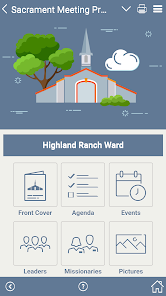
1. FRONT COVER
o Ward name (i.e. "Oak Hills 2nd Ward" or "Washington Branch")
o Meeting date, time and location
o Inspirational image (choose from stock images or upload your own)
o Scripture or inspirational quote from a general authority
o Scripture or inspirational quote reference
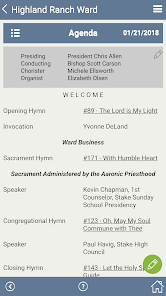
2. AGENDA
o A simple agenda format is used week to week
o The agenda includes general conducting/presiding information
o Standard agenda items (music, prayers, sacrament, speakers, etc.) are included
o Custom agenda items can be added (for special numbers, etc.)
o Hymns deep link to the "Sacred Music" mobile app
o Optional footers can be turned ON/OFF
3. EVENTS
o Add/manage calendar events and announcements
o Ward and auxiliary leaders can easily collaborate to add/manage agenda items and announcements in next week's program
o The digital program provides a way for members to read announcements and select items to place into their personal, digital calendar
o The digital program allows wards/branches to make last-minute changes
o Church, area, or stake-wide information and announcement sharing is possible
4. LEADERS
o Add/manage a short list of the local leaders in your ward/branch
o Tap a leader to view their profile picture and contact information
o Tap a leader's phone number to click-to-call that leader
o Tap a leader's email address to send an email to that leader
5. MISSIONARIES
o Add/manage a short list of the missionaries serving from your ward/branch
o Sort the missionaries by their name, entry dates or return dates
o Tap a missionary to view their profile picture and contact information
o Tap the missionary's email address to send an email to that missionary
o Tap the missionary's "View More" button to deep link to their pictures in the "Called to Serve" mobile app
6. PICTURES
o Share hundreds pictures from recent stake/ward activities
o Pictures can be uploaded for members to view and download from the app
7. LEFT-MENU
o Provides access to your user Profile
o Provides access to the app's Settings page
o Provides ward/branch Admins access to the Admin Menu (to manage images, etc.)
Wards/branches can use this app to create and print traditional paper programs, or they can go 100% paperless saving literally hundreds of trees.
Benefits
This app offers many advantages over the old traditional paper programs, these include:
o Automatically formats and creates weekly sacrament meeting programs.
o Create both traditional paper programs and digital programs (visible in the app).
o Ward and auxiliary leaders can collaborate to add/manage the agenda items, calendar events and announcements in next week's program.
o Last minute program changes go live instantly in the digital program.
o Hymns and music deep link to the "Sacred Music" mobile app.
o Missionaries deep link to the "Called to Serve" mobile app.
o Pictures of recent stake/ward activities can be uploaded by auxiliary leaders for members to view and download from the app.
Traditional vs Digital Programs
1. Paper Programs – Once the program is created, a PDF version can be downloaded and printed in a traditional, two-page layout.
2. Digital Programs – The digital program can be viewed by scanning a QR code on the bottom of the printed program, or by downloading the Sacrament Meeting Program app and searching for your ward/branch.
Each sacrament meeting program is organized into content blocks. The app helps Admins create each block, one at a time. Then it does all of the formatting to create beautifully printed programs. Each week, your Sunday programs are available to print or view digitally.
1. FRONT COVER
o Ward name (i.e. "Oak Hills 2nd Ward" or "Washington Branch")
o Meeting date, time and location
o Inspirational image (choose from stock images or upload your own)
o Scripture or inspirational quote from a general authority
o Scripture or inspirational quote reference
2. AGENDA
o A simple agenda format is used week to week
o The agenda includes general conducting/presiding information
o Standard agenda items (music, prayers, sacrament, speakers, etc.) are included
o Custom agenda items can be added (for special numbers, etc.)
o Hymns deep link to the "Sacred Music" mobile app
o Optional footers can be turned ON/OFF
3. EVENTS
o Add/manage calendar events and announcements
o Ward and auxiliary leaders can easily collaborate to add/manage agenda items and announcements in next week's program
o The digital program provides a way for members to read announcements and select items to place into their personal, digital calendar
o The digital program allows wards/branches to make last-minute changes
o Church, area, or stake-wide information and announcement sharing is possible
4. LEADERS
o Add/manage a short list of the local leaders in your ward/branch
o Tap a leader to view their profile picture and contact information
o Tap a leader's phone number to click-to-call that leader
o Tap a leader's email address to send an email to that leader
5. MISSIONARIES
o Add/manage a short list of the missionaries serving from your ward/branch
o Sort the missionaries by their name, entry dates or return dates
o Tap a missionary to view their profile picture and contact information
o Tap the missionary's email address to send an email to that missionary
o Tap the missionary's "View More" button to deep link to their pictures in the "Called to Serve" mobile app
6. PICTURES
o Share hundreds pictures from recent stake/ward activities
o Pictures can be uploaded for members to view and download from the app
7. LEFT-MENU
o Provides access to your user Profile
o Provides access to the app's Settings page
o Provides ward/branch Admins access to the Admin Menu (to manage images, etc.)
Ažurirano dana
Sigurnost počinje razumijevanjem na koji način programeri prikupljaju i dijele vaše podatke. Privatnost podataka i sigurnosne prakse se mogu razlikovati ovisno o korištenju, regiji i dobi. Programer je naveo ove informacije i može ih s vremenom ažurirati.

Podaci se ne dijele s trećim stranama
Saznajte više o načinu na koji programeri pružaju izjavu o dijeljenju

Ova aplikacija može prikupljati ove vrste podataka
Lokacija, Lične informacije i još 2

Podaci se šifriraju tokom prenosa

Možete zatražiti da se podaci izbrišu
Ocjene i recenzije
3,4
39 recenzija
Što je novo
Your Stake or Ward – Now if your Stake or Ward isn’t listed, you can add these yourself. Open the app, (1) tap the Menu (top-right) to access the Left-Menu, (2) select Ward Admin, (3) tap the Stake Profile button, and (4) use the green “+” Add button (bottom-right), and (5) add your Stake first and then add your Ward.
Podrška za aplikaciju
Informacije o programeru
Latter Day Apps, LLC
Apps@LatterDayApps.com
1423 S Higley Rd Ste 127
Mesa, AZ 85206
United States
+1 480-633-8000


