
Color Analyzer
4,3star
114 recenzija
10 hilj.+
Preuzimanja

Svako
info
O aplikaciji
Want to know more about the color you are looking at?
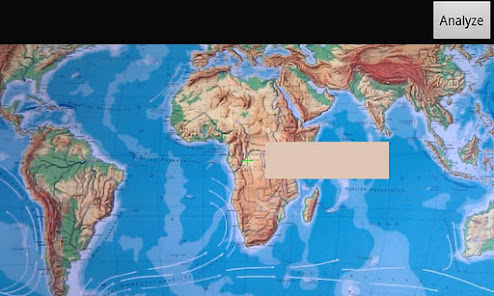
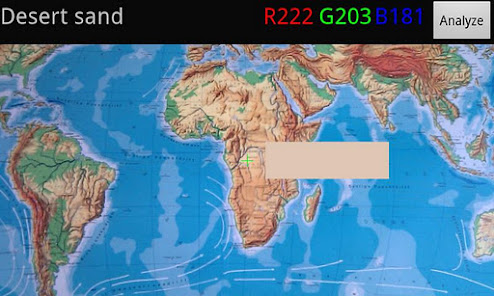
ColorAnalyzer lets you pick a color using the camera and gives you back the red, green and blue (RGB) components and name of the color.
The color under the cross hairs is shown in a continuously updated section of the display. When you have just the right color, click the "Analyze" button and get the red, green and blue components of the color as well as the name of the closest color in the Wikipedia List of Colors.
The color being analyzed is the color you see on the display:
* No flash is used because this changes the color.
* No waiting for auto focus etc.
Note that the color being analyzed is the representation of the color as seen by the camera under the present light conditions. The intensity and color of the light on the surface being analyzed and the properties of the camera sensor has great impact on the outcome of the analysis.
ColorAnalyzer lets you pick a color using the camera and gives you back the red, green and blue (RGB) components and name of the color.
The color under the cross hairs is shown in a continuously updated section of the display. When you have just the right color, click the "Analyze" button and get the red, green and blue components of the color as well as the name of the closest color in the Wikipedia List of Colors.
The color being analyzed is the color you see on the display:
* No flash is used because this changes the color.
* No waiting for auto focus etc.
Note that the color being analyzed is the representation of the color as seen by the camera under the present light conditions. The intensity and color of the light on the surface being analyzed and the properties of the camera sensor has great impact on the outcome of the analysis.
Ažurirano dana
Sigurnost počinje razumijevanjem na koji način programeri prikupljaju i dijele vaše podatke. Privatnost podataka i sigurnosne prakse se mogu razlikovati ovisno o korištenju, regiji i dobi. Programer je naveo ove informacije i može ih s vremenom ažurirati.

Podaci se ne dijele s trećim stranama
Saznajte više o načinu na koji programeri pružaju izjavu o dijeljenju

Podaci se ne prikupljaju
Saznajte više o načinu na koji programeri pružaju izjavu o prikupljanju
Ocjene i recenzije
4,3
110 recenzija
Što je novo
The size of the cross hairs and the color sample area is now proportional to the screen dimensions.
Podrška za aplikaciju
Informacije o programeru
Jens Peter Vester
jenspeter.vester+google-play@gmail.com
Denmark
undefined


