Monitask
1 hilj.+
Preuzimanja

Svako
info





O aplikaciji
Monitask for Android allows employees and freelancers to manually start a clock when they begin working on an assignment for employers, submit offline time and view reports.
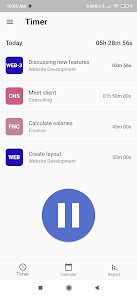
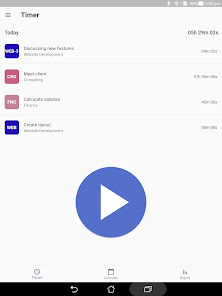
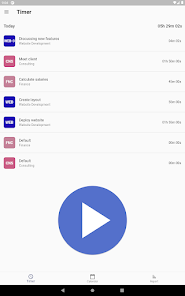
On the Timer screen tap Play button and select project with task on which you are working on, optionally add photos and tap the Clock In button. Track some time and tap on the Pause button. Your time will be synchronized with your account and will be visible in Calendar and Report screens
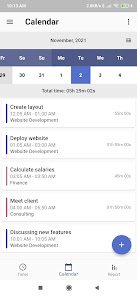
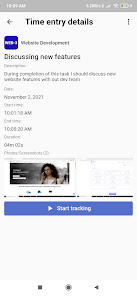
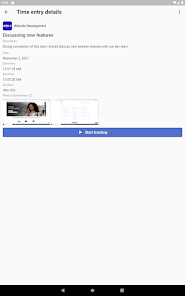
On Calendar screen you can browse all your time entries, filter them by project/task and sort. Tap on any time entry and you will see it’s details:
- Start/end time and duration
- Clock In/Out locations
- Attached photos, screenshots
On that screen you can also change time entry’s project and task, split it’s time into multiple sub-tasks or delete.
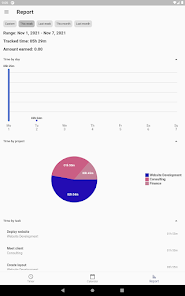
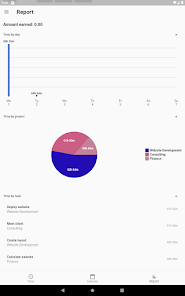
Report screen allows you to see full picture of how much time you spend on your projects/tasks. You can select any predefined or custom range for which the report is rendered and see a breakdown of tracked time by day, project and task. You can also export the report and share it with your employer.
- You need an active Monitask account to use this application. You can register an account here here https://app.monitask.com/account/register
- GPS location tracking is optional and used to capture Clock In and Clock Out locations only. Your employer controls if location tracking is enabled for your account
How it works
On the Timer screen tap Play button and select project with task on which you are working on, optionally add photos and tap the Clock In button. Track some time and tap on the Pause button. Your time will be synchronized with your account and will be visible in Calendar and Report screens
Calendar
On Calendar screen you can browse all your time entries, filter them by project/task and sort. Tap on any time entry and you will see it’s details:
- Start/end time and duration
- Clock In/Out locations
- Attached photos, screenshots
On that screen you can also change time entry’s project and task, split it’s time into multiple sub-tasks or delete.
Report
Report screen allows you to see full picture of how much time you spend on your projects/tasks. You can select any predefined or custom range for which the report is rendered and see a breakdown of tracked time by day, project and task. You can also export the report and share it with your employer.
Prerequisites
- You need an active Monitask account to use this application. You can register an account here here https://app.monitask.com/account/register
- GPS location tracking is optional and used to capture Clock In and Clock Out locations only. Your employer controls if location tracking is enabled for your account
Ažurirano dana
Sigurnost počinje razumijevanjem na koji način programeri prikupljaju i dijele vaše podatke. Privatnost podataka i sigurnosne prakse se mogu razlikovati ovisno o korištenju, regiji i dobi. Programer je naveo ove informacije i može ih s vremenom ažurirati.

Podaci se ne dijele s trećim stranama
Saznajte više o načinu na koji programeri pružaju izjavu o dijeljenju

Ova aplikacija može prikupljati ove vrste podataka
Lokacija, Lične informacije i još 3

Podaci se šifriraju tokom prenosa

Možete zatražiti da se podaci izbrišu
Što je novo
Fix loading screen for deleted tasks
Podrška za aplikaciju
Informacije o programeru
Fest Technologies LLC
askarru@gmail.com
6434 N Vancouver Ave
Portland, OR 97217
United States
+1 971-804-6378