Offline Notepad
In-app purchases
4.4star
1.48K reviews
100K+
Downloads

Everyone
info


About this app
Offline notepad is exactly what it says on the tin: A notepad which operates completely offline. No server syncs or data loss if you forget the login credentials to your account! Main features include:
Creating Content:
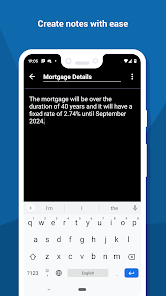
1- Create as many notes as you like, and search for them by title or anything in the note body to find them again at ease.
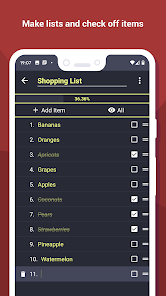
2- Create & write your weekly shopping list or anything else with the dedicated list creation feature. Add as many items as you like! Check off items, filter by complete/incomplete items & see your progress at ease with a progress percentage bar!
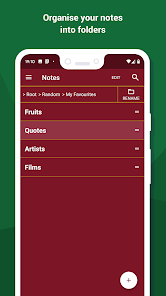
3- Organise your notes & lists into folders and sub-folders, create as many folders as you like - as many layers deep as you like also!
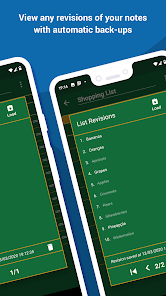
4- Revisit old revisions/edits of a note/list to see the history of that item. You may also replace the current version of that note or list with an older version of it.
Convenience & Utility:
5- A completely uninterrupted user experience: no videos or ads in any shape or form! The app is 100% free & simply accepts donations for those who love it enough to support it. Simple!
6- Lock the app to portrait (default) or landscape so you can use it on phones & tablets alike!
7- Flag and highlight your favoured notes to make them stand out from the rest. Organise & sort them all by either dragging & dropping or by alphabetical order.
Security & Backup:
8- Protect your notes by setting up an app PIN & fingerprint unlocking within the app.
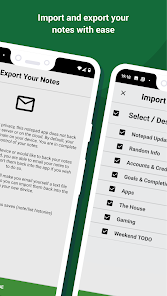
9- Export & import your items to yourself across devices by following the export/import process within the app. As this is an offline notepad, the export/import process is done by emailing your data to yourself. Your exported items are encrypted by default.
Customise:
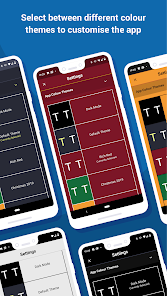
10- Reskin the entire look of your app from a variety of themes! Choose from ‘panda white’, ‘dark mode’ & ‘rich red’ just to name a few!
11- Resize the text throughout the entire app to better suit your visual needs.
Offline notepad is entirely free & your notes, lists and folders are only stored within the app itself. There are no limitations on how many items you can create or how many times you can edit your notes/lists.
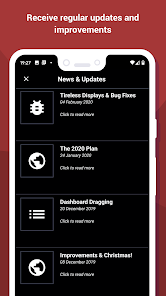
This app is updated regularly with brand new features, fixes & improvements; and all of these changes are documented frequently in the ‘News & Updates’ section found from the home screen in the app!
That's all there is to it - happy note taking!
Creating Content:
1- Create as many notes as you like, and search for them by title or anything in the note body to find them again at ease.
2- Create & write your weekly shopping list or anything else with the dedicated list creation feature. Add as many items as you like! Check off items, filter by complete/incomplete items & see your progress at ease with a progress percentage bar!
3- Organise your notes & lists into folders and sub-folders, create as many folders as you like - as many layers deep as you like also!
4- Revisit old revisions/edits of a note/list to see the history of that item. You may also replace the current version of that note or list with an older version of it.
Convenience & Utility:
5- A completely uninterrupted user experience: no videos or ads in any shape or form! The app is 100% free & simply accepts donations for those who love it enough to support it. Simple!
6- Lock the app to portrait (default) or landscape so you can use it on phones & tablets alike!
7- Flag and highlight your favoured notes to make them stand out from the rest. Organise & sort them all by either dragging & dropping or by alphabetical order.
Security & Backup:
8- Protect your notes by setting up an app PIN & fingerprint unlocking within the app.
9- Export & import your items to yourself across devices by following the export/import process within the app. As this is an offline notepad, the export/import process is done by emailing your data to yourself. Your exported items are encrypted by default.
Customise:
10- Reskin the entire look of your app from a variety of themes! Choose from ‘panda white’, ‘dark mode’ & ‘rich red’ just to name a few!
11- Resize the text throughout the entire app to better suit your visual needs.
Offline notepad is entirely free & your notes, lists and folders are only stored within the app itself. There are no limitations on how many items you can create or how many times you can edit your notes/lists.
This app is updated regularly with brand new features, fixes & improvements; and all of these changes are documented frequently in the ‘News & Updates’ section found from the home screen in the app!
That's all there is to it - happy note taking!
Updated on
Safety starts with understanding how developers collect and share your data. Data privacy and security practices may vary based on your use, region and age. The developer provided this information and may update it over time.


Ratings and reviews
4.4
1.38K reviews

Alice Clearman, PhD
- Flag inappropriate
29 November 2025
OHMYGOSH, I LOVE THIS APP!! I've tried so, so, so many and this one is my absolute favorite. easy to use and to organize. The tools within it are fantastic. I've tried so many - one even rearranged my desktop. No kidding! This app is perfect for my needs and easy to transfer between devices. I can't recommend it highly enough! Thank you for this, Gino!

Rin Morningstar
- Flag inappropriate
- Show review history
25 October 2025
A good, stable, minimal app that does what it says with no fuss. I'd like to save notes as discrete .utf8 text files in my Documents folder, but I understand the complications that creates under Google's "safety policy" regime. I use this for things I don't want in Google Keep, and SolidExplorer's SE Text Editor for things I need to copy freely. Edit: I've had to move on from this app. It's good for what it does, but the lack of ability to operate with external files is too much of a hinderance
12 people found this review helpful

Seth Clydesdale
- Flag inappropriate
7 September 2025
I use this app to organize and use my recipes and it works really well. I was able to import all my text files I had on my PC making setup easy for me. The only thing I didn't like was that it imports the notes with a generic title instead of copying the file name as the title, so it was a little tedious to rename all my imported recipes. Other than that I think this is a really solid note app.
5 people found this review helpful
Gino Basiletti
30 November 2025
Hey Seth, thanks so much for your review and the constructive feedback :) I'm actually looking at the whole import/export process soon (IE the coming days and weeks), I would like to strengthen it for reliability and also look at adding greater flexibility / improving the experience. I've noted your feedback and will assess, thanks!
What's new
Build tools used within the app have been updated, and a new in-app post has been written about the future of the app! Check it out in the News & Updates section found within the app!
Best wishes,
-Gino
Best wishes,
-Gino
App support
About the developer
Gino Basiletti
ginobasiletti@gmail.com
59 Clonakilty Way
CARDIFF
CF23 8PR
United Kingdom
undefined


