

PitchBop Pro

3.1star
44 reviews
500+
Downloads

Everyone
info










About this app
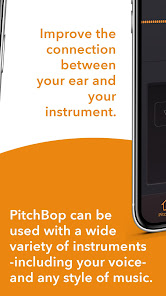
PitchBop is a melodic ear training app designed to help you improve the connection between your ear and your instrument by directly linking the level of skill to the accuracy of your performance.
WHAT PITCHBOP DOES DIFFERENTLY
Unlike most ear training apps where you answer by tapping on a screen without addressing the rhythmic aspect of what you hear, PitchBop offers a performance-like scenario where you listen and actually play your instrument or use your voice.
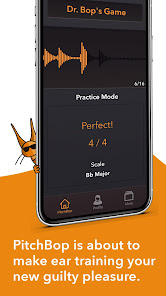
Using the 'Call and Response' model, Dr. Bop, the resident jazz cat of PitchBop, plays a short phrase for you to listen to and allows you the same amount of time to repeat the phrase back to him to evaluate the accuracy of your performance.
HOW PITCHBOP WORKS
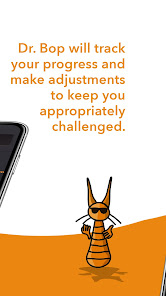
Behind the simple interface, there is a complex algorithm based on AI which creates endless melodies and adjusts the difficulty according to your progress.
Using the 'Call and Response' model, Dr. Bop plays a short phrase for you to listen to and allows you the same amount of time to repeat the phrase back to him to evaluate the accuracy of your performance. Once the session is complete, you receive feedback on how well you did, and the difficulty level is set based on your performance so you can focus on playing without needing to worry about adjusting the settings.
APP FEATURES
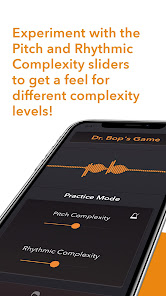
+ Pitch Complexity
PitchBop creates calls with varying levels of pitch complexity on a scale of 1 to 9. Use this slider to set the complexity level.
+ Rhythmic Complexity
Use this slider to set the rhythmic complexity level between 1 and 9.
+ Choose Your Instrument
Tap the instrument name to see a list of instrument choices, then tap the name of your instrument to automatically set your available range. PitchBop can be used with a wide variety of instruments, including your voice.
+ Metronome Settings
Set the metronome volume and choose if you want it to give you all four beats, one and three, two and four, or whichever combination of beats you prefer.
+ Profile Tab
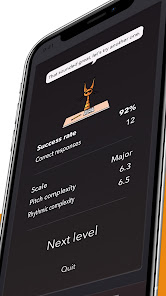
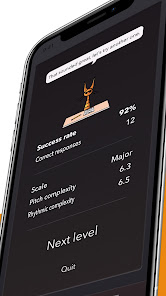
Visit the Profile Tab to study your progress. This information is only stored for Dr. Bop’s Game, however, not for Practice Mode.
Additional details can be found by tapping the up and down arrows next to “Scale” to select the various scale and harmony types PitchBop uses for the calls and it will report the success rate and the Pitch and Rhythmic Complexity in your most recent “Call-and-Response” session.
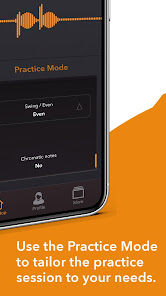
+ Practice Mode settings
Pitch Complexity
Rhythmic Complexity
Tempo
Scale
Range
Always start on root on/off
Number of calls per session
Swing/Even
Chromatic notes on/off
ADDITIONAL GAME DETAILS BEFORE YOU START
1. Pay attention to the octave
Your response must be in the same octave as Dr.Bop’s Call in order for it to be registered accurately. If it isn’t, even if the note is correct, you will see a lower score due to the incorrect octave.
Example: For level 1 (when both sliders are all the way to the left) the starting note for the piano is C4 (the middle C). For the guitar, it is C4 as well (first fret on the B string or 5th fret on the G string)
2. Pay attention to the rhythm
While the app may be called PitchBop, rhythm is still a big part of the game. Users should make sure to pay attention to the rhythm and try to be as accurate as they can in matching it. Responses played out of rhythm will lower your score.
If the Calls feel a little too challenging, you can move the sliders all the way to the left and try starting from there. If this still feels like more than you’re comfortable with for now, you also have the option to go to the “more” tab and adjust the range to be as narrow as an octave.
3. Bluetooth and external devices
Due to the diverse and often unpredictable nature of external devices, PitchBop is designed to use the device’s microphone and speaker.
Bluetooth compatibility, however, will be addressed in a future update.
For any other questions please contact us at support@pitchbop.com
WHAT PITCHBOP DOES DIFFERENTLY
Unlike most ear training apps where you answer by tapping on a screen without addressing the rhythmic aspect of what you hear, PitchBop offers a performance-like scenario where you listen and actually play your instrument or use your voice.
Using the 'Call and Response' model, Dr. Bop, the resident jazz cat of PitchBop, plays a short phrase for you to listen to and allows you the same amount of time to repeat the phrase back to him to evaluate the accuracy of your performance.
HOW PITCHBOP WORKS
Behind the simple interface, there is a complex algorithm based on AI which creates endless melodies and adjusts the difficulty according to your progress.
Using the 'Call and Response' model, Dr. Bop plays a short phrase for you to listen to and allows you the same amount of time to repeat the phrase back to him to evaluate the accuracy of your performance. Once the session is complete, you receive feedback on how well you did, and the difficulty level is set based on your performance so you can focus on playing without needing to worry about adjusting the settings.
APP FEATURES
+ Pitch Complexity
PitchBop creates calls with varying levels of pitch complexity on a scale of 1 to 9. Use this slider to set the complexity level.
+ Rhythmic Complexity
Use this slider to set the rhythmic complexity level between 1 and 9.
+ Choose Your Instrument
Tap the instrument name to see a list of instrument choices, then tap the name of your instrument to automatically set your available range. PitchBop can be used with a wide variety of instruments, including your voice.
+ Metronome Settings
Set the metronome volume and choose if you want it to give you all four beats, one and three, two and four, or whichever combination of beats you prefer.
+ Profile Tab
Visit the Profile Tab to study your progress. This information is only stored for Dr. Bop’s Game, however, not for Practice Mode.
Additional details can be found by tapping the up and down arrows next to “Scale” to select the various scale and harmony types PitchBop uses for the calls and it will report the success rate and the Pitch and Rhythmic Complexity in your most recent “Call-and-Response” session.
+ Practice Mode settings
Pitch Complexity
Rhythmic Complexity
Tempo
Scale
Range
Always start on root on/off
Number of calls per session
Swing/Even
Chromatic notes on/off
ADDITIONAL GAME DETAILS BEFORE YOU START
1. Pay attention to the octave
Your response must be in the same octave as Dr.Bop’s Call in order for it to be registered accurately. If it isn’t, even if the note is correct, you will see a lower score due to the incorrect octave.
Example: For level 1 (when both sliders are all the way to the left) the starting note for the piano is C4 (the middle C). For the guitar, it is C4 as well (first fret on the B string or 5th fret on the G string)
2. Pay attention to the rhythm
While the app may be called PitchBop, rhythm is still a big part of the game. Users should make sure to pay attention to the rhythm and try to be as accurate as they can in matching it. Responses played out of rhythm will lower your score.
If the Calls feel a little too challenging, you can move the sliders all the way to the left and try starting from there. If this still feels like more than you’re comfortable with for now, you also have the option to go to the “more” tab and adjust the range to be as narrow as an octave.
3. Bluetooth and external devices
Due to the diverse and often unpredictable nature of external devices, PitchBop is designed to use the device’s microphone and speaker.
Bluetooth compatibility, however, will be addressed in a future update.
For any other questions please contact us at support@pitchbop.com
Updated on
Safety starts with understanding how developers collect and share your data. Data privacy and security practices may vary based on your use, region and age. The developer provided this information and may update it over time.

No data shared with third parties
Learn more about how developers declare sharing

No data collected
Learn more about how developers declare collection
Ratings and reviews
3.1
44 reviews

John Coyne
- Flag inappropriate
- Show review history
20 December 2020
I think the app is having a difficult time reaching my phone's sound card. It makes an unpleasant beeping sound when it starts up and it doesn't seem to pick up any of what I'm singing into it. This seems like a cool idea, and I'd love to give it a higher review! Edit: never mind! I was singing in the wrong octave! I didn't know it was sensitive to octave. Revised to a well-deserved five stars 🙂
1 person found this review helpful
Antonis Tsikandilakis
20 December 2020
Thank you for the 5 stars, John!
You’re right. Recognizing the right octave is part of the listening game.

Mitra Samarasinghe
- Flag inappropriate
- Show review history
11 January 2023
I think this has the potential to be the best app I've seen to develop musicality and ear for a new or maybe even senior musician. There is still some bugs and inconsistencies and doesn't feel like it's being developed or updated anymore. But fingers crossed it will. Would be nice if one could split stat across different instruments. At the moment I bought the android version for my guitar and then bought piano version for os x (ios version) so i can practise and improve on both instruments.
1 person found this review helpful

Ryan Carneiro
- Flag inappropriate
26 December 2020
Good concept! But needs lot of work! The pitch recognition is not good. I have a very good intonation on my guitar. Also I am playing in the correct octave as well as in timing. Still it fails to recognize many times and gives me 1/3 instead of 3/3. The same problem with vocals. My octaves are spot on as well as my pitching. The app developers needs to solve this problem asap and then I'll change my ratings. I would've given it 5 stars if it was free. But I am not paying for such major glitches
3 people found this review helpful
Antonis Tsikandilakis
26 December 2020
Thank you for the review, Ryan! Please, contact us at support@pitchbop.com. We are pretty sure we can help you with this issue. As far as we know, lots of users are playing the Game even at higher levels, which means the pitch detection works fine.
What's new
This update ensures compatibility with the latest Android OS requirements.
We’ve also made performance improvements and minor bug fixes.
App support
About the developer
Antonios Tsikandilakis
support@geniusjamtracks.com
Prinias
Ηρακλειο 70003
Greece