
Ultra Watch Face
4.2star
42 reviews
1K+
Downloads

Everyone
info




About this app
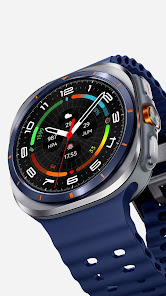
Ultra Analog – Classic Elegance for Wear OS by Galaxy Design
Experience timeless sophistication with Ultra Analog, a premium analog watch face crafted for users who appreciate classic design paired with modern smart features. With refined styling, smooth performance, and essential real-time data, Ultra Analog brings elegance and precision to your everyday routine.
PREMIUM ANALOG DESIGN
• Classic watch dial with clean, modern detailing
• Sharp analog hands for accurate timekeeping
• Elegant layout designed for round AMOLED screens
• Perfect for Galaxy Watch, Pixel Watch & other Wear OS devices
SMART FEATURES YOU NEED
• Heart rate (BPM)*
• Steps counter*
• Battery level
• Live weather info (temperature & barometer)*
• Full day/date display
CUSTOMIZABLE YOUR WAY
• 4 customizable complications
• Add shortcuts to apps, fitness stats, tools & more
• Flexible layout for both minimal and data-rich setups
ALWAYS-ON DISPLAY (AOD) READY
• Beautiful dim-mode analog design
• Battery-efficient with clean, minimal visuals
• Always readable indoors or outdoors
BUILT FOR DAILY PERFORMANCE
• Lightweight and smooth on Wear OS 5+
• Combines analog elegance with essential smart data
• Perfect for work, formal wear, and all-day use
PERFECT FOR:
• Fans of classic analog watch styling
• Professionals wanting a refined, timeless look
• Users who want elegance without losing smart features
COMPATIBILITY
• Samsung Galaxy Watch Series
• Google Pixel Watch Series
• All Wear OS 5.0+ devices
• Not compatible with Tizen OS
HOW TO USE
1. Install Ultra Analog from Google Play.
2. Ensure your smartwatch is running Wear OS 5 or later.
3. On your watch, touch and hold your current face, then scroll and select Ultra Analog by Galaxy Design.
NOTE
• Health and weather data rely on your watch’s sensors and Google Fit / system services.*
• Allow all necessary permissions for full functionality.
ABOUT GALAXY DESIGN
Galaxy Design creates premium Wear OS watch faces with a focus on clarity, performance, and timeless aesthetics. Explore more by searching "Galaxy Design Watch Face" on Google Play.
Classic style. Smart features. Elevate your wrist with Ultra Analog.
Experience timeless sophistication with Ultra Analog, a premium analog watch face crafted for users who appreciate classic design paired with modern smart features. With refined styling, smooth performance, and essential real-time data, Ultra Analog brings elegance and precision to your everyday routine.
PREMIUM ANALOG DESIGN
• Classic watch dial with clean, modern detailing
• Sharp analog hands for accurate timekeeping
• Elegant layout designed for round AMOLED screens
• Perfect for Galaxy Watch, Pixel Watch & other Wear OS devices
SMART FEATURES YOU NEED
• Heart rate (BPM)*
• Steps counter*
• Battery level
• Live weather info (temperature & barometer)*
• Full day/date display
CUSTOMIZABLE YOUR WAY
• 4 customizable complications
• Add shortcuts to apps, fitness stats, tools & more
• Flexible layout for both minimal and data-rich setups
ALWAYS-ON DISPLAY (AOD) READY
• Beautiful dim-mode analog design
• Battery-efficient with clean, minimal visuals
• Always readable indoors or outdoors
BUILT FOR DAILY PERFORMANCE
• Lightweight and smooth on Wear OS 5+
• Combines analog elegance with essential smart data
• Perfect for work, formal wear, and all-day use
PERFECT FOR:
• Fans of classic analog watch styling
• Professionals wanting a refined, timeless look
• Users who want elegance without losing smart features
COMPATIBILITY
• Samsung Galaxy Watch Series
• Google Pixel Watch Series
• All Wear OS 5.0+ devices
• Not compatible with Tizen OS
HOW TO USE
1. Install Ultra Analog from Google Play.
2. Ensure your smartwatch is running Wear OS 5 or later.
3. On your watch, touch and hold your current face, then scroll and select Ultra Analog by Galaxy Design.
NOTE
• Health and weather data rely on your watch’s sensors and Google Fit / system services.*
• Allow all necessary permissions for full functionality.
ABOUT GALAXY DESIGN
Galaxy Design creates premium Wear OS watch faces with a focus on clarity, performance, and timeless aesthetics. Explore more by searching "Galaxy Design Watch Face" on Google Play.
Classic style. Smart features. Elevate your wrist with Ultra Analog.
Updated on
Safety starts with understanding how developers collect and share your data. Data privacy and security practices may vary based on your use, region, and age. The developer provided this information and may update it over time.

No data shared with third parties
Learn more about how developers declare sharing

No data collected
Learn more about how developers declare collection
App support
About the developer
Irma Yusnita, S. P.
galaxywatchdesign@gmail.com
Alam Tirta Lestari Blok D8 / 12
003/014, Pagelaran Ciomas
Bogor
Jawa Barat 16610
Indonesia


