
Code Editor: IDE & Compiler
Enthält Werbung


Jedes Alter
info
100+
Downloads

Jedes Alter
Weitere Informationen


Über diese App
Code Editor is a fast, native code editor, compiler and IDE for Android. Write, run and debug code in 150+ languages — run Python, JavaScript and Lua fully offline, and compile more with the built-in online compiler.
Whether you're a student learning to code, a professional developer, or a system administrator managing remote servers, Code Editor gives you a desktop-class coding experience on your phone or tablet.
━━━━━━━━━━━━━━━━
🚀 Desktop-Grade Code Editor
• Supports 150+ programming languages
• Syntax highlighting for Python, JavaScript, HTML, CSS, C, C++, C#, Java, Kotlin, Dart, PHP, Go, Rust, SQL, JSON, XML, YAML, Markdown, Lua, and many more
• Smart auto indentation
• Auto-closing HTML/XML tags
• Bracket matching
• Line numbers
• Word wrap
• Fast native editor engine
• Smooth scrolling and editing
━━━━━━━━━━━━━━━━
📑 Multi-Tab Workspace
• Open and edit multiple files simultaneously
• Flat tab interface
• Unsaved change indicators
• Switch between files instantly
━━━━━━━━━━━━━━━━
💾 Auto Save & Session Restore
• Automatically saves your work
• Restore all open tabs after restarting the app
• Continue coding exactly where you left off
━━━━━━━━━━━━━━━━
🔍 Powerful Search & Replace
• Search within the current file
• Find in Files
• Plain text search
• Whole-word matching
• Case-sensitive search
• Regular Expression (Regex) support
• Replace single or multiple matches
━━━━━━━━━━━━━━━━
▶️ Built-in Code Playground
Run code directly on your Android device.
Supported languages:
• Python
• JavaScript
• Lua
Includes:
• Real-time output
• Interactive execution
• Trace visualizer
• Console logs
━━━━━━━━━━━━━━━━
☁️ GitHub Integration
Manage your repositories without leaving the app.
• Clone repositories
• Browse project files
• Commit changes
• Push updates
• Pull latest changes
━━━━━━━━━━━━━━━━
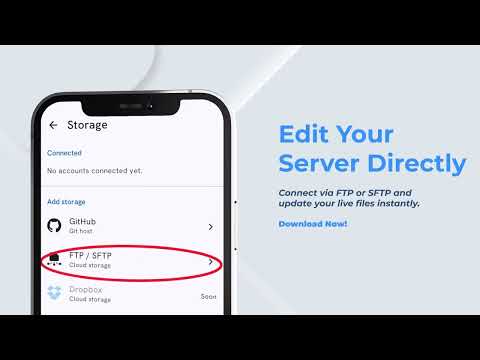
🔐 Secure SFTP & FTPS Client
Edit files directly on remote servers.
Features include:
• SFTP support
• FTPS support
• Browse remote directories
• Edit remote files
• Auto upload on save
• Secure encrypted connections
Note: Unencrypted FTP is intentionally not supported for better security.
━━━━━━━━━━━━━━━━
🔒 Biometric Security
Protect your saved server credentials using:
• Fingerprint authentication
• Face Unlock
• Device PIN verification
━━━━━━━━━━━━━━━━
📂 Advanced File Manager
Manage files with ease.
Storage support:
• Internal Storage
• Storage Access Framework (SAF)
• SD Cards
• External Storage
File operations:
• Create
• Rename
• Copy
• Move
• Duplicate
• Delete
• Cut & Paste
Sorting options:
• Name
• Extension
• Size
• Last Modified
Navigate folders quickly using clickable breadcrumbs.
━━━━━━━━━━━━━━━━
🎨 Built for Developers
• Fully customizable symbol bar
• Beautiful editor themes
• Desktop-style layout on tablets
• Optimized for phones and large screens
• Fast and responsive interface
Available themes include:
• One Dark
• Monokai
• Darcula
• GitHub Light
• Ayu Dark
• And more
━━━━━━━━━━━━━━━━
🔒 Privacy First
Your code stays private.
• Offline-first experience
• No analytics tracking
• No unnecessary data collection
• Files remain on your device
• Credentials are never shared with third parties
━━━━━━━━━━━━━━━━
👨💻 Perfect For
• Students
• Software Developers
• Web Developers
• Android Developers
• Flutter Developers
• Python Developers
• DevOps Engineers
• Linux Users
• System Administrators
• Remote Developers
━━━━━━━━━━━━━━━━
⭐ Why Choose Code Editor?
• Native Android performance
• Professional editing experience
• Secure remote development
• GitHub integration
• Built-in code execution
• Modern interface
• Lightweight and fast
• Regular updates
• Designed for productivity
Start coding anywhere with Code Editor — your mobile IDE, compiler and editor.
Whether you're a student learning to code, a professional developer, or a system administrator managing remote servers, Code Editor gives you a desktop-class coding experience on your phone or tablet.
━━━━━━━━━━━━━━━━
🚀 Desktop-Grade Code Editor
• Supports 150+ programming languages
• Syntax highlighting for Python, JavaScript, HTML, CSS, C, C++, C#, Java, Kotlin, Dart, PHP, Go, Rust, SQL, JSON, XML, YAML, Markdown, Lua, and many more
• Smart auto indentation
• Auto-closing HTML/XML tags
• Bracket matching
• Line numbers
• Word wrap
• Fast native editor engine
• Smooth scrolling and editing
━━━━━━━━━━━━━━━━
📑 Multi-Tab Workspace
• Open and edit multiple files simultaneously
• Flat tab interface
• Unsaved change indicators
• Switch between files instantly
━━━━━━━━━━━━━━━━
💾 Auto Save & Session Restore
• Automatically saves your work
• Restore all open tabs after restarting the app
• Continue coding exactly where you left off
━━━━━━━━━━━━━━━━
🔍 Powerful Search & Replace
• Search within the current file
• Find in Files
• Plain text search
• Whole-word matching
• Case-sensitive search
• Regular Expression (Regex) support
• Replace single or multiple matches
━━━━━━━━━━━━━━━━
▶️ Built-in Code Playground
Run code directly on your Android device.
Supported languages:
• Python
• JavaScript
• Lua
Includes:
• Real-time output
• Interactive execution
• Trace visualizer
• Console logs
━━━━━━━━━━━━━━━━
☁️ GitHub Integration
Manage your repositories without leaving the app.
• Clone repositories
• Browse project files
• Commit changes
• Push updates
• Pull latest changes
━━━━━━━━━━━━━━━━
🔐 Secure SFTP & FTPS Client
Edit files directly on remote servers.
Features include:
• SFTP support
• FTPS support
• Browse remote directories
• Edit remote files
• Auto upload on save
• Secure encrypted connections
Note: Unencrypted FTP is intentionally not supported for better security.
━━━━━━━━━━━━━━━━
🔒 Biometric Security
Protect your saved server credentials using:
• Fingerprint authentication
• Face Unlock
• Device PIN verification
━━━━━━━━━━━━━━━━
📂 Advanced File Manager
Manage files with ease.
Storage support:
• Internal Storage
• Storage Access Framework (SAF)
• SD Cards
• External Storage
File operations:
• Create
• Rename
• Copy
• Move
• Duplicate
• Delete
• Cut & Paste
Sorting options:
• Name
• Extension
• Size
• Last Modified
Navigate folders quickly using clickable breadcrumbs.
━━━━━━━━━━━━━━━━
🎨 Built for Developers
• Fully customizable symbol bar
• Beautiful editor themes
• Desktop-style layout on tablets
• Optimized for phones and large screens
• Fast and responsive interface
Available themes include:
• One Dark
• Monokai
• Darcula
• GitHub Light
• Ayu Dark
• And more
━━━━━━━━━━━━━━━━
🔒 Privacy First
Your code stays private.
• Offline-first experience
• No analytics tracking
• No unnecessary data collection
• Files remain on your device
• Credentials are never shared with third parties
━━━━━━━━━━━━━━━━
👨💻 Perfect For
• Students
• Software Developers
• Web Developers
• Android Developers
• Flutter Developers
• Python Developers
• DevOps Engineers
• Linux Users
• System Administrators
• Remote Developers
━━━━━━━━━━━━━━━━
⭐ Why Choose Code Editor?
• Native Android performance
• Professional editing experience
• Secure remote development
• GitHub integration
• Built-in code execution
• Modern interface
• Lightweight and fast
• Regular updates
• Designed for productivity
Start coding anywhere with Code Editor — your mobile IDE, compiler and editor.
Code editor, compiler & IDE. Git, SFTP, offline run & 150+ languages.
Aktualisiert am
Was die Sicherheit angeht, solltest du als Erstes verstehen, wie Entwickler deine Daten erheben und weitergeben. Die Datenschutz- und Sicherheitspraktiken können je nach deiner Verwendung, deiner Region und deinem Alter variieren. Diese Informationen wurden vom Entwickler zur Verfügung gestellt und können jederzeit von ihm geändert werden.
- Keine Daten werden mit Drittunternehmen oder -organisationen geteilt
- Diese App kann die folgenden Datentypen erhebenApp-Aktivitäten, App-Informationen und -Leistung und Geräte- oder andere IDs
- Daten werden bei der Übertragung verschlüsselt
- Du kannst das Löschen der Daten beantragen


Neuerungen
What's new in v1.5.0
• Full Git client — track changes, stage, commit, pull & push your whole project on device
• GitHub integration — clone repos, view line-by-line diffs, push updates
• New Source Control panel with live added/removed line counts
• Faster, smoother code editor
• Bug fixes & stability improvements
Code, compile & run Python, JavaScript and more — anywhere.
• Full Git client — track changes, stage, commit, pull & push your whole project on device
• GitHub integration — clone repos, view line-by-line diffs, push updates
• New Source Control panel with live added/removed line counts
• Faster, smoother code editor
• Bug fixes & stability improvements
Code, compile & run Python, JavaScript and more — anywhere.
Jedes Alter
Weitere InformationenApp-Unterstützung
phone
Telefonnummer
+923011487633
Informationen zum Entwickler
Muhammad Zubair
korvexa.app@gmail.com
Mohallah Bagh Heram Tordher
Tordher swabi, 23610
Pakistan
