
Back Button Gesture Launcher

4.5star
91 Rezensionen
500+
Downloads

Jedes Alter
info
Über diese App
NOTE: License checking of the app may not work on rooted device.
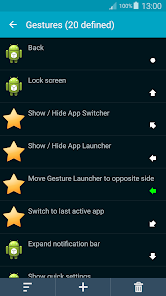
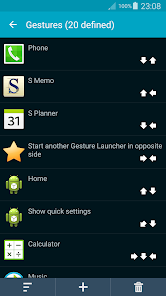
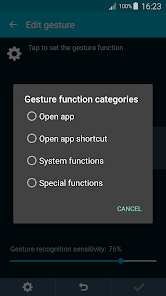
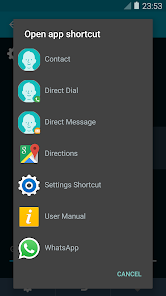
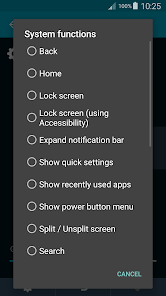
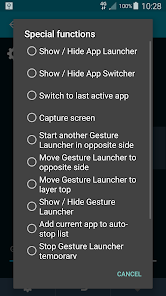
Unlimited no. of custom multi-swipes gestures (single tap supported). Use gesture to open apps, app shortcuts (e.g. Contacts + someone), perform System functions (Back, Home, Lock screen, ...) and Special functions (open built-in App Launcher, App Switcher, Capture screen,...). Each gesture can contain up to 10 different swipe directions and each swipe can even optionally short or long (shown in green color) distinguishable. This app uses Accessibility services to provide functions such as Back, and uses the Device Administrator permission to lock the device.
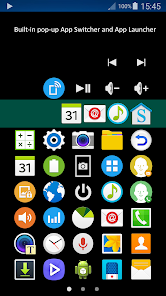
Built-in popup multi-pages App Launcher, can launch apps, app shortcuts, and some of System and Special functions.
Built-in popup App Switcher, likes Taskbar on Windows, shows currently running apps, it is movable and pinnable.
Switch to last active app, likes Alt+Tab on Windows, switches between two most recent running apps (exclude those closed).
Capture screen, supports JPEG output file format which speeds up the process and makes the file size much smaller. (Android 10 not supported)
TIPS for devices with on-screen navigation buttons. You don't need it when using this app. Follow the steps below to auto-hide it, free the space, swipe up from the bottom to show it again. Some newer devices can be simply done via Settings app.
1. Enable "Developer options" of your device: Settings > About phone > Tap "Build number" 7 times.
2. Settings > Developer options > select "USB debugging".
3. On a computer, open a web browser and download Platform Tools (~7.2 MB) from Google:
https://dl.google.com/android/repository/platform-tools-latest-windows.zip
4. Open download folder, right-click on the downloaded file and select "Extract all" and press the "Extract" button.
5. Open a Command Prompt, and type the line below and press Enter
cd Downloads\platform-tools-latest-windows\platform-tools
6. Type the approximate command below and press Enter.
To hide bottom navigation bar:
adb shell settings put global policy_control immersive.navigation=*
To show bottom navigation bar:
adb shell settings put global policy_control immersive.navigation=null
To hide top status bar:
adb shell settings put global policy_control immersive.status=*
To show top status bar:
adb shell settings put global policy_control immersive.status=null
For the App Launcher to use the extra space, please clear this app's data or uninstall and install it again.
Unlimited no. of custom multi-swipes gestures (single tap supported). Use gesture to open apps, app shortcuts (e.g. Contacts + someone), perform System functions (Back, Home, Lock screen, ...) and Special functions (open built-in App Launcher, App Switcher, Capture screen,...). Each gesture can contain up to 10 different swipe directions and each swipe can even optionally short or long (shown in green color) distinguishable. This app uses Accessibility services to provide functions such as Back, and uses the Device Administrator permission to lock the device.
Built-in popup multi-pages App Launcher, can launch apps, app shortcuts, and some of System and Special functions.
Built-in popup App Switcher, likes Taskbar on Windows, shows currently running apps, it is movable and pinnable.
Switch to last active app, likes Alt+Tab on Windows, switches between two most recent running apps (exclude those closed).
Capture screen, supports JPEG output file format which speeds up the process and makes the file size much smaller. (Android 10 not supported)
TIPS for devices with on-screen navigation buttons. You don't need it when using this app. Follow the steps below to auto-hide it, free the space, swipe up from the bottom to show it again. Some newer devices can be simply done via Settings app.
1. Enable "Developer options" of your device: Settings > About phone > Tap "Build number" 7 times.
2. Settings > Developer options > select "USB debugging".
3. On a computer, open a web browser and download Platform Tools (~7.2 MB) from Google:
https://dl.google.com/android/repository/platform-tools-latest-windows.zip
4. Open download folder, right-click on the downloaded file and select "Extract all" and press the "Extract" button.
5. Open a Command Prompt, and type the line below and press Enter
cd Downloads\platform-tools-latest-windows\platform-tools
6. Type the approximate command below and press Enter.
To hide bottom navigation bar:
adb shell settings put global policy_control immersive.navigation=*
To show bottom navigation bar:
adb shell settings put global policy_control immersive.navigation=null
To hide top status bar:
adb shell settings put global policy_control immersive.status=*
To show top status bar:
adb shell settings put global policy_control immersive.status=null
For the App Launcher to use the extra space, please clear this app's data or uninstall and install it again.
Aktualisiert am
Was die Sicherheit angeht, solltest du als Erstes verstehen, wie Entwickler deine Daten erheben und weitergeben. Die Datenschutz- und Sicherheitspraktiken können je nach deiner Verwendung, deiner Region und deinem Alter variieren. Diese Informationen wurden vom Entwickler zur Verfügung gestellt und können jederzeit von ihm geändert werden.

Keine Daten werden mit Drittunternehmen oder -organisationen geteilt

Keine Daten erhoben
Bewertungen und Rezensionen
4.5
88 Rezensionen
Neuerungen
- New System functions "Search" and "Voice command", can be used by gesture or inside App Launcher
- New App Launcher option "Add new items"
- New App Launcher option "Add new items"
Support für diese App
Informationen zum Entwickler
TSANG WING TAT
activesofthk@gmail.com
Flat 1407, 14/F., Kin Fat Industrial Centre,
13 Kin Fat Street
屯門
Hong Kong