CalenGoo - Calendar and Tasks
4.4star
9.22 Tsg. Rezensionen
100 Tsg.+
Downloads

Jedes Alter
info
Das Spiel ist mit einem Play Pass-Abo kostenlos verfügbar Weitere Informationen



Über diese App
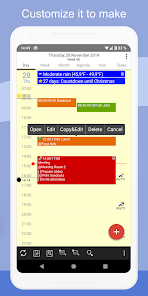
With CalenGoo you can manage all your events and tasks. With lots of configuration options you can make it look and work the way you want.
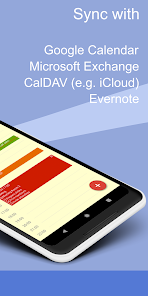
✔️ Sync all your past and future events with Google Calendar (just add your Google account under "Settings > Accounts" instead of syncing via the Android calendar).
✔️ Sync calendars with Google Calendar, Exchange, CalDAV and iCloud (via the Android calendar or directly).
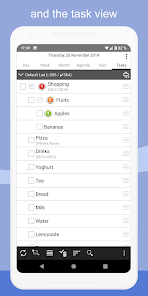
✔️ Sync tasks with Google Calendar, Exchange, CalDAV and iCloud.
✔️ Attach photos and files to your events (when syncing directly with Google Calendar).
✔️ Attach Evernote® notes to events.
✔️ Weather forecast ("Settings > Weather").
✔️ Add icons to Google events (you have to add your Google account under "Settings > Accounts", then you can configure the icons under "Settings > Icons").
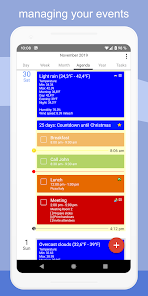
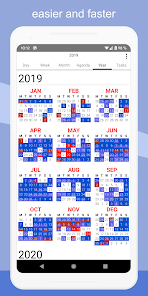
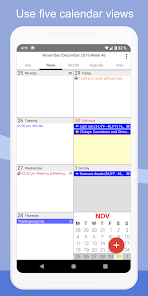
✔️ Five types of calendar views (day, week, month, agenda and year).
✔️ Four styles of agenda views ("Settings > Display and Use > Agenda view")
✔️ Use drag&drop to move and copy your events.
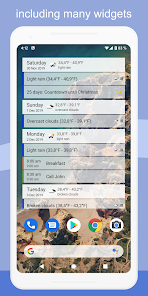
✔️ Widgets to see your events on your home screen (day, week, month, agenda, year and task widget).
✔️ Support for Exchange categories (when syncing CalenGoo directly with Exchange using EWS).
✔️ Share calendars with other people (using Google Calendar).
✔️ Search function
✔️ Various reminder functions (e.g. notifications, pop-up window, spoken reminders, different sounds, ...)
✔️ Birthdays and anniversaries of your contacts
✔️ Floating events and completable events
✔️ Templates for events
✔️ Print to PDF function
✔️ Tasks in events (add a short list of tasks into an event)
✔️ Contacts can be linked to events
✔️ Use keywords to change the color or icons of your events ("Settings > Display and Use > General > Keywords").
✔️ Dark theme and light theme ("Settings > Design")
✔️ Many configuration options can be found under "Settings > Display and Use".
✔️ Supports WearOS by Google (Agenda view, New event, New task)
For more details please see here:
http://android.calengoo.com
Additionally you can add ideas or vote for ideas on https://calengoo.de/features/calengooandroid
And you can find a free 3-day trial version here: http://android.calengoo.com/trial
If you have problems just contact the support: http://android.calengoo.com/support
✔️ Sync all your past and future events with Google Calendar (just add your Google account under "Settings > Accounts" instead of syncing via the Android calendar).
✔️ Sync calendars with Google Calendar, Exchange, CalDAV and iCloud (via the Android calendar or directly).
✔️ Sync tasks with Google Calendar, Exchange, CalDAV and iCloud.
✔️ Attach photos and files to your events (when syncing directly with Google Calendar).
✔️ Attach Evernote® notes to events.
✔️ Weather forecast ("Settings > Weather").
✔️ Add icons to Google events (you have to add your Google account under "Settings > Accounts", then you can configure the icons under "Settings > Icons").
✔️ Five types of calendar views (day, week, month, agenda and year).
✔️ Four styles of agenda views ("Settings > Display and Use > Agenda view")
✔️ Use drag&drop to move and copy your events.
✔️ Widgets to see your events on your home screen (day, week, month, agenda, year and task widget).
✔️ Support for Exchange categories (when syncing CalenGoo directly with Exchange using EWS).
✔️ Share calendars with other people (using Google Calendar).
✔️ Search function
✔️ Various reminder functions (e.g. notifications, pop-up window, spoken reminders, different sounds, ...)
✔️ Birthdays and anniversaries of your contacts
✔️ Floating events and completable events
✔️ Templates for events
✔️ Print to PDF function
✔️ Tasks in events (add a short list of tasks into an event)
✔️ Contacts can be linked to events
✔️ Use keywords to change the color or icons of your events ("Settings > Display and Use > General > Keywords").
✔️ Dark theme and light theme ("Settings > Design")
✔️ Many configuration options can be found under "Settings > Display and Use".
✔️ Supports WearOS by Google (Agenda view, New event, New task)
For more details please see here:
http://android.calengoo.com
Additionally you can add ideas or vote for ideas on https://calengoo.de/features/calengooandroid
And you can find a free 3-day trial version here: http://android.calengoo.com/trial
If you have problems just contact the support: http://android.calengoo.com/support
Aktualisiert am
Was die Sicherheit angeht, solltest du als Erstes verstehen, wie Entwickler deine Daten erheben und weitergeben. Die Datenschutz- und Sicherheitspraktiken können je nach deiner Verwendung, deiner Region und deinem Alter variieren. Diese Informationen wurden vom Entwickler zur Verfügung gestellt und können jederzeit von ihm geändert werden.

Keine Daten werden mit Drittunternehmen oder -organisationen geteilt

Diese App kann die folgenden Datentypen erheben
Personenbezogene Daten, App-Aktivitäten und Geräte- oder andere IDs

Daten werden bei der Übertragung verschlüsselt

Du kannst das Löschen der Daten beantragen
Bewertungen und Rezensionen
4.5
8.65 Tsg. Rezensionen
Neuerungen
- Added edge-to-edge support for all screens
- Improved support for Google's birthday entries.
- Added several new options (e.g. separate color for private events, GPS for sunrise/sunset, "free" event color only for selected calendars, ...).
- Added a new function to the multiselect bar to apply a template to all selected events
- Workaround for syncing via Graph API.
- Bug fixes
- Improved support for Google's birthday entries.
- Added several new options (e.g. separate color for private events, GPS for sunrise/sunset, "free" event color only for selected calendars, ...).
- Added a new function to the multiselect bar to apply a template to all selected events
- Workaround for syncing via Graph API.
- Bug fixes
Support für diese App
Informationen zum Entwickler
Gunia UG (haftungsbeschränkt)
info@dgunia.com
Haselhöfer Ring 9
30916 Isernhagen
Germany
+49 511 165896720


