Stanley Nimbus Cloud Video
100+
Downloads

Jedes Alter
info
Über diese App
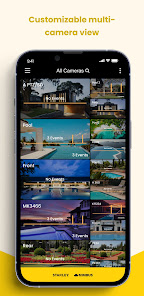
Nimbus Cloud Video provides a simple, cost-effective cloud video monitoring system for various small business applications.
Our mobile app allows easy access to your Nimbus Cloud Video from anywhere!
With the Nimbus Cloud Video Mobile App you can:
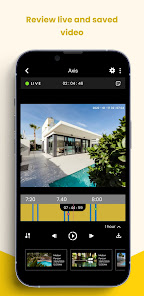
- Watch live video from your cameras
- View and manage your recorded video from cloud or edge storage
- Receive alerts notifications of health status, motion or I/O trigger events
- Configure camera settings for motion, record schedules and more
- Edit your user specific account settings
- Define cameras and users by Groups and unique labels
- Dynamic multi-view layouts
- In app de-warping of Hanwha fisheye camera
- Share short video clips or images with others
Supported Camera Brands:
- Axis Communications – AVHS single imager cameras
- Hanwha – Model specific single imager cameras
Common Uses:
- Monitor your business from anywhere and anytime
- Get notified with the health status of your cameras
- Receive notifications on motion or event triggers for quick easy look-ins after hours
- Cost-effective video security for your business
- Add cloud storage and access for specific site cameras as a stand alone or redundant solution
Our mobile app allows easy access to your Nimbus Cloud Video from anywhere!
With the Nimbus Cloud Video Mobile App you can:
- Watch live video from your cameras
- View and manage your recorded video from cloud or edge storage
- Receive alerts notifications of health status, motion or I/O trigger events
- Configure camera settings for motion, record schedules and more
- Edit your user specific account settings
- Define cameras and users by Groups and unique labels
- Dynamic multi-view layouts
- In app de-warping of Hanwha fisheye camera
- Share short video clips or images with others
Supported Camera Brands:
- Axis Communications – AVHS single imager cameras
- Hanwha – Model specific single imager cameras
Common Uses:
- Monitor your business from anywhere and anytime
- Get notified with the health status of your cameras
- Receive notifications on motion or event triggers for quick easy look-ins after hours
- Cost-effective video security for your business
- Add cloud storage and access for specific site cameras as a stand alone or redundant solution
Aktualisiert am
Was die Sicherheit angeht, solltest du als Erstes verstehen, wie Entwickler deine Daten erheben und weitergeben. Die Datenschutz- und Sicherheitspraktiken können je nach deiner Verwendung, deiner Region und deinem Alter variieren. Diese Informationen wurden vom Entwickler zur Verfügung gestellt und können jederzeit von ihm geändert werden.

Diese App kann die folgenden Datentypen an Dritte weitergeben
App-Informationen und -Leistung und Geräte- oder andere IDs

Diese App kann die folgenden Datentypen erheben
Personenbezogene Daten und Geräte- oder andere IDs

Daten werden bei der Übertragung verschlüsselt

Du kannst das Löschen der Daten beantragen
Neuerungen
- Major new release that includes revamped UI and support for all new Cloud AI feature (coming soon!)
- Cloud AI feature now detects and notifies when a person, vehicle, animal or other object appeared in the video
- Added a brand new timeline layout
- New filtering allows users to view the events that matter
- Brand new event carousel that showing a preview of events detected
- New push notifications including preview of event or Cloud AI activity
- Cloud AI feature now detects and notifies when a person, vehicle, animal or other object appeared in the video
- Added a brand new timeline layout
- New filtering allows users to view the events that matter
- Brand new event carousel that showing a preview of events detected
- New push notifications including preview of event or Cloud AI activity
Support für diese App
Informationen zum Entwickler
Stanley Black & Decker, Inc.
jeyakumar.subbaraj@sbdinc.com
1000 Stanley Dr
New Britain, CT 06053
United States
+1 203-952-4367


