Zebra Enterprise Keyboard
4.5star
12 Rezensionen
1 Tsg.+
Downloads

Jedes Alter
info

Über diese App
Increase productivity, efficiency and accuracy with custom keys, layouts, and dictionaries
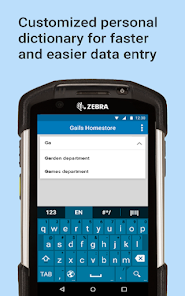
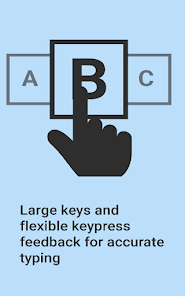
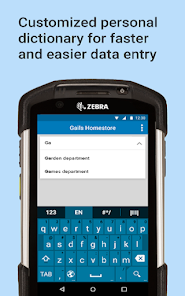
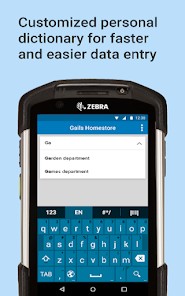
Your workers are using Zebra Android all-touch mobile computers to capture crucial enterprise data — but the standard consumer Android soft keypad falls short of your enterprise requirements. Key size, lack of auto correction for the terms used in your business and more reduce data entry efficiency and accuracy.
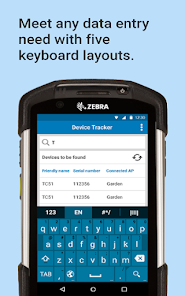
Zebra’s Enterprise Keyboard, truly designed for the enterprise user. Your users get all the features they need to enter highly accurate data in record time. Make your Zebra mobile computers easier to use and boost worker productivity with Enterprise Keyboard — only from Zebra.
Easier Keyboard creation with Enterprise Keyboard Designer
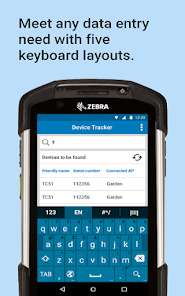
Enterprise Keyboard Designer (EKD) is a GUI tool for Windows that can be used to create customized key layouts to enhance an application and enable efficient and accurate data entry. Layouts created with EKD work on Zebra Android devices that use Zebra's Enterprise Keyboard (EKB) 3.2 (and later), and can be displayed programmatically using Android intents or through DataWedge 7.4.44 (and later) when specific input situations arise.
EKD employs a drag-and-drop interface with control over fonts, images, key codes, layout transparency and many other layout properties. As many as 20 custom key layouts can be created, and are stored in a "layout definition file," which is deployed to devices and called by apps as needed to match specific types of input. Zebra Enterprise Keyboard (EKB) must be installed and set as the default input method to make use of custom EKD layouts.
Important Note:
Android 13 device support extended.
[SPR50863] Intent SHOW API now supports display of EKB layouts
Adds support for ET60, TC22 and TC27 devices.
For more details refer to https://techdocs.zebra.com/enterprise-keyboard/4-2/guide/about/#newinv42
Your workers are using Zebra Android all-touch mobile computers to capture crucial enterprise data — but the standard consumer Android soft keypad falls short of your enterprise requirements. Key size, lack of auto correction for the terms used in your business and more reduce data entry efficiency and accuracy.
Zebra’s Enterprise Keyboard, truly designed for the enterprise user. Your users get all the features they need to enter highly accurate data in record time. Make your Zebra mobile computers easier to use and boost worker productivity with Enterprise Keyboard — only from Zebra.
Easier Keyboard creation with Enterprise Keyboard Designer
Enterprise Keyboard Designer (EKD) is a GUI tool for Windows that can be used to create customized key layouts to enhance an application and enable efficient and accurate data entry. Layouts created with EKD work on Zebra Android devices that use Zebra's Enterprise Keyboard (EKB) 3.2 (and later), and can be displayed programmatically using Android intents or through DataWedge 7.4.44 (and later) when specific input situations arise.
EKD employs a drag-and-drop interface with control over fonts, images, key codes, layout transparency and many other layout properties. As many as 20 custom key layouts can be created, and are stored in a "layout definition file," which is deployed to devices and called by apps as needed to match specific types of input. Zebra Enterprise Keyboard (EKB) must be installed and set as the default input method to make use of custom EKD layouts.
Important Note:
Android 13 device support extended.
[SPR50863] Intent SHOW API now supports display of EKB layouts
Adds support for ET60, TC22 and TC27 devices.
For more details refer to https://techdocs.zebra.com/enterprise-keyboard/4-2/guide/about/#newinv42
Aktualisiert am
Was die Sicherheit angeht, solltest du als Erstes verstehen, wie Entwickler deine Daten erheben und weitergeben. Die Datenschutz- und Sicherheitspraktiken können je nach deiner Verwendung, deiner Region und deinem Alter variieren. Diese Informationen wurden vom Entwickler zur Verfügung gestellt und können jederzeit von ihm geändert werden.

Keine Daten werden mit Drittunternehmen oder -organisationen geteilt

Keine Daten erhoben
Bewertungen und Rezensionen
4.5
12 Rezensionen
Neuerungen
Support added for French-Canadian keyboard layout
Now supports special characters for French (Canada) and other languages
Supports additional Zebra devices running Android 14 (see below)
Now supports special characters for French (Canada) and other languages
Supports additional Zebra devices running Android 14 (see below)
Support für diese App
Informationen zum Entwickler
Zebra Technologies Corporation
banno@zebra.com
3 Overlook Pt
Lincolnshire, IL 60069-4302
United States
+1 847-612-2634


