
TRIGGER ACS Plus
1,8star
51 avis
5K+
Téléchargements

Tout public
info
À propos de l'application
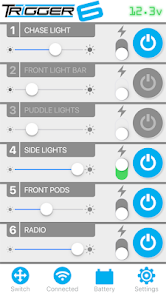
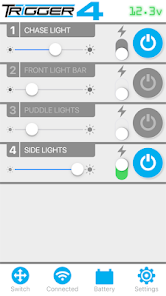
Control our new TRIGGER 6 SHOOTER Six-Channel and 4 PLUS Four-Channel Wireless Accessory Control Systems with our all new completely redesigned app!
Please note: Do not attempt to pair a Trigger device to your phone through the Bluetooth settings screen. Doing so will prevent the app from seeing your Trigger hardware and you will not be able to add the device. If you have already paired using the Settings screen, you must "Forget" the device from that Settings screen.
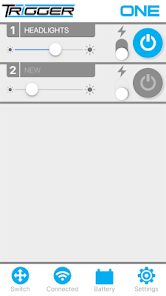
Control power and dimming functions as well as a strobe features when used with LED or conventional lighting. It is simple to set up and allows for user customization. Use the app to “Trigger” lights from outside the vehicle whenever you might need to activate an accessory on demand.
Additional app features:
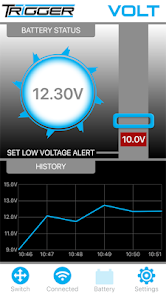
- Monitor voltage of connected battery (6 Shooter and VOLT only)
- Set alerts if battery falls below user defined low-voltage threshold (6 Shooter only)
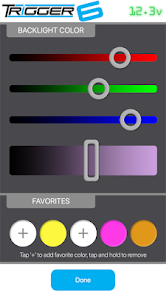
- Customize switch backlight colors, save and recall favorites (6 Shooter only)
- Set power function to either standard toggle or momentary
The Trigger Wireless Accessory Control System substantially saves time and simplifies installation of your electronic accessories! Eliminate the need to run wires under the dash or through the firewall of your vehicle.
Once installed, follow these instructions for getting connected:
Ensure Bluetooth is active on your mobile device, and your Trigger hardware is powered on.
Select your Trigger hardware model
Tap ‘Add Device’ on the ‘Get Started with...' screen.
Enter the default pairing code ‘0000’ and tap ‘Confirm’.
You are then asked to create a new, unique 4 digit pairing code. This prevents other nearby Trigger interference. Remember this code.
Setup instructions are also available in-app or visit our website at www.triggercontroller.com for additional details and how-to videos.
Please note: Do not attempt to pair a Trigger device to your phone through the Bluetooth settings screen. Doing so will prevent the app from seeing your Trigger hardware and you will not be able to add the device. If you have already paired using the Settings screen, you must "Forget" the device from that Settings screen.
Control power and dimming functions as well as a strobe features when used with LED or conventional lighting. It is simple to set up and allows for user customization. Use the app to “Trigger” lights from outside the vehicle whenever you might need to activate an accessory on demand.
Additional app features:
- Monitor voltage of connected battery (6 Shooter and VOLT only)
- Set alerts if battery falls below user defined low-voltage threshold (6 Shooter only)
- Customize switch backlight colors, save and recall favorites (6 Shooter only)
- Set power function to either standard toggle or momentary
The Trigger Wireless Accessory Control System substantially saves time and simplifies installation of your electronic accessories! Eliminate the need to run wires under the dash or through the firewall of your vehicle.
Once installed, follow these instructions for getting connected:
Ensure Bluetooth is active on your mobile device, and your Trigger hardware is powered on.
Select your Trigger hardware model
Tap ‘Add Device’ on the ‘Get Started with...' screen.
Enter the default pairing code ‘0000’ and tap ‘Confirm’.
You are then asked to create a new, unique 4 digit pairing code. This prevents other nearby Trigger interference. Remember this code.
Setup instructions are also available in-app or visit our website at www.triggercontroller.com for additional details and how-to videos.
Date de mise à jour
La sécurité, c'est d'abord comprendre comment les développeurs collectent et partagent vos données. Les pratiques concernant leur confidentialité et leur protection peuvent varier selon votre utilisation, votre région et votre âge. Le développeur a fourni ces informations et peut les modifier ultérieurement.

Aucune donnée partagée avec des tiers
En savoir plus sur la manière dont les développeurs déclarent le partage

Aucune donnée collectée
En savoir plus sur la manière dont les développeurs déclarent la collecte
Notes et avis
1,7
48 avis
Assistance de l'appli
À propos du développeur
AAC Enterprises
justin@oraclelights.com
4401 Division St
Metairie, LA 70002
United States
+1 504-915-5821