
HomeFeed - RSS Widget

Tout public
info
10+
Téléchargements
shoppingmode20 % de remise•Offre valable jusqu'au 1/12/2026 18:59

Tout public
En savoir plus




À propos de l'application
Key Features
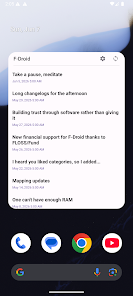
• Multi-Feed Support: Aggregate multiple RSS and Atom feeds into a single, unified stream on your home screen.
• Distraction-Free Reader: Read article content instantly in an integrated reader popup, or open full articles in your browser or Chrome Custom Tabs.
• Rich Media & Thumbnails: Automatically extracts high-resolution article images and media enclosures.
• Material You Design: Full support for Material 3 and dynamic theming, automatically adapting to your system wallpaper and dark/light mode.
Customization & Layout
• Layout Modes: Choose between full image cards or a space-efficient Compact Mode with customizable thumbnail positioning (left or right).
• Typography & Colors: Pick your preferred font family (Sans-serif, Serif, Monospace) and customize title and description text colors to suit your home screen aesthetic.
• Widget Appearance: Adjust background opacity, corner radius, item spacing, and header visibility.
• Article Controls: Toggle descriptions, trim length, or show article source labels.
Reading Management
• Read Status Filtering: Convenient in-widget header control lets you toggle between showing, dimming, or hiding read articles.
• Tap-to-Read: Track what you've read effortlessly with automatic status updates.
Smart Sync & Performance
• Battery-Friendly Sync: Set automatic background refresh intervals and define active hours to prevent syncing while you sleep.
• Quick Manual Refresh: On-demand refresh button right on the widget header.
• Privacy-First & Offline: Feeds and articles are cached locally on your device with zero tracking and minimal resource usage.
HomeFeed is a customizable RSS feed widget
Date de mise à jour
La sécurité, c'est d'abord comprendre comment les développeurs collectent et partagent vos données. Les pratiques concernant leur confidentialité et leur protection peuvent varier selon votre utilisation, votre région et votre âge. Le développeur a fourni ces informations et peut les modifier ultérieurement.
- Aucune donnée partagée avec des tiersEn savoir plus sur la manière dont les développeurs déclarent le partage
- Aucune donnée collectéeEn savoir plus sur la manière dont les développeurs déclarent la collecte


Nouveautés
- Revamped configuration screen with Material 3 section cards and sticky actions.
- Read filter button on widget header (Show / Dim / Hide read articles).
- Active hours sync schedule to limit background refreshes during off-hours.
- Click-to-edit for feed URLs.
- Font family and custom title/description color options.
- Option to position images on the right or left in compact mode.
- Improved HTML image extraction and widget scrolling reliability.
Tout public
En savoir plusAssistance de l'appli
À propos du développeur
Mohsin Shaikh
byter.dev.apps@gmail.com
SD 295, DOHS Phase 2, Malir Cantt, Malir
Karachi, 75070
Pakistan