
Float Text –Floating Clipboard
Contient des annonces


Tout public
info
1K+
Téléchargements

Tout public
En savoir plus


À propos de l'application
FloatText is your personal floating clipboard and text assistant designed to make copying and managing text smarter, faster, and hands-free. Whether you're reading OTPs, copying data entries, or navigating long text files — FloatText simplifies everything in a draggable, resizable floating window that works over any app.
Designed for productivity and ease, FloatText helps students, developers, content writers, and support teams streamline their workflow. No more switching between apps to copy or view data. Just float it and work on top of any screen!
🚀 Key Features at a Glance
🔹 Floating Window with Resizable Controls
Stay productive with a floating popup that works over other apps. Resize it to suit your screen size or task — from compact to full window.
🔹 One-Tap Copy and Auto-Advance
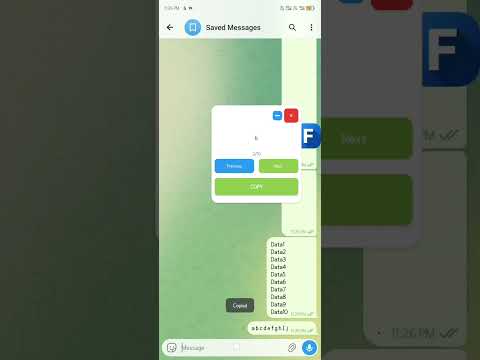
Press COPY to instantly copy the current line and auto-move to the next. No need to tap “Next” manually. Perfect for copying multiple lines quickly (like usernames, OTPs, or list items).
🔹 Line Tracking (1/100 Format)
Always know where you are in your data. If your file has 100 lines, FloatText will show 1/100, 2/100, and so on. This is great for referencing and organization.
🔹 Previous/Next Navigation
Manually go back or forward in your text. Useful if you need to re-copy a previous line or skip ahead.
🔹 Minimize to Icon Mode
Turn the full floating window into a tiny bubble icon when not needed. Tap it again to restore — retaining its position and current data.
🔹 Night Mode Support
Toggle dark mode for low-light environments and reduce eye strain.
🔹 Upload or Paste Text
Paste any text directly or upload a .txt file to load content. Works great for checklists, data scripts, instructions, and templates.
🔹 Persistent Session
Your data stays active until you reset it, so you can minimize the app and return without losing your place.
💡 Perfect For:
✔️ Copy-paste tasks
✔️ Data entry professionals
✔️ Freelancers & developers
✔️ Note viewing while multitasking
✔️ Studying or memorizing line-by-line content
✔️ Text-based task automation
✔️ Repeated OTP or access code copying
✔️ Rewriting scripts or command lines one step at a time
🔐 Privacy & Performance First
All features work offline
No personal data is collected
No background battery drain
Lightweight and fast (under 5MB depending on build)
📲 How It Works
Upload or paste your text (even long ones with 100+ lines)
Open the floating popup
Tap “COPY” — the app copies the current line and moves to the next
Navigate manually if needed
Minimize to bubble when not in use
It’s that easy — and it works anywhere, over any app!
📦 App Highlights
Easy-to-use UI
Clean animations
Supports both light and dark modes
Works great for multitasking
Doesn’t require login or internet
Helpful for power users and casual users alike
📚 Keywords
floating text, floating copy, text assistant, clipboard manager, productivity tool, multitasking window, floating bubble, text navigation, text line manager, smart clipboard, minimal UI, copy tool
floating clipboard
clipboard app
copy paste app
text copy tool
floating notes
floating text editor
clipboard manager free
text manager
quick copy
copy bubble
smart clipboard
text shortcut tool
floating text bubble
overlay clipboard
text multitasking
floating window tool
quick notes app
text navigator
bubble clipboard
minimal clipboard
clipboard for multitasking
easy copy paste tool
floating clipboard manager
quick copy & paste app
overlay text clipboard
smart copy manager
bubble text manager
floating copy paste notes
clipboard for productivity
floating text organizer
Designed for productivity and ease, FloatText helps students, developers, content writers, and support teams streamline their workflow. No more switching between apps to copy or view data. Just float it and work on top of any screen!
🚀 Key Features at a Glance
🔹 Floating Window with Resizable Controls
Stay productive with a floating popup that works over other apps. Resize it to suit your screen size or task — from compact to full window.
🔹 One-Tap Copy and Auto-Advance
Press COPY to instantly copy the current line and auto-move to the next. No need to tap “Next” manually. Perfect for copying multiple lines quickly (like usernames, OTPs, or list items).
🔹 Line Tracking (1/100 Format)
Always know where you are in your data. If your file has 100 lines, FloatText will show 1/100, 2/100, and so on. This is great for referencing and organization.
🔹 Previous/Next Navigation
Manually go back or forward in your text. Useful if you need to re-copy a previous line or skip ahead.
🔹 Minimize to Icon Mode
Turn the full floating window into a tiny bubble icon when not needed. Tap it again to restore — retaining its position and current data.
🔹 Night Mode Support
Toggle dark mode for low-light environments and reduce eye strain.
🔹 Upload or Paste Text
Paste any text directly or upload a .txt file to load content. Works great for checklists, data scripts, instructions, and templates.
🔹 Persistent Session
Your data stays active until you reset it, so you can minimize the app and return without losing your place.
💡 Perfect For:
✔️ Copy-paste tasks
✔️ Data entry professionals
✔️ Freelancers & developers
✔️ Note viewing while multitasking
✔️ Studying or memorizing line-by-line content
✔️ Text-based task automation
✔️ Repeated OTP or access code copying
✔️ Rewriting scripts or command lines one step at a time
🔐 Privacy & Performance First
All features work offline
No personal data is collected
No background battery drain
Lightweight and fast (under 5MB depending on build)
📲 How It Works
Upload or paste your text (even long ones with 100+ lines)
Open the floating popup
Tap “COPY” — the app copies the current line and moves to the next
Navigate manually if needed
Minimize to bubble when not in use
It’s that easy — and it works anywhere, over any app!
📦 App Highlights
Easy-to-use UI
Clean animations
Supports both light and dark modes
Works great for multitasking
Doesn’t require login or internet
Helpful for power users and casual users alike
📚 Keywords
floating text, floating copy, text assistant, clipboard manager, productivity tool, multitasking window, floating bubble, text navigation, text line manager, smart clipboard, minimal UI, copy tool
floating clipboard
clipboard app
copy paste app
text copy tool
floating notes
floating text editor
clipboard manager free
text manager
quick copy
copy bubble
smart clipboard
text shortcut tool
floating text bubble
overlay clipboard
text multitasking
floating window tool
quick notes app
text navigator
bubble clipboard
minimal clipboard
clipboard for multitasking
easy copy paste tool
floating clipboard manager
quick copy & paste app
overlay text clipboard
smart copy manager
bubble text manager
floating copy paste notes
clipboard for productivity
floating text organizer
Floating tool to copy, manage, and view text line-by-line with ease (clipboard)
Date de mise à jour
La sécurité, c'est d'abord comprendre comment les développeurs collectent et partagent vos données. Les pratiques concernant leur confidentialité et leur protection peuvent varier selon votre utilisation, votre région et votre âge. Le développeur a fourni ces informations et peut les modifier ultérieurement.
- Aucune donnée partagée avec des tiersEn savoir plus sur la manière dont les développeurs déclarent le partage
- Aucune donnée collectéeEn savoir plus sur la manière dont les développeurs déclarent la collecte


Nouveautés
v1.1.1 — Bug Fixes & Improvements
🐛 Fixed floating window crashes (move, resize, close)
✨ Input History — access last 10 saved inputs instantly
✨ Onboarding tutorial for new users
🎨 Better permission explanation dialog
⚙️ 1 rewarded ad = 24h ad-free (was 3 ads)
⚙️ Ad space hidden until real ad loads
⚙️ Default window height increased to 700
⚙️ Android 15 edge-to-edge support
🐛 Fixed floating window crashes (move, resize, close)
✨ Input History — access last 10 saved inputs instantly
✨ Onboarding tutorial for new users
🎨 Better permission explanation dialog
⚙️ 1 rewarded ad = 24h ad-free (was 3 ads)
⚙️ Ad space hidden until real ad loads
⚙️ Default window height increased to 700
⚙️ Android 15 edge-to-edge support
Tout public
En savoir plusAssistance de l'appli
À propos du développeur
Anand Kumar
anandkumar93765@gmail.com
India


