Easy AppLock &Hide Photo/Video
Contient des annoncesAchats via l'appli
4,3star
26,4K avis
1M+
Téléchargements

Tout public
info
À propos de l'application
Totally Free App Lock & Vault (Hide Photos & Videos)
=============
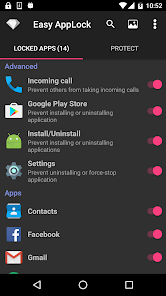
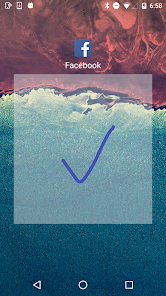
Easy AppLock can lock your Facebook, WhatsApp, Gallery, Messenger, SMS, Contacts, Gmail, Settings and any other apps you would like to lock.
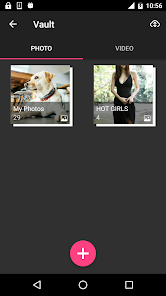
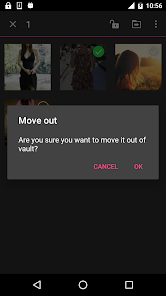
Easy AppLock can Encrypt and Hide your Photos and Videos, and support Cloud Backup.
Prevent unauthorized access and guard privacy.
Ensure security.
With Easy AppLock, you will:
★ Don't worry about exposing your privacy and private data to friends!
★ Don't worry about kids mess up Settings, send wrong messages, paying games again.
★ All features are totally free!!!
■ Features
• Encrypt and Hide your photos and videos.
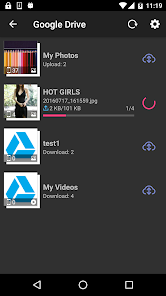
• Backup and sync your photos and videos with Google Drive (15GB free storage space)
• Lock any apps you want to lock. (e.g Twitter, Gallery, Camera)
• Prevent others from taking incoming calls
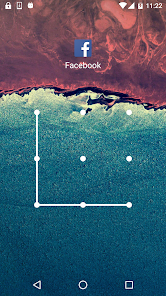
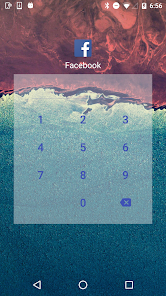
• Support lock with Pattern, Gesture,or PIN
• Support fingerprint unlock (Device need Android 6.0+ & hardware support)
• Support Invisible lock,protect your secrete lock screen password from the snoopers, make it invisible!
• Can hide its own launch icon, nobody knows you have Easy AppLock
• Break-in alerts: Will capture a photo of the would-be intruder.
• Support App Lock switch widget
• Support Dark Theme in Settings
• Easy-to-use and user friendly GUI
• Battery use less than 1%
Open Easy AppLock
After you hide Easy AppLock, You can
1) Enter *#*#000#*#* on your dial pad to open it
2) Click here to open it https://easyapplock.page.link/open
Encrypted photos & videos were stored in the folder /sdcard/.EALV
So please never delete that folder manually or let other apps to do it.
Starting from Android 11, You need to manually select the folder.
About Allow a brief exit
Re-lock is not required when returning from a brief exit, avoiding to frequently unlock and smoothing the app switches.
About Quick Lock
Will quickly lock the protected apps without delay.
If you feel Easy AppLock's lock action has a little delay, please enable "Quick Lock" in "Protect".
Quick Lock will consume a little more power.
About Forgot pattern
1. By security answer: enter your security answer and click 'reset pattern'.
2. By security email: click 'send code to security email', input reset code and click 'reset pattern'.
#1 This app uses Accessibility services. It is used to help lock protected apps.
#2 Starting from Android 11, this app need QUERY_ALL_PACKAGES permission to get your installed app list, so you can choose which apps to lock. We will never use your app list for other purposes.
=============
Easy AppLock can lock your Facebook, WhatsApp, Gallery, Messenger, SMS, Contacts, Gmail, Settings and any other apps you would like to lock.
Easy AppLock can Encrypt and Hide your Photos and Videos, and support Cloud Backup.
Prevent unauthorized access and guard privacy.
Ensure security.
With Easy AppLock, you will:
★ Don't worry about exposing your privacy and private data to friends!
★ Don't worry about kids mess up Settings, send wrong messages, paying games again.
★ All features are totally free!!!
■ Features
• Encrypt and Hide your photos and videos.
• Backup and sync your photos and videos with Google Drive (15GB free storage space)
• Lock any apps you want to lock. (e.g Twitter, Gallery, Camera)
• Prevent others from taking incoming calls
• Support lock with Pattern, Gesture,or PIN
• Support fingerprint unlock (Device need Android 6.0+ & hardware support)
• Support Invisible lock,protect your secrete lock screen password from the snoopers, make it invisible!
• Can hide its own launch icon, nobody knows you have Easy AppLock
• Break-in alerts: Will capture a photo of the would-be intruder.
• Support App Lock switch widget
• Support Dark Theme in Settings
• Easy-to-use and user friendly GUI
• Battery use less than 1%
Open Easy AppLock
After you hide Easy AppLock, You can
1) Enter *#*#000#*#* on your dial pad to open it
2) Click here to open it https://easyapplock.page.link/open
Encrypted photos & videos were stored in the folder /sdcard/.EALV
So please never delete that folder manually or let other apps to do it.
Starting from Android 11, You need to manually select the folder.
About Allow a brief exit
Re-lock is not required when returning from a brief exit, avoiding to frequently unlock and smoothing the app switches.
About Quick Lock
Will quickly lock the protected apps without delay.
If you feel Easy AppLock's lock action has a little delay, please enable "Quick Lock" in "Protect".
Quick Lock will consume a little more power.
About Forgot pattern
1. By security answer: enter your security answer and click 'reset pattern'.
2. By security email: click 'send code to security email', input reset code and click 'reset pattern'.
#1 This app uses Accessibility services. It is used to help lock protected apps.
#2 Starting from Android 11, this app need QUERY_ALL_PACKAGES permission to get your installed app list, so you can choose which apps to lock. We will never use your app list for other purposes.
Date de mise à jour
La sécurité, c'est d'abord comprendre comment les développeurs collectent et partagent vos données. Les pratiques concernant leur confidentialité et leur protection peuvent varier selon votre utilisation, votre région et votre âge. Le développeur a fourni ces informations et peut les modifier ultérieurement.

Aucune donnée partagée avec des tiers
En savoir plus sur la manière dont les développeurs déclarent le partage

Cette appli peut recueillir ces types de données
Position, Activité dans l'application et 2 autres

Les données sont chiffrées lors de leur transfert

Impossible de supprimer les données
Notes et avis
4,3
25,5K avis
Nouveautés
Support Android 14, fix bugs
How to Open Easy AppLock
1) Enter *#*#000#*#* on your dial pad to open it
2) Click here to open it https://easyapplock.page.link/open
How to Open Easy AppLock
1) Enter *#*#000#*#* on your dial pad to open it
2) Click here to open it https://easyapplock.page.link/open
Assistance de l'appli
À propos du développeur
程乐乎
mobileidea2011@gmail.com
安外大街187号
东城区, 北京市
China
100011


