Simple Red Theme GO SMS
Contient des annonces
4,5star
1,28K avis
100K+
Téléchargements

Jeunes adultes 17+
info
À propos de l'application
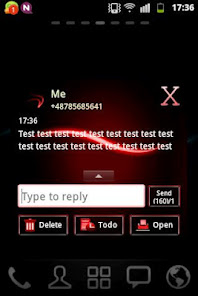
Simple Red Theme GO SMS works only with GO SMS Pro application if you don't have it, download for free from Google Play.
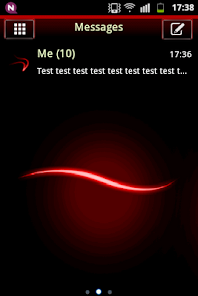
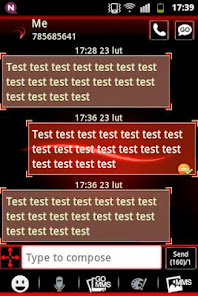
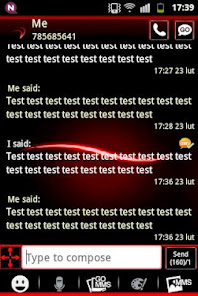
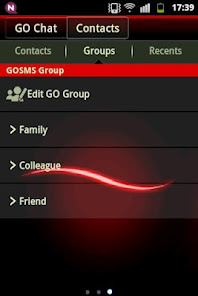
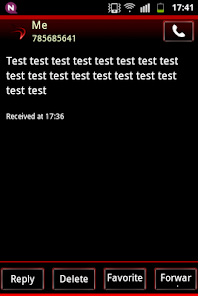
New red neons style from future now in Your devices!
The reds future skin for GO SMS Pro Theme = is minimalistic, simple or neon and futuristic them.
The theme is about shiny, light line. With white blur and glow effects.
Luminescent line is a graphics design is like a luminous stripes
afterglow bright, shining or radiant dash.
Designed specially for people who love modern neon and laser dark or black and red progressive colors.
The best application to personalization and customization your GOSMS Theme.
Everything has been designed specifically for people who love the red and black color.
This Go Theme have a three great wallpapers for the main background, and great red icons.
To apply the theme(also for GO Chat):
1. Download this theme from Google Play for free
2. Download GO SMS Pro for free
3. Install and launch GO SMS app
3. Press right to see options and press theme
4. Press "Installed" tab
5. Tap the GO SMS Theme simple red
Everything has been designed specifically for people who love sanguine, amaranthine, indygo and black colors.
Try now beautiful, lazure, neon style with tons of customization options.
To change appearance settings about conversation list
1. Press Menu
2. Press Advanced
3. Press Appearance Settings.
4. Press Conversation List Customization
And now You can adjust for each other, you can change:
- Background in messages.
- Displayed contact pictures.
- Contact font.
- Contact font color.
- Time and message fonts pattern
- Or reset this setting as to default.
To change appearance settings about conversation style
1. Press Menu
2. Press Advanced
3. Press Appearance Settings.
4. Press Conversation customization
And now You can adjust for each other, you can change:
Conversation style ( bubble setting or list style)
- Background
- Incoming font
- Outgoing font
- Hyperlink color in text
If you want to use avatar icon for any contact simply change it and the new image fuchsia for each contact are visible on conversation list and messages SMS list.
Disclaimer: this application uses interstitial ads and banners.
Check other our GOSMSPro Themes, GO Locker Themes, and GO Launcher EX, free themes.
Themes are published all the time, so remember to check our developer account regularly.
Style was created by WorkshopTheme
New red neons style from future now in Your devices!
The reds future skin for GO SMS Pro Theme = is minimalistic, simple or neon and futuristic them.
The theme is about shiny, light line. With white blur and glow effects.
Luminescent line is a graphics design is like a luminous stripes
afterglow bright, shining or radiant dash.
Designed specially for people who love modern neon and laser dark or black and red progressive colors.
The best application to personalization and customization your GOSMS Theme.
Everything has been designed specifically for people who love the red and black color.
This Go Theme have a three great wallpapers for the main background, and great red icons.
To apply the theme(also for GO Chat):
1. Download this theme from Google Play for free
2. Download GO SMS Pro for free
3. Install and launch GO SMS app
3. Press right to see options and press theme
4. Press "Installed" tab
5. Tap the GO SMS Theme simple red
Everything has been designed specifically for people who love sanguine, amaranthine, indygo and black colors.
Try now beautiful, lazure, neon style with tons of customization options.
To change appearance settings about conversation list
1. Press Menu
2. Press Advanced
3. Press Appearance Settings.
4. Press Conversation List Customization
And now You can adjust for each other, you can change:
- Background in messages.
- Displayed contact pictures.
- Contact font.
- Contact font color.
- Time and message fonts pattern
- Or reset this setting as to default.
To change appearance settings about conversation style
1. Press Menu
2. Press Advanced
3. Press Appearance Settings.
4. Press Conversation customization
And now You can adjust for each other, you can change:
Conversation style ( bubble setting or list style)
- Background
- Incoming font
- Outgoing font
- Hyperlink color in text
If you want to use avatar icon for any contact simply change it and the new image fuchsia for each contact are visible on conversation list and messages SMS list.
Disclaimer: this application uses interstitial ads and banners.
Check other our GOSMSPro Themes, GO Locker Themes, and GO Launcher EX, free themes.
Themes are published all the time, so remember to check our developer account regularly.
Style was created by WorkshopTheme
Date de mise à jour
La sécurité, c'est d'abord comprendre comment les développeurs collectent et partagent vos données. Les pratiques concernant leur confidentialité et leur protection peuvent varier selon votre utilisation, votre région et votre âge. Le développeur a fourni ces informations et peut les modifier ultérieurement.

Cette appli peut partager ces types de données avec des tiers
Appareil ou autres ID

Aucune donnée collectée
En savoir plus sur la manière dont les développeurs déclarent la collecte

Les données ne sont pas chiffrées
Impossible de supprimer les données
Notes et avis
4,5
1,26K avis
Nouveautés
Fixed bugs
Assistance de l'appli
À propos du développeur
Łukasz Drewicz
udrewicz@gmail.com
1 Maja 4/17
46-040 Ozimek
Poland


