
Navbar Notifications Button
4,1star
135 avis
10K+
Téléchargements

Tout public
info



À propos de l'application
NOTE: In order to use this app, you need to have the regular Android navigation bar with Back, Home and Recents buttons enabled. The app will not work with gesture navigation enabled. It also will not work on a device with physical navigation buttons.
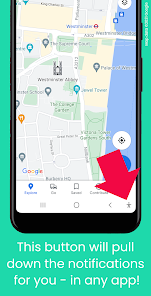
Tired of having to reach all the way up to the top of the screen each time a new message arrives? This app adds a new button to your phone's navigation bar - which will pull down the notifications for you. Just tap the button, and the notifications will be opened. Easy access from any app!
Navbar Notifications Button also lets you choose an action to be performed when tapping the button a second time (when the notifications are already open). This includes opening quick settings (normally accessed by swiping down on the notifications), or clicking the first notification, to open the latest message. NOTE: This second tap doesn't currently work on Huawei devices or ColorOS 12 (Oppo).
Additionally, you can choose to have a different action to be performed on a quick double tap of the button.
Note: You cannot use this app while using one of the following apps from the Android Accessibility Suite: TalkBack, Switch Access, Select to Speak and Accessibility Menu.
Navbar Notifications Button requires you to enable its Accessibility Service before you can use it. This app uses this service only to enable its functionality. It needs the following permissions:
◯ View and control screen:
- to determine whether notifications or quick settings are already shown
◯ View and perform actions:
- to add a button to the navigation bar
- to open the notifications for you
Navbar Notifications Button will not process any data about your interactions with other apps.
Gmail™ email service is a trademark of Google LLC.
Tired of having to reach all the way up to the top of the screen each time a new message arrives? This app adds a new button to your phone's navigation bar - which will pull down the notifications for you. Just tap the button, and the notifications will be opened. Easy access from any app!
Navbar Notifications Button also lets you choose an action to be performed when tapping the button a second time (when the notifications are already open). This includes opening quick settings (normally accessed by swiping down on the notifications), or clicking the first notification, to open the latest message. NOTE: This second tap doesn't currently work on Huawei devices or ColorOS 12 (Oppo).
Additionally, you can choose to have a different action to be performed on a quick double tap of the button.
Note: You cannot use this app while using one of the following apps from the Android Accessibility Suite: TalkBack, Switch Access, Select to Speak and Accessibility Menu.
Navbar Notifications Button requires you to enable its Accessibility Service before you can use it. This app uses this service only to enable its functionality. It needs the following permissions:
◯ View and control screen:
- to determine whether notifications or quick settings are already shown
◯ View and perform actions:
- to add a button to the navigation bar
- to open the notifications for you
Navbar Notifications Button will not process any data about your interactions with other apps.
Gmail™ email service is a trademark of Google LLC.
Date de mise à jour
La sécurité, c'est d'abord comprendre comment les développeurs collectent et partagent vos données. Les pratiques concernant leur confidentialité et leur protection peuvent varier selon votre utilisation, votre région et votre âge. Le développeur a fourni ces informations et peut les modifier ultérieurement.

Aucune donnée partagée avec des tiers
En savoir plus sur la manière dont les développeurs déclarent le partage

Aucune donnée collectée
En savoir plus sur la manière dont les développeurs déclarent la collecte
Notes et avis
4,1
127 avis
Nouveautés
- fixed issue of app not working properly after upgrade to Android 14
Assistance de l'appli
À propos du développeur
Phone Phreak
support@phonephreaksoftware.com
Käsityöläiskatu 1D 90
20100 TURKU
Finland
+358 44 9128024


