

Smart Digital Photo Frame

3,3star
93 avis
5K+
Téléchargements

Tout public
info




À propos de l'application
💰 THIS APP IS
▶ Free.
▶ No Ads.
🔓 COMMON PERMISSIONS
▶ NONE.
🔐 SENSITIVE PERMISSIONS
▶ NONE.
💾 DOWNLOAD SIZE
▶ Less than 4 MB.
🖼 CURRENT FEATURES
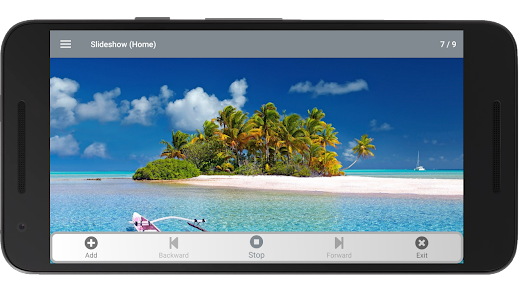
▶ Most photo formats can be loaded, including animated gifs.
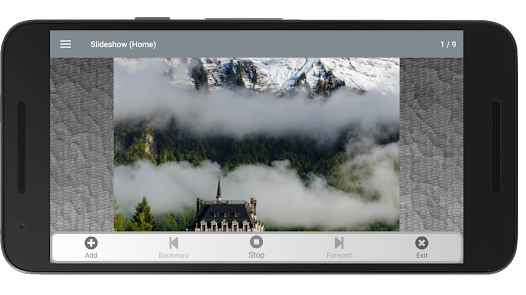
▶ Various transitions and effects when displaying photos.
▶ You can set the time between slides.
▶ You can navigate between photos, backward or forward, with transition.
▶ Current photo indicator and the number of photos loaded.
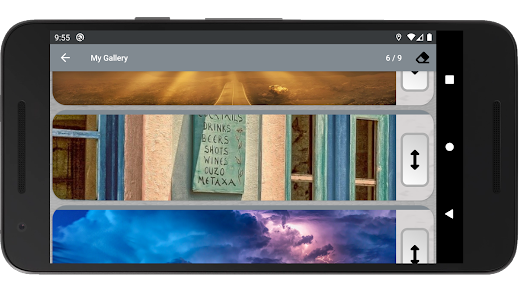
▶ From My Gallery of the app you can change the order and delete the photos for the slides. In My Gallery of the app you can zoom in on the photos with a double tick on the photo.
▶ Support for loading photos from various data sources, depending on the apps you have installed on your device.
▶ The background of the slides changes automatically with animation.
▶ The app incorporates a timer mode, so that, after a few hours, the app closes automatically when it is in play mode in the slideshow. In this mode a timer is displayed that can be moved anywhere on the screen and can be hidden.
▶ A smart mode has been implemented that uses the ambient light sensor. Thanks to this sensor, your digital photo frame will be suspended and reactivated depending on the ambient light. In this mode a panel is displayed indicating the amount of light detected by the sensor. This panel can be moved anywhere on the screen and can be hidden.
▶ Add user-selectable background music to slides.
📆 NEXT FEATURES
▶ More transitions.
▶ More effects.
▶ Programming a time to turn on and off automatically.
▶ More configurable.
🌟 COMPATIBLE WITH YOUR PHOTO GALLERY ON THE SDCARD AND MORE
▶ You can use the photos from your gallery on your sdcard, but also, with Google Drive, Google Photos and other clouds, as long as you have the corresponding application installed.For more information, install the app and check the built-in help.
🔠 APP LANGUAGES
▶ 🇬🇧 English.
▶ 🇪🇸 Spanish.
🔗 WEB
▶ https://sites.google.com/view/soappspro-en/apps/
📹 VIDEOS
▶ https://www.youtube.com/watch?v=al4jJ4DkVqY
🔏 PRIVACY POLICY
▶ https://sites.google.com/view/soappspro-en/apps/smart-digital-photo-frame/privacy-policy-smart-digital-photo-frame
▶ Free.
▶ No Ads.
🔓 COMMON PERMISSIONS
▶ NONE.
🔐 SENSITIVE PERMISSIONS
▶ NONE.
💾 DOWNLOAD SIZE
▶ Less than 4 MB.
🖼 CURRENT FEATURES
▶ Most photo formats can be loaded, including animated gifs.
▶ Various transitions and effects when displaying photos.
▶ You can set the time between slides.
▶ You can navigate between photos, backward or forward, with transition.
▶ Current photo indicator and the number of photos loaded.
▶ From My Gallery of the app you can change the order and delete the photos for the slides. In My Gallery of the app you can zoom in on the photos with a double tick on the photo.
▶ Support for loading photos from various data sources, depending on the apps you have installed on your device.
▶ The background of the slides changes automatically with animation.
▶ The app incorporates a timer mode, so that, after a few hours, the app closes automatically when it is in play mode in the slideshow. In this mode a timer is displayed that can be moved anywhere on the screen and can be hidden.
▶ A smart mode has been implemented that uses the ambient light sensor. Thanks to this sensor, your digital photo frame will be suspended and reactivated depending on the ambient light. In this mode a panel is displayed indicating the amount of light detected by the sensor. This panel can be moved anywhere on the screen and can be hidden.
▶ Add user-selectable background music to slides.
📆 NEXT FEATURES
▶ More transitions.
▶ More effects.
▶ Programming a time to turn on and off automatically.
▶ More configurable.
🌟 COMPATIBLE WITH YOUR PHOTO GALLERY ON THE SDCARD AND MORE
▶ You can use the photos from your gallery on your sdcard, but also, with Google Drive, Google Photos and other clouds, as long as you have the corresponding application installed.For more information, install the app and check the built-in help.
🔠 APP LANGUAGES
▶ 🇬🇧 English.
▶ 🇪🇸 Spanish.
🔗 WEB
▶ https://sites.google.com/view/soappspro-en/apps/
📹 VIDEOS
▶ https://www.youtube.com/watch?v=al4jJ4DkVqY
🔏 PRIVACY POLICY
▶ https://sites.google.com/view/soappspro-en/apps/smart-digital-photo-frame/privacy-policy-smart-digital-photo-frame
Date de mise à jour
La sécurité, c'est d'abord comprendre comment les développeurs collectent et partagent vos données. Les pratiques concernant leur confidentialité et leur protection peuvent varier selon votre utilisation, votre région et votre âge. Le développeur a fourni ces informations et peut les modifier ultérieurement.

Aucune donnée partagée avec des tiers
En savoir plus sur la manière dont les développeurs déclarent le partage

Aucune donnée collectée
En savoir plus sur la manière dont les développeurs déclarent la collecte
Notes et avis
3,3
52 avis
Nouveautés
CHANGELOG 02.03.00
▶ Random photo effect when flipping through slides.
▶ Code refactoring and dependency updates.
▶ Bug Fixes.
CHANGELOG 02.02.00
▶ New smart mode: When the battery drops below a certain percentage, the app is automatically closed, allowing the device to go into sleep mode.
▶ Update Dependencies.
CHANGELOG 02.01.00
▶ Update Dependencies.
CHANGELOG 02.00.01
▶ Update Dependencies.
▶ Random photo effect when flipping through slides.
▶ Code refactoring and dependency updates.
▶ Bug Fixes.
CHANGELOG 02.02.00
▶ New smart mode: When the battery drops below a certain percentage, the app is automatically closed, allowing the device to go into sleep mode.
▶ Update Dependencies.
CHANGELOG 02.01.00
▶ Update Dependencies.
CHANGELOG 02.00.01
▶ Update Dependencies.
Assistance de l'appli
À propos du développeur
Óscar Moya Martínez
soappspro@gmail.com
Spain


