
SecureBox Pro-ssh&terminal
100+
Téléchargements

Tout public
info




À propos de l'application
SecureBox Pro is an application that offers secure shell(ssh) commands and additional commands for management of keys, X.509 certificates, digests and etc.
As specified in RFC4251: "Secure Shell (SSH) is a protocol for secure remote login and other secure network services over an insecure network."
Same as non-professional version, SecureBox Pro is packaged with complete list of PKIX-SSH and OpenSSL commands.
Unlike non-professional version, application is bundled with terminal emulator and user interface(screens) for management of secure shell connections, identities, sessions and etc.
Application supports "Light"(default), "Dark" or "System" theme mode as "System"is linked to device default mode.
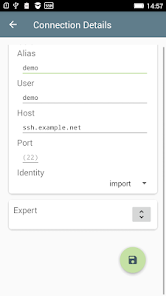
From application screens user could define parameters of secure shell connections
and directly to open secure shell connections(ssh sessions).
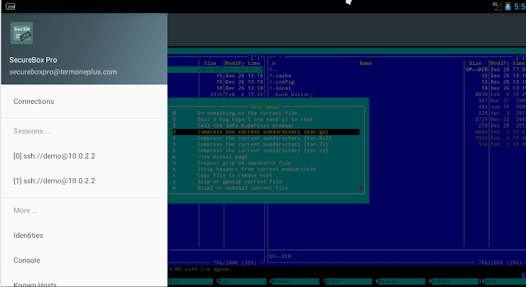
Each ssh session is opened in separate terminal window.
Terminal windows(sessions) could be switched with swipe gesture or directly from navigation menu.
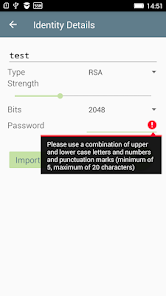
Another application screens simplify management of user identities(ssh keys) used in "Public Key Authentication Method".
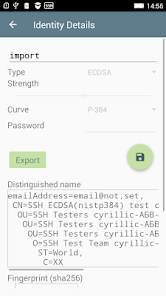
Management includes export interface to share(send) public part of key to administrator of secure-shell servers.
Import functionality allows user to import private keys either by direct files selection or send from other applications.
Application offers access to local console(terminal).
Local terminal uses build-in into each android device born-shell.
User could use system set of shell command to manage files, processes, device and etc.
As well user could use all commands packaged by application.
Terminal screens use one of predefined colour schemes like "Dark Pastels", "Solarized Light", "Solarized Dark" and etc. Size of text is subject of user preferences.
From screen context menu user could activate clipboard functionality, to send function or control key, show/hide keyboard, to acquire "CPU wake" or "Wi-Fi" locks and to paste born shell script snippet.
Snippet is obtained using various Android specific technologies - either from document provides or content providers.
Also it could be obtained from file system but on new devices OS restrict access only to application data.
Bundled PKIX-SSH offers widest range of supported key algorithms, chippers, macs
for secure shell protocol.
Supported public key algorithms, based on plan public keys, are:
Ed25519 : ssh-ed25519
EC : ecdsa-sha2-nistp256, ecdsa-sha2-nistp384, ecdsa-sha2-nistp521
RSA : rsa-sha2-256, rsa-sha2-512, ssh-rsa
DSA : ssh-dss
Plan keys are fully managed from application screens.
In addition for EC and RSA could be used keys managed by device.
In addition PKIX-SSH supports algorithms based on X.509 certificates:
EC : x509v3-ecdsa-sha2-nistp256, x509v3-ecdsa-sha2-nistp384, x509v3-ecdsa-sha2-nistp521
RSA : x509v3-rsa2048-sha256, x509v3-ssh-rsa, x509v3-sign-rsa
Ed25519 : x509v3-ssh-ed25519
DSA : x509v3-ssh-dss, x509v3-sign-dss
This set of algorithms could be used only if X.509 based identity(key) is imported.
For better support application provides ssh "ask-pass" dialog functionality.
Unlike desktops dialog is associated to the secure shell session screen.
OpenSSL command line tool provides auxiliary commands for management of keys, X.509 certificates, digests and etc.
It includes, but is not limited to,
key management commands like genpkey and pkey, ec and ecparam, rsa, dsa and dsaparam,
commands for operation with keys - pkeyutl,
commands for key data management - pkcs12, pkcs8 and pkcs7,
commands for management of X.509 certificates, revocation list and authorities - x509, crl and ca,
time stamping authority tool - ts.
Remark: the complete list of commands including manual pages is available on application web-site.
As specified in RFC4251: "Secure Shell (SSH) is a protocol for secure remote login and other secure network services over an insecure network."
Same as non-professional version, SecureBox Pro is packaged with complete list of PKIX-SSH and OpenSSL commands.
Unlike non-professional version, application is bundled with terminal emulator and user interface(screens) for management of secure shell connections, identities, sessions and etc.
Application supports "Light"(default), "Dark" or "System" theme mode as "System"is linked to device default mode.
From application screens user could define parameters of secure shell connections
and directly to open secure shell connections(ssh sessions).
Each ssh session is opened in separate terminal window.
Terminal windows(sessions) could be switched with swipe gesture or directly from navigation menu.
Another application screens simplify management of user identities(ssh keys) used in "Public Key Authentication Method".
Management includes export interface to share(send) public part of key to administrator of secure-shell servers.
Import functionality allows user to import private keys either by direct files selection or send from other applications.
Application offers access to local console(terminal).
Local terminal uses build-in into each android device born-shell.
User could use system set of shell command to manage files, processes, device and etc.
As well user could use all commands packaged by application.
Terminal screens use one of predefined colour schemes like "Dark Pastels", "Solarized Light", "Solarized Dark" and etc. Size of text is subject of user preferences.
From screen context menu user could activate clipboard functionality, to send function or control key, show/hide keyboard, to acquire "CPU wake" or "Wi-Fi" locks and to paste born shell script snippet.
Snippet is obtained using various Android specific technologies - either from document provides or content providers.
Also it could be obtained from file system but on new devices OS restrict access only to application data.
Bundled PKIX-SSH offers widest range of supported key algorithms, chippers, macs
for secure shell protocol.
Supported public key algorithms, based on plan public keys, are:
Ed25519 : ssh-ed25519
EC : ecdsa-sha2-nistp256, ecdsa-sha2-nistp384, ecdsa-sha2-nistp521
RSA : rsa-sha2-256, rsa-sha2-512, ssh-rsa
DSA : ssh-dss
Plan keys are fully managed from application screens.
In addition for EC and RSA could be used keys managed by device.
In addition PKIX-SSH supports algorithms based on X.509 certificates:
EC : x509v3-ecdsa-sha2-nistp256, x509v3-ecdsa-sha2-nistp384, x509v3-ecdsa-sha2-nistp521
RSA : x509v3-rsa2048-sha256, x509v3-ssh-rsa, x509v3-sign-rsa
Ed25519 : x509v3-ssh-ed25519
DSA : x509v3-ssh-dss, x509v3-sign-dss
This set of algorithms could be used only if X.509 based identity(key) is imported.
For better support application provides ssh "ask-pass" dialog functionality.
Unlike desktops dialog is associated to the secure shell session screen.
OpenSSL command line tool provides auxiliary commands for management of keys, X.509 certificates, digests and etc.
It includes, but is not limited to,
key management commands like genpkey and pkey, ec and ecparam, rsa, dsa and dsaparam,
commands for operation with keys - pkeyutl,
commands for key data management - pkcs12, pkcs8 and pkcs7,
commands for management of X.509 certificates, revocation list and authorities - x509, crl and ca,
time stamping authority tool - ts.
Remark: the complete list of commands including manual pages is available on application web-site.
Date de mise à jour
La sécurité, c'est d'abord comprendre comment les développeurs collectent et partagent vos données. Les pratiques concernant leur confidentialité et leur protection peuvent varier selon votre utilisation, votre région et votre âge. Le développeur a fourni ces informations et peut les modifier ultérieurement.

Aucune donnée partagée avec des tiers
En savoir plus sur la manière dont les développeurs déclarent le partage

Aucune donnée collectée
En savoir plus sur la manière dont les développeurs déclarent la collecte
Nouveautés
Compliant with Material design rules.
User interface supports X.509 based identities - registered by new "import" functionality. Accepted are identities in PKCS#12, PKCS#8 and Legacy formats.
Import uses new "File Selection" activity. Activity is available for other application and allows user to browse file system and select a file on "pick" request.
Packaged with PKIX-SSH v11.6 - fixes crash on 64-bit Android OS-es.
For other improvements and bug fixes see project page.
User interface supports X.509 based identities - registered by new "import" functionality. Accepted are identities in PKCS#12, PKCS#8 and Legacy formats.
Import uses new "File Selection" activity. Activity is available for other application and allows user to browse file system and select a file on "pick" request.
Packaged with PKIX-SSH v11.6 - fixes crash on 64-bit Android OS-es.
For other improvements and bug fixes see project page.
Assistance de l'appli
phone
Numéro de téléphone
+359887924282
À propos du développeur
Roumen Petrov
maintainer@termoneplus.com
zhk Mladost 1, bl.78
141
1784 Sofia
Bulgaria