San Carlos Apache Media Player
4,0star
6 avis

Tout public
info
500+
Téléchargements

Tout public
En savoir plus


À propos de l'application
A fun audio companion for your Apache textbook! Just look, tap, and listen!
Audio available for:
Nṉēē/Nḏēē biyáti’ yánłti’go! - Speak Apache Level 1 Textbook
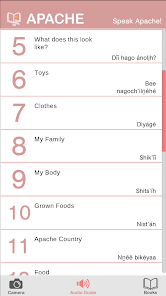
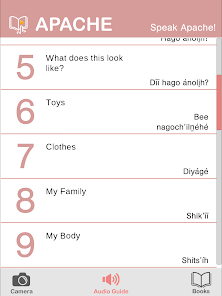
The San Carlos Apache Media Player is a companion to the San Carlos Apache L1 Textbook. Just point your phone at the page and tap to hear native speakers pronounce the words. The audio guide section gives you complete access to the textbook vocabulary with an easy tap and swipe interface.
-The textbook has full-text audio so you can read along.
-Augmented reality (AR) places audio players right on the page in every unit!
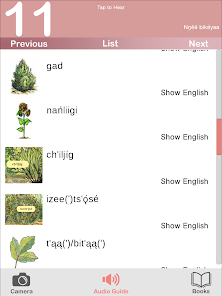
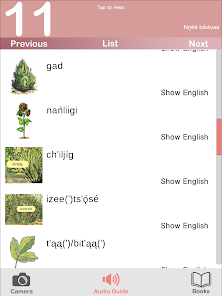
-The audio guide reveals the English with a tap.
Instructions:
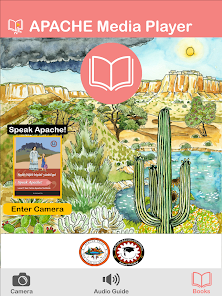
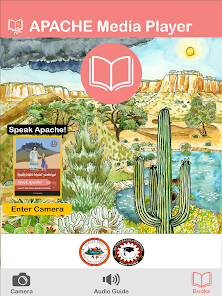
The San Carlos Apache Media Player is easy to use. You’ll start out in Books, where you can select and download the content for your books. The Camera mode lets you use your phone’s camera to put audio content right on the page. The Audio Guide mode has the spellings, images, English translations, and audio, all in one easy tap and swipe interface.
Books
- Tap the image of the book’s cover to select and again to enter Camera mode.
- Select a book and tap Audio Guide to go directly to the Audio Guide.
- New books will automatically pop up in the books list when they become available. Tap download to receive the content for your book.
- Occasionally, new content will be added to existing books. Just tap Update Now when it appears below one of your books.
Camera Mode
- Tap the Camera to enter Camera mode
- Look at the page through your phone or tablet's camera.
- Looking at the first page of each unit will set the current section, or you can select it from the list by tapping List.
- Explore the page and play buttons will pop up right on the page!
- Tap the buttons to hear the words.
*Image recognition performance may vary depending on the device. Try the Audio Guide if you are having trouble getting all the play buttons to appear.
Audio Guide Mode
- Tap Audio Guide to enter Audio Guide mode.
Audio available for:
Nṉēē/Nḏēē biyáti’ yánłti’go! - Speak Apache Level 1 Textbook
The San Carlos Apache Media Player is a companion to the San Carlos Apache L1 Textbook. Just point your phone at the page and tap to hear native speakers pronounce the words. The audio guide section gives you complete access to the textbook vocabulary with an easy tap and swipe interface.
-The textbook has full-text audio so you can read along.
-Augmented reality (AR) places audio players right on the page in every unit!
-The audio guide reveals the English with a tap.
Instructions:
The San Carlos Apache Media Player is easy to use. You’ll start out in Books, where you can select and download the content for your books. The Camera mode lets you use your phone’s camera to put audio content right on the page. The Audio Guide mode has the spellings, images, English translations, and audio, all in one easy tap and swipe interface.
Books
- Tap the image of the book’s cover to select and again to enter Camera mode.
- Select a book and tap Audio Guide to go directly to the Audio Guide.
- New books will automatically pop up in the books list when they become available. Tap download to receive the content for your book.
- Occasionally, new content will be added to existing books. Just tap Update Now when it appears below one of your books.
Camera Mode
- Tap the Camera to enter Camera mode
- Look at the page through your phone or tablet's camera.
- Looking at the first page of each unit will set the current section, or you can select it from the list by tapping List.
- Explore the page and play buttons will pop up right on the page!
- Tap the buttons to hear the words.
*Image recognition performance may vary depending on the device. Try the Audio Guide if you are having trouble getting all the play buttons to appear.
Audio Guide Mode
- Tap Audio Guide to enter Audio Guide mode.
Date de mise à jour
La sécurité, c'est d'abord comprendre comment les développeurs collectent et partagent vos données. Les pratiques concernant leur confidentialité et leur protection peuvent varier selon votre utilisation, votre région et votre âge. Le développeur a fourni ces informations et peut les modifier ultérieurement.

Aucune donnée partagée avec des tiers
En savoir plus sur la manière dont les développeurs déclarent le partage

Aucune donnée collectée
En savoir plus sur la manière dont les développeurs déclarent la collecte
Notes et avis
4,0
6 avis
Nouveautés
Bug Fixes
Tout public
En savoir plusAssistance de l'appli
À propos du développeur
THE LANGUAGE CONSERVANCY, INC.
tech@languageconservancy.org
1720 N Kinser Pike
Bloomington, IN 47404
United States
+1 812-340-1742


