

Smart Clean:Phone Junk Cleaner
Achats via l'appli

4,4star
3,36K avis
100K+
Téléchargements

Tout public
info
À propos de l'application
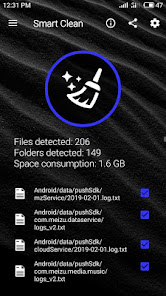
Smart Clean is the most powerful junk (Unwanted Files) cleaner ever made on android.
It has the following features:
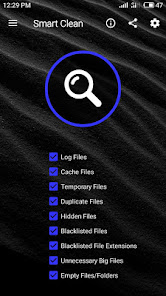
1. Log Files:
Removes logs files and folders from every location.
2. Cache Files:
Removes caches without removing your important files.
3. Temporary Files:
Removes temporary files and folders which sometimes not gets deleted by apps and results in storage consumption.
4. Duplicate Files:
Scans clone files very fast without removing original files from Duplicates.
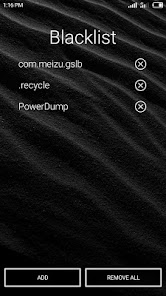
5. Blacklist Files:
Removes all the files which is present in Blacklist
Unnecessary files / folders which are automatically created with time could be kept inside blacklist to remove them automatically on every scan.
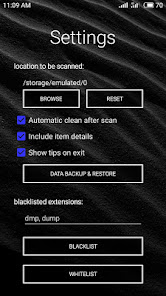
6. Blacklisted File Extensions:
Removes all those files which have blacklisted extensions
(i.e. whose extensions are present in "Extensions Blacklist")
Simply insert those extensions in "Blacklist Extensions" separated by commas without including period.
7. Hidden Files:
Removes all those files and folders which are hidden to users (which are started with a period).
CAUTION: Make sure to add important hidden files and folders into whitelist to prevent them from deleting at the time of scan.
8. Unnecessary Big Files:
Remove all large files without fearing of loosing your favourite movies, music, apk and many more important big files.
9. Empty Files:
Removes all empty files.
i.e. Files which don't have any contents in it.
10. Empty Folder:
Removes all the folders which are empty.
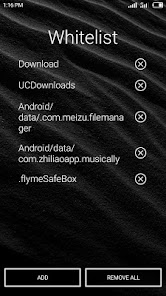
11. Whitelist Files/Folders:
This feature is developed to save some of those files or folders which are important to the user but occurs in category of logs, cache, hidden, unnecessary large files, etc...
Simply put those files/folders into white list and this will not going to scan those folders / files.
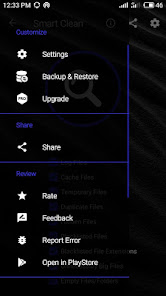
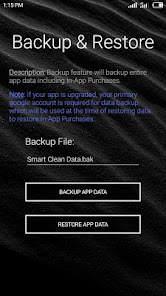
12: Data Backup & Restore:
This feature is developed to backup all the data of Smart Clean including blacklist, whitelist, and preferences data.
In short its best cleaner ever made on android !
It has the following features:
1. Log Files:
Removes logs files and folders from every location.
2. Cache Files:
Removes caches without removing your important files.
3. Temporary Files:
Removes temporary files and folders which sometimes not gets deleted by apps and results in storage consumption.
4. Duplicate Files:
Scans clone files very fast without removing original files from Duplicates.
5. Blacklist Files:
Removes all the files which is present in Blacklist
Unnecessary files / folders which are automatically created with time could be kept inside blacklist to remove them automatically on every scan.
6. Blacklisted File Extensions:
Removes all those files which have blacklisted extensions
(i.e. whose extensions are present in "Extensions Blacklist")
Simply insert those extensions in "Blacklist Extensions" separated by commas without including period.
7. Hidden Files:
Removes all those files and folders which are hidden to users (which are started with a period).
CAUTION: Make sure to add important hidden files and folders into whitelist to prevent them from deleting at the time of scan.
8. Unnecessary Big Files:
Remove all large files without fearing of loosing your favourite movies, music, apk and many more important big files.
9. Empty Files:
Removes all empty files.
i.e. Files which don't have any contents in it.
10. Empty Folder:
Removes all the folders which are empty.
11. Whitelist Files/Folders:
This feature is developed to save some of those files or folders which are important to the user but occurs in category of logs, cache, hidden, unnecessary large files, etc...
Simply put those files/folders into white list and this will not going to scan those folders / files.
12: Data Backup & Restore:
This feature is developed to backup all the data of Smart Clean including blacklist, whitelist, and preferences data.
In short its best cleaner ever made on android !
Date de mise à jour
La sécurité, c'est d'abord comprendre comment les développeurs collectent et partagent vos données. Les pratiques concernant leur confidentialité et leur protection peuvent varier selon votre utilisation, votre région et votre âge. Le développeur a fourni ces informations et peut les modifier ultérieurement.

Aucune donnée partagée avec des tiers
En savoir plus sur la manière dont les développeurs déclarent le partage

Aucune donnée collectée
En savoir plus sur la manière dont les développeurs déclarent la collecte
Notes et avis
4,4
2,99K avis
Nouveautés
* Purchase Bug Fixes
Assistance de l'appli
phone
Numéro de téléphone
+919955580632
À propos du développeur
Rituraj Shakti
xtraszone@gmail.com
Q. No. E-412
Rd. No. 1A
Ramgarh, Jharkhand 829119
India


