
foolcontrol
4,1star
43 avis
10K+
Téléchargements

Tout public
info


À propos de l'application
foolcontrol lets you take full control over a RED DIGITAL CINEMA DSMC™ camera.
Finally available for Android it comes with free support for RS 232 wired connection...
App is a free download and works in view only mode with unlicensed cameras. Your camera can be unlocked for 1 month, 1 year or 2 years. Anyone can then use it camera from their own Android device.
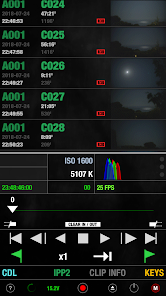
- PREVIEW : recording state, format, project / sensor frame rate, timecode, pre-record, frame trigger frame tagging, OLPF, REDcode, lookaround, shutter angle / speed, histogram, goal posts, traffic lights, gamma / color space, recording mode, frame processing, HDRx, Motion Mount, iris vale, white balance, tint, ISO, tools, RAW view, magnify, production info, scene and take metadata, VU meter, battery level / time left, media remaining / recording time, clip count, clip name, previous clip info. Indicators for : LAN, ext. timecode, sync, genlock, RIG, errors, camera fan speed and temperature. Eject media, power saving modes and shutdown the camera.
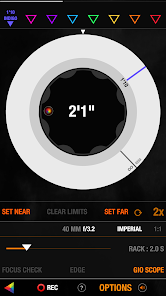
- FOCUS : Circular focus disc with advanced features : colored users marks, smooth bezier rack focus with adjustable speed, add hard stop for near/far focus, select 1,2,3,4,5 or 10 knob turns for super precise focusing without loosing any previous marks. AF mode selection, autofocus trigger, AF zone size and center, iris, magnify and more.
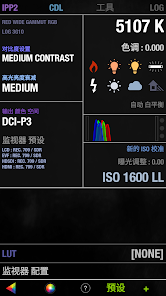
- LOOK / IPP2 : set camera look using a multi speed slider or manual value input : contrast, exposure, saturation, shadow, brightness, RGB gains, kelvin, tint and FLUT. Color temperature presets, auto white balance, ISO, color / gamma space.
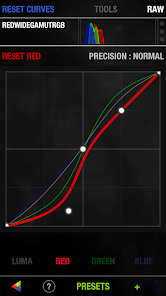
- CURVES : Shape luma, red, green and blue curves to create in-camera grades. Drag curves points using 3 different modes for normal, fine, and super fine curve adjustment.
- PLAYBACK : list all the clips on your media with timecode, thumbnail and duration. Play forward, backward, frame by frame, go to end and beginning, set in/out points, navigate marked frame, set playback speed and looping mode.
- KEYS : navigate your camera menu using knob, buttons or gesture pad. Access to all buttons and menu pages.
- PRESETS : create and apply camera presets. A preset can include one or several parameters from look, curves, camera settings, slate and many more. Presets can be sorted, renamed and exported by email.
- SLATE : quickly set metadata values for production, director, DOP, scene, shot, take, project info, camera operator, unit and location. GPS location (on GPS enabled devices). Set timecode mode and value.
- CAMERA MENU tree
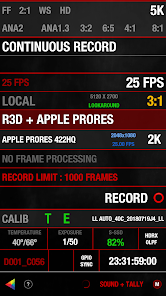
- RECORD SETTINGS with access to advanced record formats, mode and options.
-------------
connection tips : foolcolor.net/tips.pdf
more info, video demos and support : http://foolcolor.net/
IG : @mikafool
Please note :
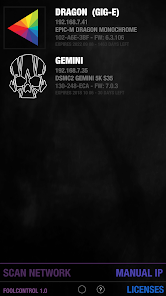
DSMC2, SCARLET-W and RAVEN all have built in wifi, older DSMC1 EPIC / SCARLET cameras require additional wireless accessories to work with foolcontrol (see below).
This application will only work with RED DSMC cameras. It does not work with the RED ONE or any other camera. Focus control requires a RED Canon or Nikon mount and a compatible electronic lens.
take fool control of your camera !
Finally available for Android it comes with free support for RS 232 wired connection...
App is a free download and works in view only mode with unlicensed cameras. Your camera can be unlocked for 1 month, 1 year or 2 years. Anyone can then use it camera from their own Android device.
- PREVIEW : recording state, format, project / sensor frame rate, timecode, pre-record, frame trigger frame tagging, OLPF, REDcode, lookaround, shutter angle / speed, histogram, goal posts, traffic lights, gamma / color space, recording mode, frame processing, HDRx, Motion Mount, iris vale, white balance, tint, ISO, tools, RAW view, magnify, production info, scene and take metadata, VU meter, battery level / time left, media remaining / recording time, clip count, clip name, previous clip info. Indicators for : LAN, ext. timecode, sync, genlock, RIG, errors, camera fan speed and temperature. Eject media, power saving modes and shutdown the camera.
- FOCUS : Circular focus disc with advanced features : colored users marks, smooth bezier rack focus with adjustable speed, add hard stop for near/far focus, select 1,2,3,4,5 or 10 knob turns for super precise focusing without loosing any previous marks. AF mode selection, autofocus trigger, AF zone size and center, iris, magnify and more.
- LOOK / IPP2 : set camera look using a multi speed slider or manual value input : contrast, exposure, saturation, shadow, brightness, RGB gains, kelvin, tint and FLUT. Color temperature presets, auto white balance, ISO, color / gamma space.
- CURVES : Shape luma, red, green and blue curves to create in-camera grades. Drag curves points using 3 different modes for normal, fine, and super fine curve adjustment.
- PLAYBACK : list all the clips on your media with timecode, thumbnail and duration. Play forward, backward, frame by frame, go to end and beginning, set in/out points, navigate marked frame, set playback speed and looping mode.
- KEYS : navigate your camera menu using knob, buttons or gesture pad. Access to all buttons and menu pages.
- PRESETS : create and apply camera presets. A preset can include one or several parameters from look, curves, camera settings, slate and many more. Presets can be sorted, renamed and exported by email.
- SLATE : quickly set metadata values for production, director, DOP, scene, shot, take, project info, camera operator, unit and location. GPS location (on GPS enabled devices). Set timecode mode and value.
- CAMERA MENU tree
- RECORD SETTINGS with access to advanced record formats, mode and options.
-------------
connection tips : foolcolor.net/tips.pdf
more info, video demos and support : http://foolcolor.net/
IG : @mikafool
Please note :
DSMC2, SCARLET-W and RAVEN all have built in wifi, older DSMC1 EPIC / SCARLET cameras require additional wireless accessories to work with foolcontrol (see below).
This application will only work with RED DSMC cameras. It does not work with the RED ONE or any other camera. Focus control requires a RED Canon or Nikon mount and a compatible electronic lens.
take fool control of your camera !
Date de mise à jour
La sécurité, c'est d'abord comprendre comment les développeurs collectent et partagent vos données. Les pratiques concernant leur confidentialité et leur protection peuvent varier selon votre utilisation, votre région et votre âge. Le développeur a fourni ces informations et peut les modifier ultérieurement.

Aucune donnée partagée avec des tiers
En savoir plus sur la manière dont les développeurs déclarent le partage

Aucune donnée collectée
En savoir plus sur la manière dont les développeurs déclarent la collecte
Notes et avis
4,1
41 avis
Nouveautés
CDL page added for IPP2.
Some bug fixes and tweaks.
Some bug fixes and tweaks.
Assistance de l'appli
À propos du développeur
FOOLCOLOR
mika@foolcolor.net
9 RUE PAUL GILLET
92600 ASNIERES SUR SEINE
France
+33 6 86 44 61 50


