
Eze for Android
500+
ଡାଉନଲୋଡ

ସମସ୍ତେ
info








ଏହି ଆପ୍ ବିଷୟରେ
Introduction
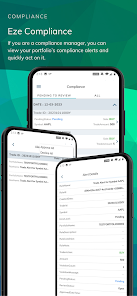
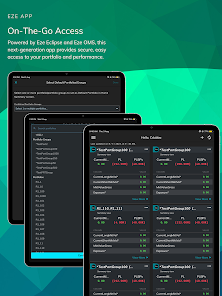
The new Eze mobile experience has arrived on your Phone and Tablet! Powered by Eze Eclipse and Eze OMS, the next-generation SS&C Eze app provides secure, access to Eze applications on-the-go with a simple, easy-to-use interface.
Whether you’re a Trader or a Portfolio Manager, the SS&C Eze app helps you manage your portfolio and keep an eye on performance so you can more quickly act when the time is right.
Eze App for OMS
Secure and Fast Login
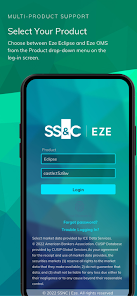
• Select your product (Eze OMS) from the Product drop-down list on the Log in screen.
• Login using Open ID Authentication
• Unlock the app using biometrics
Quickly View Portfolio Information and Analytics
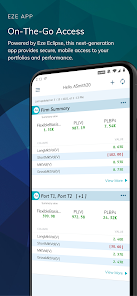
• View high-level summary and detail view of your portfolios and get a quick idea about your performance on the portfolio at groups level/aggregated level.
• Metrics such as PL(V)/PLBPs, Exposure, MarketValGross and more are at your fingertips, with the ability to add fields such as Market Value, Currency, Port Base Currency at portfolio level.
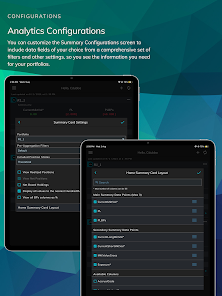
• Customize data points as per your needs.
• Aggregate the portfolios by Industry, Sector, and more!
Your App, Your Configuration
• Configure positions split by Location (Custodian) or Net Positions or Strategy
• Choose from a list of Position States such as Proposed, Released to Market, Fill Received, Finalized, Confirmed, and Settled.
• Edit columns in the Analytics screen.
Trading Screen
• You can view the trade details on-the-go. Also, Market Data Integration is live.
Settings Screen
• You can configure Default Portfolio settings, and Trade Swipe Options to quickly act on your trade or confirmation before cancelling an order or removing a card from Home, respectively.
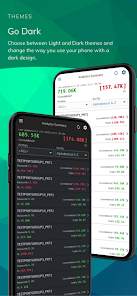
• Switch between Dark and Light modes.
Eze App for Eclipse
Secure and Fast Login
• Select your product (Eze Eclipse) from the Product drop-down list on the Log in screen.
• Login using Open ID Authentication
• Unlock the app using biometrics
Quickly View Portfolio Information
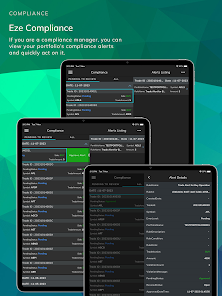
• See a summary view of your real-time intraday portfolio and get a quick idea about your performance.
• Metrics such as Realized PL(V)/PLBPs, Unrealized PL(V)/PLBPs, and more are at your fingertips, with the ability to add fields such as Market Value, Currency, Port Base Currency.
Analytics On-the-Go
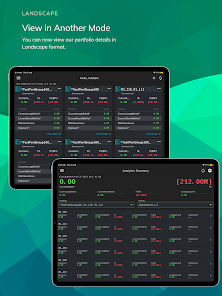
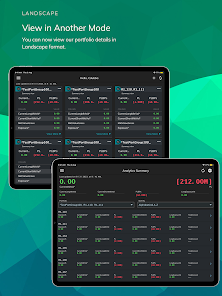
• View the high-level summary of your portfolios with various data points
• Customize data points as per your needs
• Aggregate the portfolios by Industry, Sector, and more!
Your App, Your Configuration
• Configure positions split by Location (Custodian) or Net Positions or Strategy
• Choose from a list of Position States such as Proposed, Released to Market, Fill Received, Finalized, Confirmed, and Settled.
• Edit columns in the Analytics detailed screen.
Trading (Trade Blotter, Order Management and Routes Management)
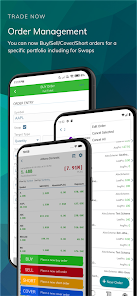
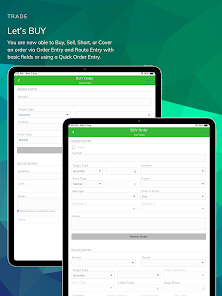
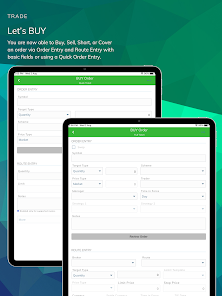
• Create orders from Trade Blotter, filter orders based on Order Status and Action
• View orders created, fill status and order progression for the orders on the Trade Blotter.
• Sort orders based on Symbol and Date
• Add, Edit, Cancel All and Cancel Selected orders from the Trade Blotter and Order details screen
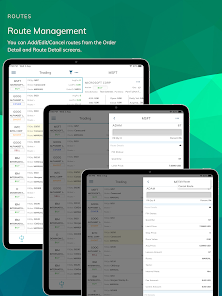
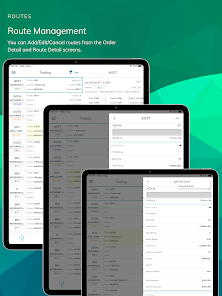
• Add, Edit and Cancel Routes from Order Details and Routes Details screen
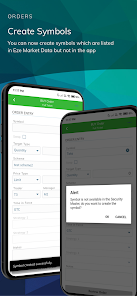
• Add new symbols while creating trade which are not present in the master security files
Settings Screen
• You can configure Trade Swipe Options and Account Settings to quickly act on your trade or confirmation before cancelling an order or removing a card from Home, respectively.
• Switch between Dark and Light modes.
Ensure Your Data is Secure
• SS&C Eze maintains a robust security framework and is ISO 27001 certified, encompassing ISO 27017 and 27018 for Cloud Security and Cloud Privacy.
Note: Your organization must authorize access to the SS&C Eze mobile app. You’ll only have access to mobile features your organization has enabled, based on your role (not all mobile features may be available to you). Not all SS&C Eze features are available on mobile.
The new Eze mobile experience has arrived on your Phone and Tablet! Powered by Eze Eclipse and Eze OMS, the next-generation SS&C Eze app provides secure, access to Eze applications on-the-go with a simple, easy-to-use interface.
Whether you’re a Trader or a Portfolio Manager, the SS&C Eze app helps you manage your portfolio and keep an eye on performance so you can more quickly act when the time is right.
Eze App for OMS
Secure and Fast Login
• Select your product (Eze OMS) from the Product drop-down list on the Log in screen.
• Login using Open ID Authentication
• Unlock the app using biometrics
Quickly View Portfolio Information and Analytics
• View high-level summary and detail view of your portfolios and get a quick idea about your performance on the portfolio at groups level/aggregated level.
• Metrics such as PL(V)/PLBPs, Exposure, MarketValGross and more are at your fingertips, with the ability to add fields such as Market Value, Currency, Port Base Currency at portfolio level.
• Customize data points as per your needs.
• Aggregate the portfolios by Industry, Sector, and more!
Your App, Your Configuration
• Configure positions split by Location (Custodian) or Net Positions or Strategy
• Choose from a list of Position States such as Proposed, Released to Market, Fill Received, Finalized, Confirmed, and Settled.
• Edit columns in the Analytics screen.
Trading Screen
• You can view the trade details on-the-go. Also, Market Data Integration is live.
Settings Screen
• You can configure Default Portfolio settings, and Trade Swipe Options to quickly act on your trade or confirmation before cancelling an order or removing a card from Home, respectively.
• Switch between Dark and Light modes.
Eze App for Eclipse
Secure and Fast Login
• Select your product (Eze Eclipse) from the Product drop-down list on the Log in screen.
• Login using Open ID Authentication
• Unlock the app using biometrics
Quickly View Portfolio Information
• See a summary view of your real-time intraday portfolio and get a quick idea about your performance.
• Metrics such as Realized PL(V)/PLBPs, Unrealized PL(V)/PLBPs, and more are at your fingertips, with the ability to add fields such as Market Value, Currency, Port Base Currency.
Analytics On-the-Go
• View the high-level summary of your portfolios with various data points
• Customize data points as per your needs
• Aggregate the portfolios by Industry, Sector, and more!
Your App, Your Configuration
• Configure positions split by Location (Custodian) or Net Positions or Strategy
• Choose from a list of Position States such as Proposed, Released to Market, Fill Received, Finalized, Confirmed, and Settled.
• Edit columns in the Analytics detailed screen.
Trading (Trade Blotter, Order Management and Routes Management)
• Create orders from Trade Blotter, filter orders based on Order Status and Action
• View orders created, fill status and order progression for the orders on the Trade Blotter.
• Sort orders based on Symbol and Date
• Add, Edit, Cancel All and Cancel Selected orders from the Trade Blotter and Order details screen
• Add, Edit and Cancel Routes from Order Details and Routes Details screen
• Add new symbols while creating trade which are not present in the master security files
Settings Screen
• You can configure Trade Swipe Options and Account Settings to quickly act on your trade or confirmation before cancelling an order or removing a card from Home, respectively.
• Switch between Dark and Light modes.
Ensure Your Data is Secure
• SS&C Eze maintains a robust security framework and is ISO 27001 certified, encompassing ISO 27017 and 27018 for Cloud Security and Cloud Privacy.
Note: Your organization must authorize access to the SS&C Eze mobile app. You’ll only have access to mobile features your organization has enabled, based on your role (not all mobile features may be available to you). Not all SS&C Eze features are available on mobile.
ଗତ ଅପଡେଟର ସମୟ
ଡେଭେଲପରମାନେ ଆପଣଙ୍କ ଡାଟାକୁ କିପରି ସଂଗ୍ରହ ଏବଂ ସେୟାର କରନ୍ତି ସେହି ଧାରଣା ସହିତ ସୁରକ୍ଷା ଆରମ୍ଭ ହୁଏ। ଆପଣଙ୍କ ବ୍ୟବହାର, ଅଞ୍ଚଳ ଏବଂ ବୟସ ଆଧାରରେ, ଡାଟା ଗୋପନୀୟତା ଓ ସୁରକ୍ଷା ପ୍ରାକ୍ଟିସ ଭିନ୍ନ ହୋଇପାରେ। ଡେଭେଲପର ଏହି ସୂଚନା ପ୍ରଦାନ କରିଛନ୍ତି ଏବଂ ସେ ସମୟାନୁସାରେ ଏହାକୁ ଅପଡେଟ କରିପାରନ୍ତି।

ଏହି ଆପ ତୃତୀୟ ପକ୍ଷଗୁଡ଼ିକ ସହ ଏହି ଡାଟା ପ୍ରକାରଗୁଡ଼ିକ ସେୟାର କରିପାରେ
ଆପ ସୂଚନା ଏବଂ ପରଫରମାନ୍ସ

କୌଣସି ଡାଟା ସଂଗ୍ରହ କରାଯାଇନାହିଁ
ଡେଭେଲପରମାନେ କିପରି ସଂଗ୍ରହର ଘୋଷଣା କରନ୍ତି ସେ ବିଷୟରେ ଅଧିକ ଜାଣନ୍ତୁ

ଟ୍ରାଞ୍ଜିଟ ସମୟରେ ଡାଟା ଏନକ୍ରିପ୍ଟ କରାଯାଇଥାଏ

ଡାଟା ଡିଲିଟ କରିଦିଆଯାଉ ବୋଲି ଆପଣ ଅନୁରୋଧ କରିପାରିବେ
ନୂଆ କଣ ଅଛି
What’s New:
Our latest release includes new features and enhancements!
OMS:
Add/Edit/Cancel Routes from the Route details screen.
Quick Send trades from the Trade Blotter screen.
The Trade Swipe options are moved under Trade Settings in the Settings screen.
Eclipse:
Broker details and their corresponding route information are automatically populated based on predefined configurations.
The Trade Swipe options are moved under Trade Settings in the Settings screen.
Our latest release includes new features and enhancements!
OMS:
Add/Edit/Cancel Routes from the Route details screen.
Quick Send trades from the Trade Blotter screen.
The Trade Swipe options are moved under Trade Settings in the Settings screen.
Eclipse:
Broker details and their corresponding route information are automatically populated based on predefined configurations.
The Trade Swipe options are moved under Trade Settings in the Settings screen.
ଆପ ସପୋର୍ଟ
phone
ଫୋନ୍ ନମ୍ଵର୍
+16173161000
ଡେଭେଲପରଙ୍କ ବିଷୟରେ
Eze Castle Software LLC
EZE-Eze.Drifters.Hyd@sscinc.com
50 Milk St FL 7
Boston, MA 02109-5000
United States
+91 99585 95587