
DS Camera Scanner & Photo
Zawiera reklamyZakupy w aplikacji

star
168 tys. opinii

Dla wszystkich
info
10 mln+
Pobrania

Dla wszystkich
Więcej informacji


Informacje o aplikacji
An all-in-one scanner app to scan documents, convert to pdf, extract text from image and edit your files. With DS Camera Scanner & Photo, you can turn your phone into a powerful, easy-to-use PDF converter and document scanner that meet your needs.
MAIN FEATURES OF DSCANNER: CAMERA SCANNER
📝 A Smart Document Scanner
DS Camera Scanner & Photo is a powerful tool to help you scan documents, or digitize all kinds of paper documents. Whether you want to scan PDF, text files, excel sheets, or images, our document scanner application makes it easy.
Simply scan your files with our camera scanner or upload your documents. The scan camera will automatically detect document edges, ensuring perfect alignment and clarity in every scan.
📘 Fast PDF reader and PDF Converter
In just one scan, our app will help you open and view your PDF documents. Feel free to scroll, zoom in and out your PDF scan.
On top of being a PDF viewer, our file scanner also helps you scan to PDF. Whenever you’re ready with your scanned documents, you can convert photo to PDF within seconds. This PDF creator is easy to use, time-saving and handy.
Let’s streamline your workflow and productivity on the go with the help of PD converter.
📜Image to Text Scanner
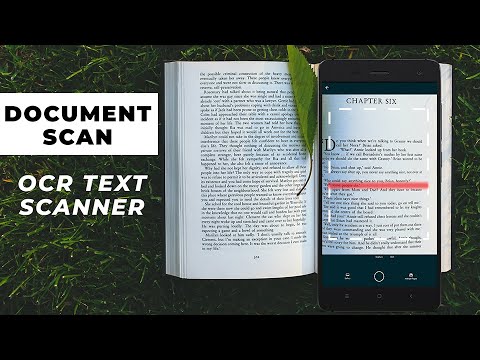
Leveraging advanced OCR technology and smart camera scanner, the scanner app allows you to effortlessly scan and convert PDF to text, photo to text or any type of documents into editable text.
It’s time to scan to text, turn your printed reports, handwritten notes, book pages into digital text with simple taps. This OCR PDF to text feature saves you time and ensures precision in converting your physical documents into editable digital files.
✏️Comprehensive Document Editor
After scanning your documents with this paper scanner, take advantage of the comprehensive editing tools our doc scanner offers.
Edit text for accuracy or change of content
Scan in color, grayscale, or black & white
Crop scanned images to focus on the essential parts
Rotate images to make sure documents are perfectly aligned
Draw, or import signature with just one click. Edit and sign PDF signature with ease. You can also rotate and scale your e-signature
Multiple levels of contrast for crisp monochrome texts
Thumbnail or list view, sort scans by date or title
Once you’ve perfected your document, DS Camera Scanner & Photo allows you to save and share your files easily. Keep your files organized and let’s share them via email or social media.
DS Camera Scanner & Photo is your all-in-one solution for efficient document management. Let’s streamline your workflow, save your time and become more precise and professional with this app.
If you have any questions or recommendations while using our app, feel free to reach out to us via contact emails. Have a nice day!
MAIN FEATURES OF DSCANNER: CAMERA SCANNER
📝 A Smart Document Scanner
DS Camera Scanner & Photo is a powerful tool to help you scan documents, or digitize all kinds of paper documents. Whether you want to scan PDF, text files, excel sheets, or images, our document scanner application makes it easy.
Simply scan your files with our camera scanner or upload your documents. The scan camera will automatically detect document edges, ensuring perfect alignment and clarity in every scan.
📘 Fast PDF reader and PDF Converter
In just one scan, our app will help you open and view your PDF documents. Feel free to scroll, zoom in and out your PDF scan.
On top of being a PDF viewer, our file scanner also helps you scan to PDF. Whenever you’re ready with your scanned documents, you can convert photo to PDF within seconds. This PDF creator is easy to use, time-saving and handy.
Let’s streamline your workflow and productivity on the go with the help of PD converter.
📜Image to Text Scanner
Leveraging advanced OCR technology and smart camera scanner, the scanner app allows you to effortlessly scan and convert PDF to text, photo to text or any type of documents into editable text.
It’s time to scan to text, turn your printed reports, handwritten notes, book pages into digital text with simple taps. This OCR PDF to text feature saves you time and ensures precision in converting your physical documents into editable digital files.
✏️Comprehensive Document Editor
After scanning your documents with this paper scanner, take advantage of the comprehensive editing tools our doc scanner offers.
Edit text for accuracy or change of content
Scan in color, grayscale, or black & white
Crop scanned images to focus on the essential parts
Rotate images to make sure documents are perfectly aligned
Draw, or import signature with just one click. Edit and sign PDF signature with ease. You can also rotate and scale your e-signature
Multiple levels of contrast for crisp monochrome texts
Thumbnail or list view, sort scans by date or title
Once you’ve perfected your document, DS Camera Scanner & Photo allows you to save and share your files easily. Keep your files organized and let’s share them via email or social media.
DS Camera Scanner & Photo is your all-in-one solution for efficient document management. Let’s streamline your workflow, save your time and become more precise and professional with this app.
If you have any questions or recommendations while using our app, feel free to reach out to us via contact emails. Have a nice day!
Scanner app to scan documents with precision &ease. Smart PDF scanner, converter
Ostatnia aktualizacja
Polecane tematy

Podstawą bezpieczeństwa jest wiedza o tym, jak deweloperzy zbierają i udostępniają Twoje dane. Praktyki w zakresie zapewniania prywatności i bezpieczeństwa danych mogą się różnić w zależności od sposobu korzystania z aplikacji, regionu i wieku użytkownika. Te informacje podał deweloper i z czasem może je aktualizować.
- Ta aplikacja może udostępniać innym firmom te rodzaje danychPliki i dokumenty i Identyfikatory urządzenia i inne
- Aplikacja nie zbiera danychDowiedz się więcej o deklarowaniu zbierania danych przez deweloperów
- Dane są zaszyfrowane podczas przesyłania
- Nie można usunąć danych


Oceny i opinie
167 tys. opinie

Michal Gurazda
- Oznacz jako nieodpowiednią
26 maja 2025
scam
1 osoba uznała tę opinię za pomocną
TrustedOffice
27 maja 2025
Thank you, Michal Gurazda, for your feedback. We're sorry to hear about your experience. Could you please provide more details so we can better understand the issue and try to address it?

Sylwek Z
- Oznacz jako nieodpowiednią
10 czerwca 2025
ok

Martin Lesner
- Oznacz jako nieodpowiednią
4 czerwca 2025
ok
Dla wszystkich
Więcej informacjiPomoc dotycząca aplikacji
Deweloper
APERO TECHNOLOGIES GROUP PTE. LTD.
store@apero.global
C/O: GATEWAY OF ASIA PTE. LTD.
114 Lavender Street
Singapore 338729
+84 336 050 100


