Hello Oil Painter
Ilova ichida xaridlar
4,1star
541 ta sharh
10 ming+
Yuklanmalar
Ustozlar tasdiqlagan

Hamma uchun
info

Bu ilova haqida
'Hello Oil Painter' is an easy & fun oil painting APP. It provides realistic oil paint , brushes and more.
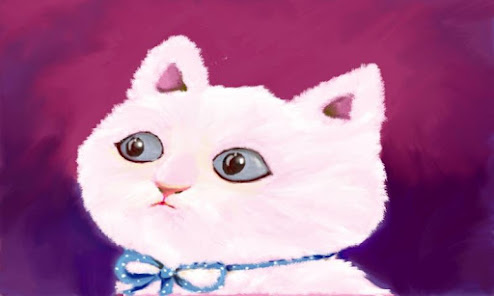
It create the realistic drawing through simulation of virtual oil paint and brush.
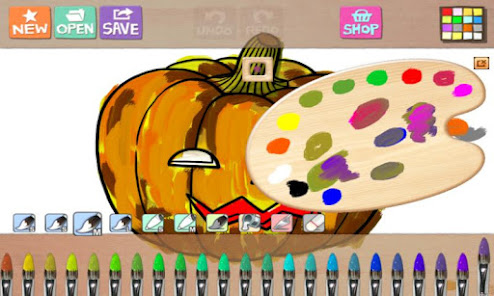
Especially it support 'the palette' with which you can add, mix and manipulate colors.
It also support many free and IAP coloring books.
We hope you can have fun with this cool App!
Features
- Realistic oil paint and brush
- True interactive oil palette
- Cool drawing sound
- 5 and more style oil brushes
- Intuitive user interface
- Many free coloring books (20+).
- Coloring books shop,
===================================================================
This app requires following mandatory permissions
1. Read/Write External Storage
- Modify / delete the contents of the SD card
- Test Access to Protected Storage
-> Save your app-drawn artwork (picture) to SD card or protected storage
2. Other
- Full network access
-> Share pictures on social networks such as Facebook
- Google in app billing services
-> Use Google's in app billing service to purchase sketches and full versions
==================================================================
====
This is the notice for updated version of 'Hello' Series and 'Water Color Pencil' app, related to function of 'Image Save to External Storage.'
If you have device with Android JellyBean or previous version, when you save image to exteral storage, image files will be saved to exteral storage folder with App Name and immediately you can show that image on Gallery. (This is the conventional rule of older version of Hello Series and WCP app.)
If you have device with Android KITKAT, when you save image to exteral storage, image files copied on Camera Folder of your external storage. Surely, you can see your image on Gallery. If you got the toast message 'Cannot Save To Camera Folder' when save image, please execute basic 'Camera' app of device and make one or more photo. After that, you can save image to camera folder successfully.
It create the realistic drawing through simulation of virtual oil paint and brush.
Especially it support 'the palette' with which you can add, mix and manipulate colors.
It also support many free and IAP coloring books.
We hope you can have fun with this cool App!
Features
- Realistic oil paint and brush
- True interactive oil palette
- Cool drawing sound
- 5 and more style oil brushes
- Intuitive user interface
- Many free coloring books (20+).
- Coloring books shop,
===================================================================
This app requires following mandatory permissions
1. Read/Write External Storage
- Modify / delete the contents of the SD card
- Test Access to Protected Storage
-> Save your app-drawn artwork (picture) to SD card or protected storage
2. Other
- Full network access
-> Share pictures on social networks such as Facebook
- Google in app billing services
-> Use Google's in app billing service to purchase sketches and full versions
==================================================================
====
This is the notice for updated version of 'Hello' Series and 'Water Color Pencil' app, related to function of 'Image Save to External Storage.'
If you have device with Android JellyBean or previous version, when you save image to exteral storage, image files will be saved to exteral storage folder with App Name and immediately you can show that image on Gallery. (This is the conventional rule of older version of Hello Series and WCP app.)
If you have device with Android KITKAT, when you save image to exteral storage, image files copied on Camera Folder of your external storage. Surely, you can see your image on Gallery. If you got the toast message 'Cannot Save To Camera Folder' when save image, please execute basic 'Camera' app of device and make one or more photo. After that, you can save image to camera folder successfully.
Oxirgi yangilanish
Xavfsizlik — dastur ishlab chiquvchilar maʼlumotlaringizni qanday jamlashi va ulashishini tushunishdan boshlanadi. Maʼlumotlar maxfiyligi va xavfsizlik amaliyotlari ilovadan foydalanish, hudud va yoshga qarab farq qilishi mumkin. Bu axborot dastur ishlab chiquvchi tomonidan taqdim etilgan va keyinchalik yangilanishi mumkin.

Tashqi hamkorlarga hech qanday axborot ulashilmagan
Dastur ishlab chiquvchilar axborot ulashilishini qanday aytishi haqida batafsil

Hech qanday maʼlumot jamlanmagan
Dastur ishlab chiquvchilar axborot jamlanishini qanday aytishi haqida batafsil

Google Play “Butun oila uchun” dasturi qoidalariga amal qiladi
Reytinglar va sharhlar
4,2
353 ta sharh
Nima yangiliklar
Support 64bit Hardware
Ilova yuzasidan yordam
Dasturchi haqida
(주)레이소프트
ohjunkyu@gmail.com
대한민국 대전광역시 유성구
유성구 엑스포로 448 307동 308호 (전민동,엑스포아파트)
34049
+82 70-4616-6218


