
Comptes et Budget - Familial
10K+
Downloads

Everyone
info



About this app
100% free personal finance application, without limitation, without Ads!
Family budget / Personal accounting / Bank synchronization
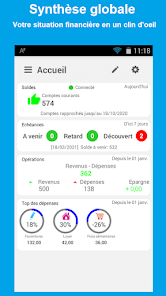
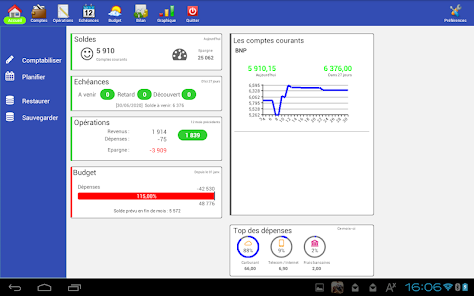
Manage all your bank accounts, savings, deferred cards, projects and family budget from your mobile or tablet with this Personal Accounting App.
Unleash the full potential of this application with automatic bank synchronization from your banks (*), the AlauxSoft cloud (*) and widgets... Without the slightest effort your data is up to date, available on all your devices, allowing monitoring of your finances at a glance...
MOST OF THIS APPLICATION
- Simple and complete.
- Standalone, does not require the PC version.
- With the "Bank synchronization" option, you no longer need to enter your transactions. An absolute time saver!
- With the Cloud option, easily find your data on your other workstations and secure your backups.
- Free support (guaranteed response if you use the official email address)
MORE THAN THAT OF YOUR BANK
- Manage more data: savings goals, multiple breakdown...
- Independent, you do not communicate additional information to your bank, so you avoid targeted advertising.
- Consolidate all of your banks into a single application.
- Keep your transaction history even if you change banks.
MS MONEY COMPATIBLE
Alternative to MS Money from which you can recover your data in a few minutes thanks to the version for computer which has a wizard compatible with MNY files of Money. See AlauxSoft.com official website for more details.
MULTI-PLATFORMS
Accounts and Budget, is also available on Windows, macOS, Linux, ChromeBook, Android, iOS (iPhone, iPad) So you can manage your personal accounting everywhere.
INPUT CHOICE
You can enter operations manually, by importing files or choose the option of direct synchronization from your bank (*).
OPTIONAL BANK SYNCHRONIZATION
The option of automatic synchronization of transactions from your bank is the option that changes everything! Start the App and 5 seconds later your data is up to date, categorized, reconciled. The App takes care of everything. Focus only on keeping track of your finances.
OPTIONAL CLOUD BACKUP
Data is stored locally by default. You can make manual backups and transfer them wherever you want. The Cloud option makes it possible to secure data backup and sharing with other workstations.
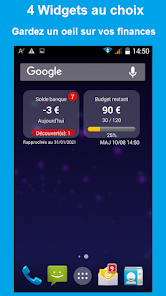
4 WIDGETS OF YOUR CHOICE
Keep an eye on your finances without having to start the App. Your finance summary will be available from your phone's home page and updated automatically (or on demand).
REALLY COMPLETE FOR YOUR MANAGEMENT
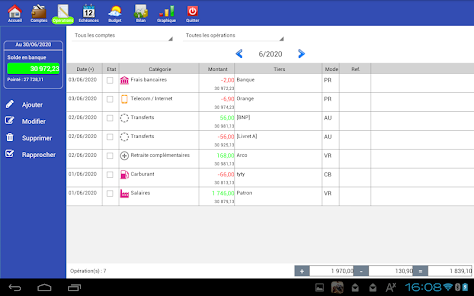
- Management of several accounts (current, savings, cash...)
- Alerts and notifications of overdrafts, maturities.
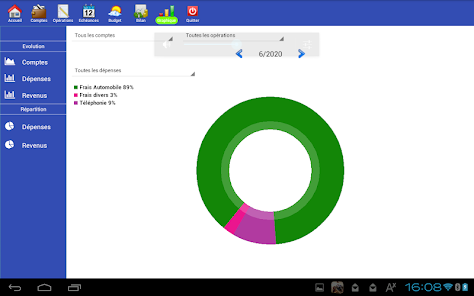
- Expenses and revenues broken down by category.
- Multiple ventilation possible for one operation.
- Management of periodic operations (Rent, salaries, etc.).
- Report by category, sub-category, by third party, by project.
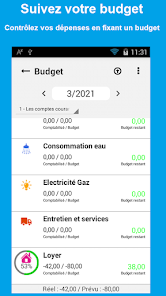
- Follow-up of the family budget.
- Follow-up of projects (savings objectives, holiday budget...)
- Property tracking (House, cars, TV...)
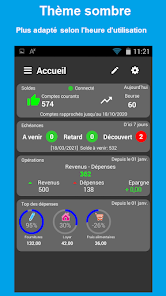
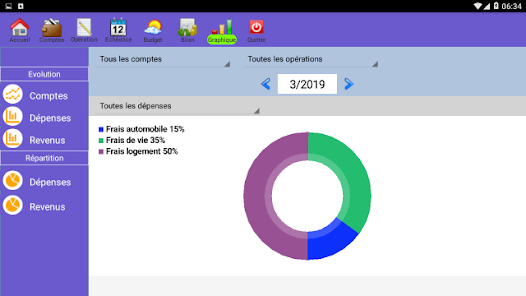
- Graphics module: evolution of accounts, breakdown of expenses...
- Synchronization of data between your different workstations.
- Backup in the AlauxSoft Cloud or personal N.A.S (*).
- Function for importing files in QIF, OFX format.
- Export function in QIF, OFX, CSV format.
- Print function (at best save in PDF)
- Various functions: Search, Replace, Duplicate...
- Automatic import of transactions directly from your bank (*).
(*) if you benefit from synchronization services (see official website).
Family budget / Personal accounting / Bank synchronization
Manage all your bank accounts, savings, deferred cards, projects and family budget from your mobile or tablet with this Personal Accounting App.
Unleash the full potential of this application with automatic bank synchronization from your banks (*), the AlauxSoft cloud (*) and widgets... Without the slightest effort your data is up to date, available on all your devices, allowing monitoring of your finances at a glance...
MOST OF THIS APPLICATION
- Simple and complete.
- Standalone, does not require the PC version.
- With the "Bank synchronization" option, you no longer need to enter your transactions. An absolute time saver!
- With the Cloud option, easily find your data on your other workstations and secure your backups.
- Free support (guaranteed response if you use the official email address)
MORE THAN THAT OF YOUR BANK
- Manage more data: savings goals, multiple breakdown...
- Independent, you do not communicate additional information to your bank, so you avoid targeted advertising.
- Consolidate all of your banks into a single application.
- Keep your transaction history even if you change banks.
MS MONEY COMPATIBLE
Alternative to MS Money from which you can recover your data in a few minutes thanks to the version for computer which has a wizard compatible with MNY files of Money. See AlauxSoft.com official website for more details.
MULTI-PLATFORMS
Accounts and Budget, is also available on Windows, macOS, Linux, ChromeBook, Android, iOS (iPhone, iPad) So you can manage your personal accounting everywhere.
INPUT CHOICE
You can enter operations manually, by importing files or choose the option of direct synchronization from your bank (*).
OPTIONAL BANK SYNCHRONIZATION
The option of automatic synchronization of transactions from your bank is the option that changes everything! Start the App and 5 seconds later your data is up to date, categorized, reconciled. The App takes care of everything. Focus only on keeping track of your finances.
OPTIONAL CLOUD BACKUP
Data is stored locally by default. You can make manual backups and transfer them wherever you want. The Cloud option makes it possible to secure data backup and sharing with other workstations.
4 WIDGETS OF YOUR CHOICE
Keep an eye on your finances without having to start the App. Your finance summary will be available from your phone's home page and updated automatically (or on demand).
REALLY COMPLETE FOR YOUR MANAGEMENT
- Management of several accounts (current, savings, cash...)
- Alerts and notifications of overdrafts, maturities.
- Expenses and revenues broken down by category.
- Multiple ventilation possible for one operation.
- Management of periodic operations (Rent, salaries, etc.).
- Report by category, sub-category, by third party, by project.
- Follow-up of the family budget.
- Follow-up of projects (savings objectives, holiday budget...)
- Property tracking (House, cars, TV...)
- Graphics module: evolution of accounts, breakdown of expenses...
- Synchronization of data between your different workstations.
- Backup in the AlauxSoft Cloud or personal N.A.S (*).
- Function for importing files in QIF, OFX format.
- Export function in QIF, OFX, CSV format.
- Print function (at best save in PDF)
- Various functions: Search, Replace, Duplicate...
- Automatic import of transactions directly from your bank (*).
(*) if you benefit from synchronization services (see official website).
Updated on
Safety starts with understanding how developers collect and share your data. Data privacy and security practices may vary based on your use, region, and age. The developer provided this information and may update it over time.

No data shared with third parties
Learn more about how developers declare sharing

No data collected
Learn more about how developers declare collection
What's new
- Synchronisation bancaire au démarrage : Amélioration de la détection des doublons