
Energy Ring Notch
Contains ads

Everyone
info
0+
Downloads

Everyone
Learn more



About this app
Energy Ring draws a glowing ring around your phone's camera cutout and lets you make it look exactly how you want. RGB spectrum, a soft corona, a slow breath, a comet running the circle. It sits there while you use every other app, so the dead space around your camera finally does something.
Make it yours
• Quick looks: a finished style in one tap, or build your own from scratch.
• Colors: a flat color, or one that shifts through the hue.
• Shapes: a filling arc, a full lit ring, a soft glow, or a gradient.
• Motion: still, breathe, a bright comet running the ring, or a ripple.
• Brightness, size, thickness, length and angle, all yours to set.
Fits your camera, not a list of phones
It asks Android where your camera actually is, so it fits punch-holes, waterdrop notches, wide notches and corner cameras, including phones released after this app. It places the ring for you on first run, and you can drag it or nudge it pixel by pixel until it sits perfectly.
The notification light, back
Phones used to have a little LED that blinked when something arrived. Now they have a camera hole. Turn on notification pulse and your ring flashes in the color of whatever app is calling for you.
It reacts to your phone
• Charging color: the ring changes to a color you choose the moment you plug in.
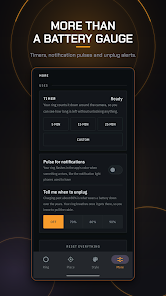
• The ring reads your battery, so a glance at the top of your phone tells you your charge without unlocking anything.
• Unplug reminder: the ring breathes once when the battery passes the level you pick, so you can pull the cable and spare it the wear.
Timer
Run a countdown that empties around your camera. Watch the time go without unlocking anything, or opening anything.
Built to be trusted
• It never steals a tap. Outside its own setup screens the ring is pure decoration and can never intercept a touch meant for the app underneath.
• It is easy on your battery. The ring costs nothing to draw when it is idle, and only animates when it has something to say.
• It does not read your data. Notification support only uses the arriving app's color, keeps nothing, and sends nothing anywhere.
Getting started
Turn the ring on, let it snap to your camera, pick a look, and you are done. It comes back on its own after a restart.
A note on permissions
Drawing over other apps is the only way to put a ring around your camera, so Android asks your permission first. The optional notification feature asks for notification access separately, and the ring works fully without it.
Stop looking at a black dot.
Make it yours
• Quick looks: a finished style in one tap, or build your own from scratch.
• Colors: a flat color, or one that shifts through the hue.
• Shapes: a filling arc, a full lit ring, a soft glow, or a gradient.
• Motion: still, breathe, a bright comet running the ring, or a ripple.
• Brightness, size, thickness, length and angle, all yours to set.
Fits your camera, not a list of phones
It asks Android where your camera actually is, so it fits punch-holes, waterdrop notches, wide notches and corner cameras, including phones released after this app. It places the ring for you on first run, and you can drag it or nudge it pixel by pixel until it sits perfectly.
The notification light, back
Phones used to have a little LED that blinked when something arrived. Now they have a camera hole. Turn on notification pulse and your ring flashes in the color of whatever app is calling for you.
It reacts to your phone
• Charging color: the ring changes to a color you choose the moment you plug in.
• The ring reads your battery, so a glance at the top of your phone tells you your charge without unlocking anything.
• Unplug reminder: the ring breathes once when the battery passes the level you pick, so you can pull the cable and spare it the wear.
Timer
Run a countdown that empties around your camera. Watch the time go without unlocking anything, or opening anything.
Built to be trusted
• It never steals a tap. Outside its own setup screens the ring is pure decoration and can never intercept a touch meant for the app underneath.
• It is easy on your battery. The ring costs nothing to draw when it is idle, and only animates when it has something to say.
• It does not read your data. Notification support only uses the arriving app's color, keeps nothing, and sends nothing anywhere.
Getting started
Turn the ring on, let it snap to your camera, pick a look, and you are done. It comes back on its own after a restart.
A note on permissions
Drawing over other apps is the only way to put a ring around your camera, so Android asks your permission first. The optional notification feature asks for notification access separately, and the ring works fully without it.
Stop looking at a black dot.
Updated on
Safety starts with understanding how developers collect and share your data. Data privacy and security practices may vary based on your use, region, and age. The developer provided this information and may update it over time.


What’s new
Bug fixes
Everyone
Learn moreApp support
About the developer
Prashant Joshi
prashantddjoshi1814@gmail.com
Bedkot 8 Kanchanpur
mahendranagar 10400
Nepal


