
PocketReceipt: UK Tax Receipts
In-app purchases


Everyone
info
500+
Downloads

Everyone
Learn more


About this app
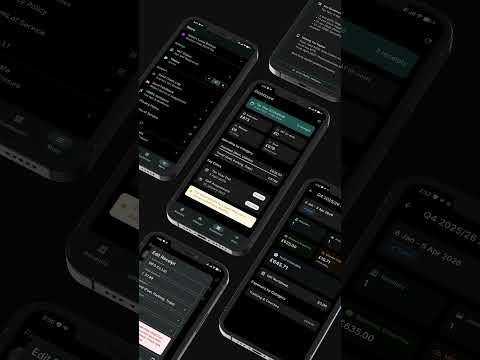
PocketReceipt is the AI powered receipt scanner and expense tracker built specifically for UK sole traders, freelancers, and self-employed professionals.
Snap a photo of any receipt and AI extracts the store, amount, date, VAT, and category automatically. Smart warnings flag duplicates, capital items, and VAT issues before you save. Every expense maps directly to HMRC Self Assessment SA103F boxes.
New: import PDF receipts from your files up to 5 pages each, every page read. Plus PDF invoices with your logo that feed your income and tax forecast when paid.
RECEIPT SCANNING
- AI extracts store, total, date, VAT, and category from any UK receipt
- Import PDF receipts and invoices up to 5 pages per receipt
- The original PDF is kept as your record and shared with your accountant
- Smart warnings catch duplicates, capital items, and missing VAT details
- 11 built in data quality checks run before every save
- Supports standard rate, reduced rate, and zero rated VAT items
INVOICING
- Create and send PDF's invoices with your own logo
- Bill by hours, days, quantity, or fixed price
- VAT applied automatically based on your registration status
- CIS deductions calculated for construction subcontractors
- Save your clients for faster repeat invoicing
- Mark an invoice as paid and it appears in your income and tax forecast
MILEAGE TRACKING
- Log trips with GPS or manual entry
- HMRC's published AMAP rates (55p first 10,000 miles, 25p above) calculated automatically
- Track per vehicle with AMAP or actual cost method
- Export a full mileage log for your accountant or tax return
CIS SUPPORT (CONSTRUCTION)
- Track CIS deductions at 20%, 30%, or gross payment rates
- Monitor the running balance of CIS offsets against your tax bill
- Built for subcontractors and tradespeople
TAX FORECASTING
- Real time estimate of your Income Tax and National Insurance
- Based on current HMRC rates and thresholds
- See how each new expense affects your forecast
ACCOUNTANT LINKING
- Share your records with your accountant via a secure 6 digit code
- Your accountant sees your receipts, mileage, and quarterly data on their Dashboard
- They can correct categories, request documents, and review quarters
- Linked clients get unlimited scans at no extra cost
EXPORT & REPORTS
- CSV and PDF exports categorised to SA103F boxes
- Quarterly breakdown with HMRC tax summaries
- Export formatted for Xero, FreeAgent, QuickBooks, Sage, and 6 more platforms
PRIVACY & SECURITY
- Local-first: your data stays on your device by default
- Optional cloud backup with end-to-end encryption
- UK GDPR compliant. ICO registered.
- We never sell your data or share it with third parties
FREE PLAN
- 10 AI receipt scans per month
- Unlimited manual entry and mileage tracking
- Smart warnings, tax forecast, and receipt CSV/PDF export
- No credit card required
PROFESSIONAL (with 7-day trial for new accounts)
- New accounts: 7 days of Professional access at no charge
- 400 AI receipt scans per month
- PDF receipt import (up to 5 pages, one scan per import)
- Invoicing with your own logo (PDF, VAT and CIS aware)
- Accountant-ready exports (CSV, PDF, JSON, quarterly summary, audit trail PDF)
- Mileage Logbook PDF and Mileage CSV export
- Receipt image backup
- Priority support
- £7.99/month after the 7-day trial then auto-renews unless cancelled at least 24 hours before each renewal
All subscriptions are managed through the App Store. Cancel anytime via your App Store subscription settings — features stay active until the end of your billing period.
Built in the UK, for UK tax rules. PocketReceipt is a record keeping and export tool it does not submit returns to HMRC.
Questions?
Email hello@pocketreceipt.co.uk
Website: https://pocketreceipt.co.uk
Privacy Policy URL: https://pocketreceipt.co.uk/privacy
Terms of Service: https://pocketreceipt.co.uk/terms
Snap a photo of any receipt and AI extracts the store, amount, date, VAT, and category automatically. Smart warnings flag duplicates, capital items, and VAT issues before you save. Every expense maps directly to HMRC Self Assessment SA103F boxes.
New: import PDF receipts from your files up to 5 pages each, every page read. Plus PDF invoices with your logo that feed your income and tax forecast when paid.
RECEIPT SCANNING
- AI extracts store, total, date, VAT, and category from any UK receipt
- Import PDF receipts and invoices up to 5 pages per receipt
- The original PDF is kept as your record and shared with your accountant
- Smart warnings catch duplicates, capital items, and missing VAT details
- 11 built in data quality checks run before every save
- Supports standard rate, reduced rate, and zero rated VAT items
INVOICING
- Create and send PDF's invoices with your own logo
- Bill by hours, days, quantity, or fixed price
- VAT applied automatically based on your registration status
- CIS deductions calculated for construction subcontractors
- Save your clients for faster repeat invoicing
- Mark an invoice as paid and it appears in your income and tax forecast
MILEAGE TRACKING
- Log trips with GPS or manual entry
- HMRC's published AMAP rates (55p first 10,000 miles, 25p above) calculated automatically
- Track per vehicle with AMAP or actual cost method
- Export a full mileage log for your accountant or tax return
CIS SUPPORT (CONSTRUCTION)
- Track CIS deductions at 20%, 30%, or gross payment rates
- Monitor the running balance of CIS offsets against your tax bill
- Built for subcontractors and tradespeople
TAX FORECASTING
- Real time estimate of your Income Tax and National Insurance
- Based on current HMRC rates and thresholds
- See how each new expense affects your forecast
ACCOUNTANT LINKING
- Share your records with your accountant via a secure 6 digit code
- Your accountant sees your receipts, mileage, and quarterly data on their Dashboard
- They can correct categories, request documents, and review quarters
- Linked clients get unlimited scans at no extra cost
EXPORT & REPORTS
- CSV and PDF exports categorised to SA103F boxes
- Quarterly breakdown with HMRC tax summaries
- Export formatted for Xero, FreeAgent, QuickBooks, Sage, and 6 more platforms
PRIVACY & SECURITY
- Local-first: your data stays on your device by default
- Optional cloud backup with end-to-end encryption
- UK GDPR compliant. ICO registered.
- We never sell your data or share it with third parties
FREE PLAN
- 10 AI receipt scans per month
- Unlimited manual entry and mileage tracking
- Smart warnings, tax forecast, and receipt CSV/PDF export
- No credit card required
PROFESSIONAL (with 7-day trial for new accounts)
- New accounts: 7 days of Professional access at no charge
- 400 AI receipt scans per month
- PDF receipt import (up to 5 pages, one scan per import)
- Invoicing with your own logo (PDF, VAT and CIS aware)
- Accountant-ready exports (CSV, PDF, JSON, quarterly summary, audit trail PDF)
- Mileage Logbook PDF and Mileage CSV export
- Receipt image backup
- Priority support
- £7.99/month after the 7-day trial then auto-renews unless cancelled at least 24 hours before each renewal
All subscriptions are managed through the App Store. Cancel anytime via your App Store subscription settings — features stay active until the end of your billing period.
Built in the UK, for UK tax rules. PocketReceipt is a record keeping and export tool it does not submit returns to HMRC.
Questions?
Email hello@pocketreceipt.co.uk
Website: https://pocketreceipt.co.uk
Privacy Policy URL: https://pocketreceipt.co.uk/privacy
Terms of Service: https://pocketreceipt.co.uk/terms
UK receipt scanner. Snap receipts, log mileage, export HMRC tax records.
Updated on
Safety starts with understanding how developers collect and share your data. Data privacy and security practices may vary based on your use, region, and age. The developer provided this information and may update it over time.
- No data shared with third partiesLearn more about how developers declare sharing
- This app may collect these data typesLocation, Personal info and 6 others
- Data is encrypted in transit
- You can request that data be deleted


What’s new
Faster, smoother scanning when adding several receipts at once, with lower memory use
Clearer confirmation of exactly what's restored when you restore from cloud backup
Stability, security and performance improvements under the hood
Clearer confirmation of exactly what's restored when you restore from cloud backup
Stability, security and performance improvements under the hood
Everyone
Learn moreApp support
About the developer
Remus Dan Pantea
hello@pocketreceipt.co.uk
25 Ashvale Gardens
ROMFORD
RM5 3QA
United Kingdom


