Cells Calculator

143 reviews
Content rating
Everyone
10K+
Downloads
Content rating
Everyone
Learn more
Screenshot image
Screenshot image
Screenshot image
Screenshot image
Screenshot image
Screenshot image
Screenshot image
Screenshot image
Screenshot image
Screenshot image
Screenshot image
Screenshot image
Screenshot image
Screenshot image
Screenshot image
Screenshot image
Screenshot image
Screenshot image
Screenshot image
Screenshot image
Screenshot image
Screenshot image
Screenshot image
Screenshot image

About this app

Cells Calculator turns a hemocytometer count into a result you can trust and a record you can file. Made for cell culture, haematology and teaching labs: count at the microscope, see the density straight away, and print a signed lab record.

COUNT IN THE CHAMBER
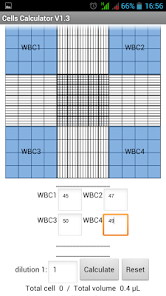
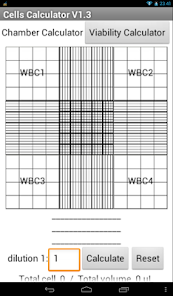
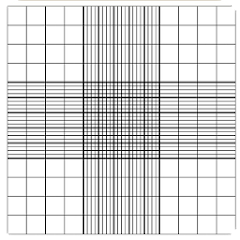
• Improved Neubauer and Fuchs-Rosenthal chambers, drawn as you see them under the microscope
• Tap the squares you count: corners, edges, the 25 small RBC squares, or hold the centre to count it whole
• Presets for 4 WBC squares, 5 RBC squares or all nine large squares
• A large tap counter for each square, or type the numbers in
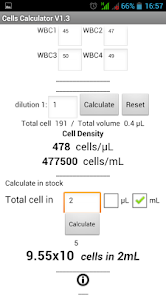
• Cells per µL, per mL, in SI units (× 10⁹/L) and in your stock volume
• Checks before you report: a blank square is asked about, large and small squares can't be mixed by mistake

KNOW HOW GOOD THE COUNT IS
• Spread between squares (CV): even, acceptable or uneven
• Counting error from the number of cells counted (±1/√N)
• Advice when squares are too crowded or too sparse, with a better dilution to use

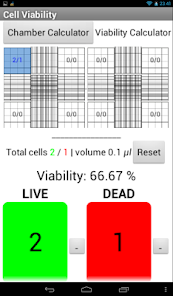
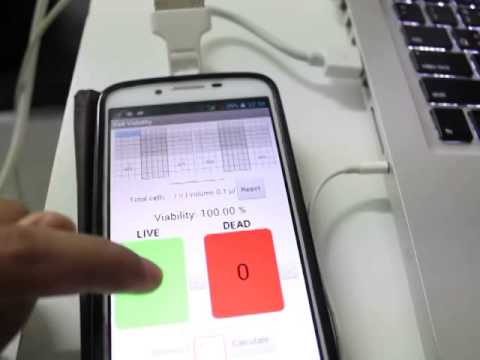
VIABILITY (TRYPAN BLUE)
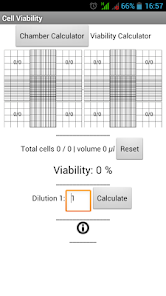
• Live and dead cells across two chambers, five zones each
• Viability %, live and dead cells per mL
• Trypan blue timer, so you count within 3–5 minutes; the stain time goes on the record

WBC DIFFERENTIAL
• Tap tiles or press keys 1–8: segmented and band neutrophils, lymphocytes, monocytes, eosinophils, basophils, other cells and nRBC
• 100 or 200 cells, with undo
• Percentages, absolute counts and nRBC-corrected WBC, with the WBC in cells/µL or × 10⁹/L
• Flags against adult or children's reference ranges that your lab can edit
• Morphology comments such as toxic granulation, left shift or smudge cells

DILUTION PLAN
• C1V1 = C2V2: how much stock and buffer to mix
• Seeding plan for well plates, dishes and flasks, per well or per cm²
• Serial dilution: steps, transfer volumes and the density in every tube
• Use the density from your last count with one tap; copy or print every plan

RECORDS FOR THE LAB
• Save each count with sample ID, operator and notes, under its own record number
• Scan the sample barcode or QR code with the camera
• Print an A4 lab record with your laboratory's name, the counts, a drawing of the counted squares and signature lines, or save it as PDF
• Next sample: keep the settings, clear the counts
• Correct a sample ID after saving; void a record with a reason instead of deleting it
• History with search, filters and trend charts
• Full backup and restore, and CSV export for Excel

PHONE, TABLET OR CHROMEBOOK
• Works with touch, or mouse and keyboard: count without looking away from the microscope, with keys you can change
• English and Thai, light and dark themes
• Works offline. No account, no ads
• Your records stay on your device

Cells Calculator is a calculation aid. Check results against your laboratory's procedures before reporting them.
Hemocytometer cell counts, viability, WBC differential and dilution plans
Updated on
Oct 5, 2026

Data safety

Safety starts with understanding how developers collect and share your data. Data privacy and security practices may vary based on your use, region, and age. The developer provided this information and may update it over time.
  • No data shared with third parties
    Learn more about how developers declare sharing
  • No data collected
    Learn more about how developers declare collection

Ratings and reviews

136 reviews
A Google user
November 16, 2019
Its a really helpfull apps i love this
4 people found this review helpful
Did you find this helpful?
Luke P
October 24, 2020
My go to cell counting app.
1 person found this review helpful
Did you find this helpful?
A Google user
July 3, 2017
Very quick and easy to use
8 people found this review helpful
Did you find this helpful?

What’s new

** Fix bugs and improve performance***

• Count all 9 large squares; hold the centre to count it whole
• Serial dilution planner, and a wider Dilution Plan layout
• Next sample, lab name on printouts, SI units (× 10⁹/L)
• Correct a sample ID after saving; void records with a reason
• Full backup and restore of History
• Warnings for blank squares, empty zones and WBC units
• Fixes: numbers with commas (200,000), RBC count advice
Content rating
Everyone
Learn more

App support

About the developer
Pongsak Sarapukdee
sarapukdee@gmail.com
House number 24, Village No. 11 Kehlek, Atsarmart ร้อยเอ็ด 45160 Thailand