
Sleep Timer (Turn music off)
Contains adsIn-app purchases

star
163K reviews

Everyone
info
5M+
Downloads
Enjoy this app for free, plus many more free of ads and in-app purchases, with a Google Play Pass subscription. Learn more


About this app
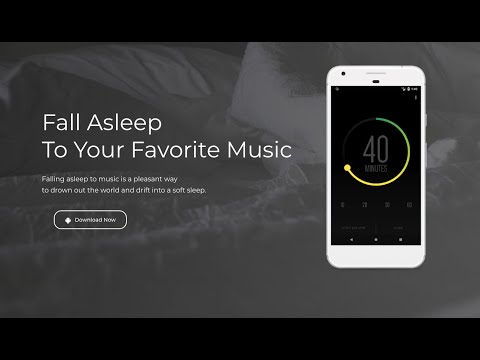
Sleep Timer lets you fall asleep to your favorite music. You simply start your music, and then set the countdown timer. At the end of the countdown, Sleep Timer softly fades your music out and stops it. Allowing you to get your precious sleep and stops your battery from draining.
Listen to music while falling asleep
Sleep Timer softly lowers the volume and then turns your music off. It works just like a Sleep Timer on the stereo or TV.
Use your favorite music player or even YouTube!
Works with Google Play Music, TuneIn Radio, Spotify, YouTube and many many more. To verify whether it works with your favorite player, just download the app and try it out.
Select how long you want the music to play
Our intuitive and beautiful user interface allows you to effortlessly set the duration of the timer and start it.
Create presets for your frequently used timers
With our presets, you can switch between standard timers with just one tap
Prevent your battery from draining
At the end of the timer, the music is stopped* to prevent your phone from playing music all night and draining the battery.
*For some apps, pausing the music does not work. In that case the phone volume will set to mute as a last resort. In this case, the music will continue playing.
Shake to extend timer
Sometimes falling asleep is not that easy. Our shake to extend allows you to shake the phone to extend the duration of the timer, without you having to unlock your phone.
Premium version (Available via in-app)
Ad-free
Beautiful Widget for your homescreen
Please try it with your favorite player before buying.
Permissions
This application may request some permissions to work, such as:
- android.permission.READ_EXTERNAL_STORAGE : Using custom notification sounds for Shake Extend notification.
- android.permission.BIND_DEVICE_ADMIN : This app uses the Device Administrator permission. This is required for the the "Turn screen off" feature. Will only be requested upon enabling the feature and will be removed as soon as the feature is disabled. If you want to uninstall while having the feature selected, open this application, click on [Menu] -> [Settings] -> [Uninstall].
You are welcome to join our beta forum, if you are interested in trying the newest Sleep Timer features before they are officially released. https://plus.google.com/communities/103722691842623837120
Developed by Patrick Boos - http://pboos.ch
Designed by Nordic Usability - http://nordicusability.com
Listen to music while falling asleep
Sleep Timer softly lowers the volume and then turns your music off. It works just like a Sleep Timer on the stereo or TV.
Use your favorite music player or even YouTube!
Works with Google Play Music, TuneIn Radio, Spotify, YouTube and many many more. To verify whether it works with your favorite player, just download the app and try it out.
Select how long you want the music to play
Our intuitive and beautiful user interface allows you to effortlessly set the duration of the timer and start it.
Create presets for your frequently used timers
With our presets, you can switch between standard timers with just one tap
Prevent your battery from draining
At the end of the timer, the music is stopped* to prevent your phone from playing music all night and draining the battery.
*For some apps, pausing the music does not work. In that case the phone volume will set to mute as a last resort. In this case, the music will continue playing.
Shake to extend timer
Sometimes falling asleep is not that easy. Our shake to extend allows you to shake the phone to extend the duration of the timer, without you having to unlock your phone.
Premium version (Available via in-app)
Ad-free
Beautiful Widget for your homescreen
Please try it with your favorite player before buying.
Permissions
This application may request some permissions to work, such as:
- android.permission.READ_EXTERNAL_STORAGE : Using custom notification sounds for Shake Extend notification.
- android.permission.BIND_DEVICE_ADMIN : This app uses the Device Administrator permission. This is required for the the "Turn screen off" feature. Will only be requested upon enabling the feature and will be removed as soon as the feature is disabled. If you want to uninstall while having the feature selected, open this application, click on [Menu] -> [Settings] -> [Uninstall].
You are welcome to join our beta forum, if you are interested in trying the newest Sleep Timer features before they are officially released. https://plus.google.com/communities/103722691842623837120
Developed by Patrick Boos - http://pboos.ch
Designed by Nordic Usability - http://nordicusability.com
Sleep Timer lets you fall asleep to your favorite music.
Updated on
Safety starts with understanding how developers collect and share your data. Data privacy and security practices may vary based on your use, region, and age. The developer provided this information and may update it over time.


Ratings and reviews
153K reviews

Rachel Martin
- Flag inappropriate
August 12, 2025
It's lovely, intuitive, and just dang helpful. I sometimes have a hard time falling asleep, so I set this – and use the setting so that the audio fades out at the end … so the LACK OF SOUND doesn't ping your brain – then put on a free classic from Librivox. Voila! [In Librivox, try David Clark's narration of The Count of Monte Cristo, or the Sherlock Holmes books. Fantastic. Or, to fall asleep even quicker, finally "read" Moby Dick. 🤪]
25 people found this review helpful

colette hammons
- Flag inappropriate
- Show review history
August 5, 2026
edit: I've used this app for years and loved it. Recently it stopped shutting everything down. The last few nights I've woken back up at midnight to find it still playing. :( It's useless, now. Original review: This app easy to use and works as expected. It shuts down whatever apps are running so they don't run down the battery or wake me back up.
2 people found this review helpful

jack
- Flag inappropriate
- Show review history
March 23, 2024
The app does not work to turn off my podcast so it would continuously run through the night until I was woken up which was very annoying causing bad sleep, when I test it sometimes it works sometimes it does not, so it's not consistent. I also paid to remove the ads. There's a setting unless I allow notification access which it says will let it read all my messages and texts, which is a privacy concern, so I did not let it turn on. Anybody has any tip to make it work? Thanks.
22 people found this review helpful
What’s new
We have fixed a few bugs in this release like RTL support that was broken, some crashes and setup to ensure the app works correctly.
App support
About the developer
Carecon GmbH
helpdesk@carecon.com
Firststrasse 15
8835 Feusisberg
Switzerland
+41 44 505 66 11


