
Shopping list — Lister
Contains adsIn-app purchases
4.0star
25.8K reviews
1M+
Downloads

Everyone
info


About this app
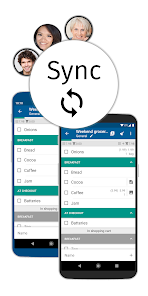
The synchronization keeps your lists up-to-date across multiple devices. In addition, you can create groups for different events, create multiple lists per group and invite multiple members. E.g. for family, roommates, office, wedding, vacation, party planning, etc.
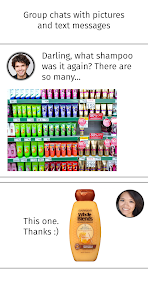
To briefly clarify, each group has its own chat with picture and text messages. Helpful if you don't know which shampoo to buy? Or who will bring the barbecue charcoal after Max has cancelled at short notice?
With the group chat you can rely on the fact that the messages are sent to all group members. You don't have to create a group in WhatsApp first. Or worry about whether everyone is on WhatsApp? Or Facebook Messenger, Telegram or Viber.
Here's how you can create long lists quickly: (see picture #3)
• Suggested items from your master list appear after you type two letters. Click on it to add the desired item.
• Select items from the master list and add them with one click.
• Create a shopping list of items you buy regularly, select all items with one click and add them to the preferred list.
Display shopping lists either categorized, alphabetically sorted or manually sorted (see picture #4). Each shopping list can have its own sorting.
In the supermarket you do not have to scroll the list, because if you sort the items into categories and set the category order for the supermarket, the items will appear one after the other as you go through the supermarket. Crossed-off items and whole categories are placed at the end of the list (see picture #5).
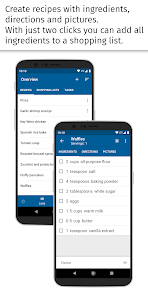
Create recipes with ingredients, directions and pictures. With a few clicks you can add all ingredients to a shopping list (see picture #6).
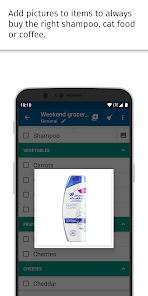
Add pictures to items to always buy the right shampoo, cat food or coffee.
Do you still have something to do? Write it down in the task lists.
There are 4 different designs including Dark theme, 4 font sizes and 6 fonts to choose from.
Additional features:
• If necessary you can edit the master list (including categories, units, stores) in the management menu
• The shopping mode enlarges the lines and makes it easier to cross off items in the supermarket
• Reminders
• Barcode scanner
• Resolve inputs with quantity and price, e.g. 500g tomatoes 2.99
• Edit all items of a shopping list in a single view
• Customize layout in settings, e.g. hide/show progress bar, hyphens, select single-line layout
• Available on Wear OS
• and much more!
Convinced? Try it out! If you have any questions, please contact support by email at ask@lister-studios.com.
To briefly clarify, each group has its own chat with picture and text messages. Helpful if you don't know which shampoo to buy? Or who will bring the barbecue charcoal after Max has cancelled at short notice?
With the group chat you can rely on the fact that the messages are sent to all group members. You don't have to create a group in WhatsApp first. Or worry about whether everyone is on WhatsApp? Or Facebook Messenger, Telegram or Viber.
Here's how you can create long lists quickly: (see picture #3)
• Suggested items from your master list appear after you type two letters. Click on it to add the desired item.
• Select items from the master list and add them with one click.
• Create a shopping list of items you buy regularly, select all items with one click and add them to the preferred list.
Display shopping lists either categorized, alphabetically sorted or manually sorted (see picture #4). Each shopping list can have its own sorting.
In the supermarket you do not have to scroll the list, because if you sort the items into categories and set the category order for the supermarket, the items will appear one after the other as you go through the supermarket. Crossed-off items and whole categories are placed at the end of the list (see picture #5).
Create recipes with ingredients, directions and pictures. With a few clicks you can add all ingredients to a shopping list (see picture #6).
Add pictures to items to always buy the right shampoo, cat food or coffee.
Do you still have something to do? Write it down in the task lists.
There are 4 different designs including Dark theme, 4 font sizes and 6 fonts to choose from.
Additional features:
• If necessary you can edit the master list (including categories, units, stores) in the management menu
• The shopping mode enlarges the lines and makes it easier to cross off items in the supermarket
• Reminders
• Barcode scanner
• Resolve inputs with quantity and price, e.g. 500g tomatoes 2.99
• Edit all items of a shopping list in a single view
• Customize layout in settings, e.g. hide/show progress bar, hyphens, select single-line layout
• Available on Wear OS
• and much more!
Convinced? Try it out! If you have any questions, please contact support by email at ask@lister-studios.com.
Updated on
Safety starts with understanding how developers collect and share your data. Data privacy and security practices may vary based on your use, region, and age. The developer provided this information and may update it over time.


Ratings and reviews
4.0
25.1K reviews

A Google user
- Flag inappropriate
- Show review history
September 18, 2019
Thanks, I figured out the fresh (nice feature, btw). Still, it really doesn't sync at all (only works when group is created with empty data set). Cleared app cache, app data, and cloud data each test. Also, units list become empty after a while, once in a while (while shops, categories, & items are copied fine and persistent)--when creating group using exiting data set, with over-writing cloud data on initial sync.
Lister Studios
September 18, 2019
Swipe down on (nearly) any view in Lister. Then you'll see a refresh animation. Again it might be best to get in touch via email as I mentioned in my previous reply. There I can write more than 350 characters which is the limit here. Greetings
A Google user
- Flag inappropriate
December 25, 2018
Latest update seems to have disabled our shared lists, which was the primary reason we use the app. If it doesn't get fixed, we'll be switching away.... 12/24/18 update: developers are very responsive and fixed both this and a later issue, and my wife and I use group lists on a near-daily basis. A very nice app for both tracking and sharing shopping lists!
1 person found this review helpful
Lister Studios
November 22, 2016
Sync-Service is up and running. You can read what happened here: http://lister-studios.com/sync-update.html. Simply translate it with an online translater. If you still have issues please contact me via email: ask@lister-studios.com Thank you!
A Google user
- Flag inappropriate
April 19, 2021
Update: all using this app and still love it! I love this app and have used it for more than a year. I made a 'Master list' containing all the things I purchase even once in a while and put each into a category... dairy, cleaning, canned goods, etc. Then, I create a 'Current' list and as I start to type an item it finishes it and automatically categorizes it based on my entry in the Master list. I can also customize the order of my categories in my list to match aisles in the store. Love it!
5 people found this review helpful
Lister Studios
June 17, 2017
That's great. You can also copy items to your current list from the shopping list 'Master list'. Or add items clicking the plus icon at the top of a shopping list. This saves on typing. There are tutorial videos in settings - help. Cheers!
What's new
Amazon Alexa integration
Final Update for Android 7 and older versions
Preparation for Amazon Alexa integration
Changelog from previous updates:
Speak to conveniently add items to your shopping list
Delete unwanted items from your master list with one click
Restore large backups & create backups if you have many (>1000) item and recipe pictures
New sort orders for shopping lists! Newly added items appear at the top - check individual shopping list settings to set the new sort order
Final Update for Android 7 and older versions
Preparation for Amazon Alexa integration
Changelog from previous updates:
Speak to conveniently add items to your shopping list
Delete unwanted items from your master list with one click
Restore large backups & create backups if you have many (>1000) item and recipe pictures
New sort orders for shopping lists! Newly added items appear at the top - check individual shopping list settings to set the new sort order