
Bluetooth Pair - Auto Connect
Contains adsIn-app purchases

star
401 reviews

Everyone
info
100K+
Downloads

Everyone
Learn more


About this app
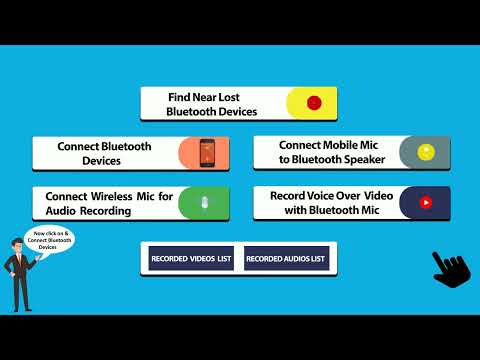
Bluetooth Auto Connect helps you connect Bluetooth devices automatically without manual intervention. Use this fast Bluetooth pairing app for Android to scan Bluetooth devices, pair Bluetooth devices, and quickly connect to your favorite gadgets like car Bluetooth, laptops and computers, Bluetooth headphones, Bluetooth speakers, and wearable devices like smart watches.
With Find my Bluetooth Device / Find Lost Bluetooth, you can locate nearby paired devices using proximity signals (works best when the device is powered on and within Bluetooth range).
You can also use the Mic to Speaker app feature to connect Bluetooth mic to speaker, connect an external microphone for audio recording, and record clearer audio for content creation, interviews, and voice notes.
Key Features (Main Keywords Included)
✅ Bluetooth Auto Connect app for Android
✅ Auto pair Bluetooth devices fast
✅ Scan Bluetooth devices in Android
✅ Fast Bluetooth pairing and easy connection
✅ Find and connect Bluetooth device
✅ Find Lost Bluetooth / Find my Bluetooth Device (nearby tracking)
✅ Pair Bluetooth device to car, laptop, headphones, speaker, smartwatch
✅ Connect live microphone to speaker
✅ Connect Bluetooth mic to speaker for audio recording
✅ Record voice with reduced echo on video (device/app dependent)
How Bluetooth Auto Connect Works
Bluetooth auto connect app connects your device with another device automatically after you pair once.
1 Open Settings on your Android device
2 Go to Bluetooth settings
3 Turn on Bluetooth
4 Pair nearby devices (car, speaker, headphones, smartwatch, etc.)
5 Open Bluetooth Auto Connect to auto reconnect faster next time.
How to Record Voice on Video with Bluetooth Microphone
How to record voice over video with Bluetooth microphone?
1 Turn on Bluetooth on your phone
2 Turn on your Bluetooth microphone and pair it
3 Open your video recording (camera/video app)
4 Allow microphone permission if needed
5 Select the Bluetooth mic as the audio input (if supported)
6 Start recording — your Bluetooth microphone records audio on the video
Mic to Speaker / External Mic Recording
Mic to speaker app connects external microphone for audio recording:
1 Grant necessary permissions to access the microphone
2 Open the recording feature/app
3 Go to audio input settings
4 Select the external microphone (Bluetooth mic) as input source
5 Start recording audio once the mic is connected.
Find Lost Bluetooth (Important Note for Play Store)
Find lost Bluetooth works using Bluetooth signal strength to help you find nearby devices.
• Works best when the device is ON, paired, and within range
• This feature is not GPS and cannot track powered-off devices
Permissions (Recommended for Policy + Trust)
To use all features smoothly, the app may request:
• Bluetooth / Nearby Devices (scan, pair, connect)
• Location (required by Android for Bluetooth scanning on some versions)
• Microphone (audio recording / Bluetooth mic use)
Support / Contact
For any suggestions or issues, send email at: mohsinullahshah1@gmail.com
With Find my Bluetooth Device / Find Lost Bluetooth, you can locate nearby paired devices using proximity signals (works best when the device is powered on and within Bluetooth range).
You can also use the Mic to Speaker app feature to connect Bluetooth mic to speaker, connect an external microphone for audio recording, and record clearer audio for content creation, interviews, and voice notes.
Key Features (Main Keywords Included)
✅ Bluetooth Auto Connect app for Android
✅ Auto pair Bluetooth devices fast
✅ Scan Bluetooth devices in Android
✅ Fast Bluetooth pairing and easy connection
✅ Find and connect Bluetooth device
✅ Find Lost Bluetooth / Find my Bluetooth Device (nearby tracking)
✅ Pair Bluetooth device to car, laptop, headphones, speaker, smartwatch
✅ Connect live microphone to speaker
✅ Connect Bluetooth mic to speaker for audio recording
✅ Record voice with reduced echo on video (device/app dependent)
How Bluetooth Auto Connect Works
Bluetooth auto connect app connects your device with another device automatically after you pair once.
1 Open Settings on your Android device
2 Go to Bluetooth settings
3 Turn on Bluetooth
4 Pair nearby devices (car, speaker, headphones, smartwatch, etc.)
5 Open Bluetooth Auto Connect to auto reconnect faster next time.
How to Record Voice on Video with Bluetooth Microphone
How to record voice over video with Bluetooth microphone?
1 Turn on Bluetooth on your phone
2 Turn on your Bluetooth microphone and pair it
3 Open your video recording (camera/video app)
4 Allow microphone permission if needed
5 Select the Bluetooth mic as the audio input (if supported)
6 Start recording — your Bluetooth microphone records audio on the video
Mic to Speaker / External Mic Recording
Mic to speaker app connects external microphone for audio recording:
1 Grant necessary permissions to access the microphone
2 Open the recording feature/app
3 Go to audio input settings
4 Select the external microphone (Bluetooth mic) as input source
5 Start recording audio once the mic is connected.
Find Lost Bluetooth (Important Note for Play Store)
Find lost Bluetooth works using Bluetooth signal strength to help you find nearby devices.
• Works best when the device is ON, paired, and within range
• This feature is not GPS and cannot track powered-off devices
Permissions (Recommended for Policy + Trust)
To use all features smoothly, the app may request:
• Bluetooth / Nearby Devices (scan, pair, connect)
• Location (required by Android for Bluetooth scanning on some versions)
• Microphone (audio recording / Bluetooth mic use)
Support / Contact
For any suggestions or issues, send email at: mohsinullahshah1@gmail.com
Connect & auto Pair Bluetooth, connect mic for recording, record voice on video
Updated on
Safety starts with understanding how developers collect and share your data. Data privacy and security practices may vary based on your use, region, and age. The developer provided this information and may update it over time.
- No data shared with third partiesLearn more about how developers declare sharing
- No data collectedLearn more about how developers declare collection
- Data is encrypted in transit
- You can request that data be deleted


Ratings and reviews
394 reviews

Mark Hungerford
- Flag inappropriate
August 21, 2022
A few bugs & annoyances. 1st, I don't mind ads, but they should never interfere with start & stop buttons. The BT status indicator on main screen doesn't always match the settings screen. BT output apparently is automatically on by default but it tells you to press the streaming button except that only works with nothing currently playing & then it will pick up the mic. This is confusing to learn.
Tactical Solution
March 7, 2023
Hi, have you tried the latest update? It seems to fix the issue for many of our users. If it doesn't work for you, could you contact us at muhsinullahshah1@gmail.com so that we can work together to figure it out?

Bill Lee Music
- Flag inappropriate
- Show review history
January 13, 2021
Well I re downloaded this app and apparently it was my bad and I have to apologise. First time I got frustrated because the ads where all over the place and I couldn't reach any buttons. This is no longer the case tho so I changed my rating to 5 stars. I just have to report because it could be a 3rd party bug. Thanks for your immediate support.
10 people found this review helpful
Tactical Solution
January 13, 2021
its working properly dear. we bring pad version soon

Chris Trickett
- Flag inappropriate
March 6, 2021
Absolutely pathetic. Advertising is not just annoying but impedes use. That's if it even works in the first place. Didn't for me. Deleted within an hour, a very frustrating hour, of installation.
19 people found this review helpful
What’s new
# Fix all the Issue
# Fix Edge to Edge Issue for Android 15 user
# Remove all crashes
# Fix Edge to Edge Issue for Android 15 user
# Remove all crashes
Everyone
Learn moreApp support
About the developer
Muhammad Sajid
mohsinullahshah1@gmail.com
Post Office Miranshah, Tehsil Miranshah
Village Miranshah North Waziristan Agency
Miranshah, 28200
Pakistan


