
Gluggy


Everyone
info
5+
Downloads

Everyone
Learn more


About this app
The ideal solution for small businesses and sole-traders such as Window Cleaners, Pool Cleaners, Gardeners, Housekeepers / Cleaners, Roof Washers, Driveway & Patio Washers, Wheelie Bin Cleaners, Dog Walkers, Pet Sitters or any other service based business.
Dashboard
- See an instant overview of your days work including todays jobs, overdue jobs and money owing.
- Gauges display how much you've earned and what has been skipped.
- Tap the Jobs, Overdue or Money Owing buttons to drill in and see more detail about the jobs and payments to be collected.
Jobs
- Use the Jobs filter button to see the jobs booked for today, tomorrow, this week, next week and more.
- Work jobs in any list marking them as complete, skipped, paid or un-paid.
- Bring jobs forward without affecting their schedule.
- Push jobs back without affecting their schedule.
- Send text and email notifications when a job is completed.
- Add new customers and jobs in a single step.
- Change a jobs schedule, type, class, price or any other details.
- Call customers directly from the job record by tapping their phone number.
- Navigate directly to a customer job by tapping their address.
Collections
- Manage outstanding payments to ensure you never miss collecting from a customer.
- Search the list of jobs awaiting collection by name, address, phone or email address.
- Send email or text payment reminders directly to the customer.
- Call customers directly from the collection screen by tapping their phone number.
- If you need to collect in person navigate directly to a customer by tapping their address in the collections record.
Customers
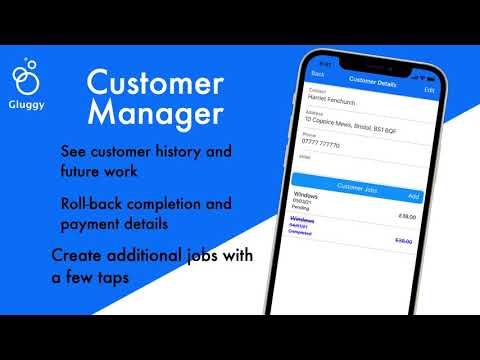
- View all your customers in the Customer manager.
- Search customers by name, address, phone number or email address.
- See each individual customers job history and scheduled jobs.
- Edit and update customer details.
- Add extra jobs for any customer.
- Accidentally marked a job as completed or paid? Use the Change Job Status tools to reset completion or payment details for any job.
More
- Change Gluggy regional settings to match where you work or live. Gluggy supports dd/mm/yyyy and mm/dd/yyyy date formats and £, €, $ and ¥ currencies.
- Add your banking details so that customer can pay direct to your account.
- Completely customise the Service Types to fit your business.
- Run reports against your data to see how well your business is performing.
- Backup and Restore your Gluggy data safely and securely.
Dashboard
- See an instant overview of your days work including todays jobs, overdue jobs and money owing.
- Gauges display how much you've earned and what has been skipped.
- Tap the Jobs, Overdue or Money Owing buttons to drill in and see more detail about the jobs and payments to be collected.
Jobs
- Use the Jobs filter button to see the jobs booked for today, tomorrow, this week, next week and more.
- Work jobs in any list marking them as complete, skipped, paid or un-paid.
- Bring jobs forward without affecting their schedule.
- Push jobs back without affecting their schedule.
- Send text and email notifications when a job is completed.
- Add new customers and jobs in a single step.
- Change a jobs schedule, type, class, price or any other details.
- Call customers directly from the job record by tapping their phone number.
- Navigate directly to a customer job by tapping their address.
Collections
- Manage outstanding payments to ensure you never miss collecting from a customer.
- Search the list of jobs awaiting collection by name, address, phone or email address.
- Send email or text payment reminders directly to the customer.
- Call customers directly from the collection screen by tapping their phone number.
- If you need to collect in person navigate directly to a customer by tapping their address in the collections record.
Customers
- View all your customers in the Customer manager.
- Search customers by name, address, phone number or email address.
- See each individual customers job history and scheduled jobs.
- Edit and update customer details.
- Add extra jobs for any customer.
- Accidentally marked a job as completed or paid? Use the Change Job Status tools to reset completion or payment details for any job.
More
- Change Gluggy regional settings to match where you work or live. Gluggy supports dd/mm/yyyy and mm/dd/yyyy date formats and £, €, $ and ¥ currencies.
- Add your banking details so that customer can pay direct to your account.
- Completely customise the Service Types to fit your business.
- Run reports against your data to see how well your business is performing.
- Backup and Restore your Gluggy data safely and securely.
A business app for managing and scheduling your customer jobs with ease
Updated on
Safety starts with understanding how developers collect and share your data. Data privacy and security practices may vary based on your use, region, and age. The developer provided this information and may update it over time.
- No data shared with third partiesLearn more about how developers declare sharing
- No data collectedLearn more about how developers declare collection


What’s new
Bug fixes and enhancements including Dark mode / Light mode support and Data Import and Export.
Everyone
Learn moreApp support
About the developer
Alan Green
hello@alan-green.co.uk
30 Dursley Road
Woodfield
DURSLEY
GL11 6PP
United Kingdom


