
kAIboard
In-app purchases


Everyone
info
10+
Downloads

Everyone
Learn more


About this app
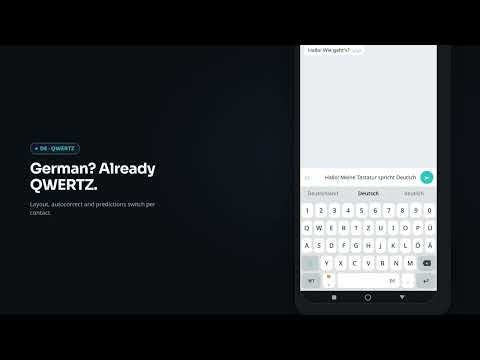
kAIboard is the first Android keyboard that automatically switches language based on who you're chatting with.
Open a chat with a German contact and the keyboard switches to German. Switch to a French friend and the French layout appears instantly. No manual language switching, no extra taps.
Designed for multilingual people who chat with contacts in different languages every day.
AUTO LANGUAGE SWITCHING
kAIboard automatically detects the contact you're chatting with and selects the correct keyboard language. Languages can be detected from the contact's phone number prefix or assigned manually per contact.
You can also change a contact's language directly from the keyboard with a long press on the spacebar.
Works with 120+ messaging apps including WhatsApp, Telegram, Signal, Messenger, Viber, Discord, Slack and many more.
AI TRANSLATION
Activate translation with a long press on Enter.
Type in your own language and kAIboard automatically translates your outgoing message into your contact's language before sending.
Cloud AI Translation (subscription)
Offline On-Device Translation using downloaded language packs
Supports all available keyboard languages
Only outgoing text is translated
SMART PREDICTION & AUTOCORRECT
kAIboard combines language models, dictionaries and personal learning to provide:
Next-word prediction
Context-aware suggestions
Smart autocorrect
Personalized learning based on your writing habits
Suggestions improve over time while all learning remains on your device.
14 SUPPORTED LANGUAGES including Chinese Pinyin input
Full keyboard layouts, dictionaries and prediction support:
Italian, English, German, French, Spanish, Portuguese, Dutch, Polish, Turkish, Russian, Ukrainian, Greek, Georgian and Chinese (Pinyin input).
The entire app interface, settings and documentation are also available in 14 languages.
MORE FEATURES
Emoji picker
Clipboard history
Scheduled messages
Local backup
Google Drive backup (subscription)
Adjustable keyboard size
Custom sounds and vibration
Per-contact language management
PRIVACY FIRST
kAIboard is built around a local-first approach.
Contact detection happens locally on your device
Contact names and phone numbers are never permanently stored
No advertising IDs
No analytics
No tracking
No profiling
Learning data stays on your device
Offline translation never sends data to external servers
AI translation uses encrypted HTTPS connections
GDPR compliant with in-app data export and deletion tools
Permissions required:
Contacts: required for automatic language detection
Accessibility: required to identify the active chat and enable automatic language switching
Notification Access: required for language switching in quick replies
What makes kAIboard different?
Most keyboards try to guess what you want to type.
kAIboard knows which language you need before you type the first character.
Less switching. Less friction. More natural conversations.
NO ADS. NO TRACKING.
Unlike many free keyboards, kAIboard does not rely on advertising, analytics or user profiling. Most features work locally on your device and your personal learning data never leaves your phone.
Support: support@kaiboard.eu
Open a chat with a German contact and the keyboard switches to German. Switch to a French friend and the French layout appears instantly. No manual language switching, no extra taps.
Designed for multilingual people who chat with contacts in different languages every day.
AUTO LANGUAGE SWITCHING
kAIboard automatically detects the contact you're chatting with and selects the correct keyboard language. Languages can be detected from the contact's phone number prefix or assigned manually per contact.
You can also change a contact's language directly from the keyboard with a long press on the spacebar.
Works with 120+ messaging apps including WhatsApp, Telegram, Signal, Messenger, Viber, Discord, Slack and many more.
AI TRANSLATION
Activate translation with a long press on Enter.
Type in your own language and kAIboard automatically translates your outgoing message into your contact's language before sending.
Cloud AI Translation (subscription)
Offline On-Device Translation using downloaded language packs
Supports all available keyboard languages
Only outgoing text is translated
SMART PREDICTION & AUTOCORRECT
kAIboard combines language models, dictionaries and personal learning to provide:
Next-word prediction
Context-aware suggestions
Smart autocorrect
Personalized learning based on your writing habits
Suggestions improve over time while all learning remains on your device.
14 SUPPORTED LANGUAGES including Chinese Pinyin input
Full keyboard layouts, dictionaries and prediction support:
Italian, English, German, French, Spanish, Portuguese, Dutch, Polish, Turkish, Russian, Ukrainian, Greek, Georgian and Chinese (Pinyin input).
The entire app interface, settings and documentation are also available in 14 languages.
MORE FEATURES
Emoji picker
Clipboard history
Scheduled messages
Local backup
Google Drive backup (subscription)
Adjustable keyboard size
Custom sounds and vibration
Per-contact language management
PRIVACY FIRST
kAIboard is built around a local-first approach.
Contact detection happens locally on your device
Contact names and phone numbers are never permanently stored
No advertising IDs
No analytics
No tracking
No profiling
Learning data stays on your device
Offline translation never sends data to external servers
AI translation uses encrypted HTTPS connections
GDPR compliant with in-app data export and deletion tools
Permissions required:
Contacts: required for automatic language detection
Accessibility: required to identify the active chat and enable automatic language switching
Notification Access: required for language switching in quick replies
What makes kAIboard different?
Most keyboards try to guess what you want to type.
kAIboard knows which language you need before you type the first character.
Less switching. Less friction. More natural conversations.
NO ADS. NO TRACKING.
Unlike many free keyboards, kAIboard does not rely on advertising, analytics or user profiling. Most features work locally on your device and your personal learning data never leaves your phone.
Support: support@kaiboard.eu
Updated on
Safety starts with understanding how developers collect and share your data. Data privacy and security practices may vary based on your use, region, and age. The developer provided this information and may update it over time.


What’s new
- Full support for Android 16.
- Fixed status and navigation bar icons that were hard to see in light mode (Terms, Privacy Policy, FAQ and more).
- Under-the-hood stability and reliability improvements.
- Fixed status and navigation bar icons that were hard to see in light mode (Terms, Privacy Policy, FAQ and more).
- Under-the-hood stability and reliability improvements.
Everyone
Learn moreApp support
About the developer
Alessandro Faedda
alessandro.faedda@me.com
Stellinger Ch 24B
22529 Hamburg
Germany