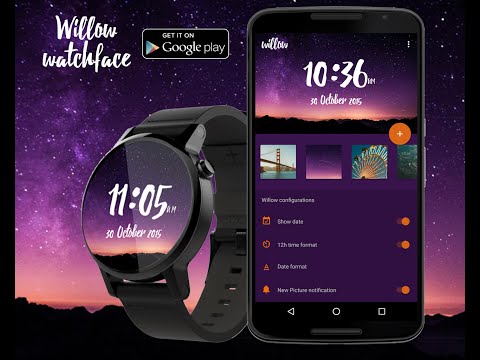

Willow - Photo Watch face
In-app purchases

star
8.72K reviews

Everyone
info
1M+
Downloads

Everyone
Learn more


About this app
Transform your Wear OS smartwatch with Willow - the ultimate photo watch face creator.
ANY IMAGE, ANY STYLE Select any image from your gallery, downloaded photos, or browse millions of stunning photos from Unsplash. Customize it completely to make it your own.
SEAMLESS SYNC WITH WATCH PUSH API Experience fast and reliable transfers. Push your customized watch faces directly to your wrist using the Watch Push API, ensuring your design appears exactly as you created it.
DEEP CUSTOMIZATION • Adjustable time & date text sizes, colors, and positions • 8+ date format options • Custom fonts from our font gallery • Text shadow for better visibility • Layer ordering - control what appears on top
SMART COMPLICATIONS Add up to 3 complications (widgets) showing: • Battery, steps, heart rate • Weather, calendar, alarms • Activity rings and more Fully customize colors for each complication individually.
AMBIENT MODE OPTIMIZATION Three text styles (Outline, Fill Black, Current Color) and three background styles (Colored, Grayscale, Blackout) to maximize battery life.
PRESET SYSTEM Save your favorite configurations as presets. Switch between watch faces instantly or share them with friends.
AUTO IMAGE CHANGE Set your watch face to automatically cycle through your favorite images at customizable intervals.
Any suggestion or bug, feel free to send it to
support@ammarptn.com
Please include "Willow watch face" in your email title
or connect with us at
Facebook : https://www.facebook.com/groups/willowwatchface
ANY IMAGE, ANY STYLE Select any image from your gallery, downloaded photos, or browse millions of stunning photos from Unsplash. Customize it completely to make it your own.
SEAMLESS SYNC WITH WATCH PUSH API Experience fast and reliable transfers. Push your customized watch faces directly to your wrist using the Watch Push API, ensuring your design appears exactly as you created it.
DEEP CUSTOMIZATION • Adjustable time & date text sizes, colors, and positions • 8+ date format options • Custom fonts from our font gallery • Text shadow for better visibility • Layer ordering - control what appears on top
SMART COMPLICATIONS Add up to 3 complications (widgets) showing: • Battery, steps, heart rate • Weather, calendar, alarms • Activity rings and more Fully customize colors for each complication individually.
AMBIENT MODE OPTIMIZATION Three text styles (Outline, Fill Black, Current Color) and three background styles (Colored, Grayscale, Blackout) to maximize battery life.
PRESET SYSTEM Save your favorite configurations as presets. Switch between watch faces instantly or share them with friends.
AUTO IMAGE CHANGE Set your watch face to automatically cycle through your favorite images at customizable intervals.
Any suggestion or bug, feel free to send it to
support@ammarptn.com
Please include "Willow watch face" in your email title
or connect with us at
Facebook : https://www.facebook.com/groups/willowwatchface
Upgrade wrist style with our watch face. Use any photo & font to show your style
Updated on
Safety starts with understanding how developers collect and share your data. Data privacy and security practices may vary based on your use, region, and age. The developer provided this information and may update it over time.
- No data shared with third partiesLearn more about how developers declare sharing
- No data collectedLearn more about how developers declare collection


Ratings and reviews
6.18K reviews

Account Used
- Flag inappropriate
February 14, 2026
It's always great to update your phone to a newer version until it makes your home screen a bunch of clutter! I loved how you could have fun with the older version so you can get an image to match a shirt or a fun one for the holiday with just time and date. Not show steps, heart rate and etc. If I want this stuff, I'd just open the tile and review the details. Hate to pay for what was free to customize. Super disappointed.
4 people found this review helpful
Ammarptn
February 16, 2026
Hi there, the icon or the complications can be turned off or disabled in the complications style setting menu.

Lilyana Chhuon
- Flag inappropriate
October 29, 2023
Great watch face app, exactly what I was looking for. I wanted a watch face app where I could use my own photos and customize what complications I wanted to see and exactly where to position them on my watch face. It's a little out of sync if you just go based on the phone but if you look at your watch as you adjust the positions of each complication, then you can get them in the perfect spot.
43 people found this review helpful

Frank Hardaway
- Flag inappropriate
- Show review history
February 22, 2022
It pretty much does exactly what it is advertised to do. I love being able to add my own images to the watch. As long as you edit your photo so that it is 1:1 ratio (square) like Instagram photos, it shows up pretty well. But it is not perfect. It would be much nicer if you could move the image up/down/left/right slightly so that it could appear the way you want it on the watch. I do love the rotating images feature. I purchased the premium version thinking I would like adding the "complication" widgets. The nice thing is you can add 1-3 of them. However, they don't all work. For example, the calendar complication does not show the date. Also, I only want to show 1 complication but the frames for all 3 of them show up in ambient mode - so even though you are not using them, they block part of your picture. All in all, I still like the application. But, I wish I would not have purchased the premium version. All it does is allow you to set/change the complications, but they do not work correctly.
138 people found this review helpful
Everyone
Learn moreApp support
About the developer
Ammar Lanui
support@ammarptn.com
18/6 Nawang Rd.
Jabangtikor, Muang Pattani
ปัตตานี 94000
Thailand


