
AndroVid Pro Video Editor

star
20K reviews

Everyone
info
100K+
Downloads
Free with a Play Pass subscription Learn more


About this app
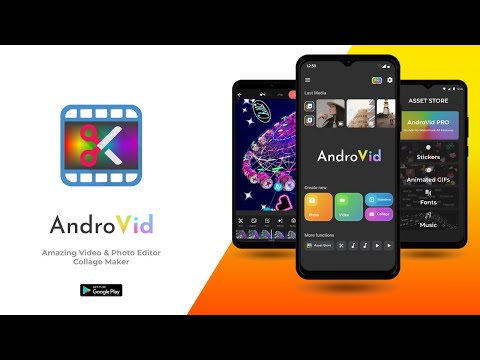
AndroVid Pro is an easy to use, full-featured video maker and photo editor for YouTube, Instagram, Tik Tok, Facebook and other social media.
Just download now and easily make amazing videos with music, text, effects, stickers and many more features.
Key Features:
Video Trimmer & Video Cutter & Video Splitter
* Trim and cut video to remove unnecessary parts.
* Fast trimmer & Fast cutter: No quality loss, no re-encoding for fast cutting. Export videos at the same quality as the original videos.
* Precise trimmer & frame accurate cutter: Additional trimmer with frame precise cutting. Export in HD Quality.
* Split videos into two pieces.
* Delete middle parts : Remove unwanted parts in the middle of your videos.
Video Merger & Video Joiner App
* Free video joiner with music.
* Combine multiple video clips to make one video
Add Music to Video
* Video Maker with song, free Tik Tok editor.
* Combine videos with music. Trim and cut music, add multiple music parts
* Adjust original video volume, adjust music volume separately
* Mute video sound
Add Text on Video & Sticker & Emoji & Watermark
* Add text on video with font, color and style
* Add emojis and stickers on video
* Animate text and emojis
* Add your own custom picture or watermark on video. By making the picture semi-transparent you can add your own watermarks on video
Draw Video Editor & Draw on Video
* Draw any shape on video by your hand
* Adjust color, transparency, brush width of the drawing
* You can add as many drawings as you like
Video FX App & Video Filters & Video Effects
* Apply stunning color filters to make your video stand out: Vintage, Sepia, Vignette, Gray, Blur and many more
* Add cool FX effects to make your videos different.
* Unique Feature: You can apply multiple filters and effects at the same time. Blend filters to create your own amazing effects.
Video Aspect Ratio Changer & Video Background
* Fit video in any Aspect Ratio without cropping.
* Easily apply appropriate aspect ratio for Instagram, YouTube and Tik Tok.
* Apply video blur background or apply background color.
* Make square video, no crop video maker.
Video to Mp3 Converter
* Extract music from video, fast convert video to MP3 music
Photo Slideshow Maker
* Make slideshow video from pictures
* Add fading transition effect, add music
Video Player & Video Organiser & Photo Organiser
* Explore all videos on your phone
* Play your video clips
* Share video clips and photos on Instagram, Facebook, Youtube, Tik Tok, Whatsapp etc.
* Rename, delete, sort and list videos
* Recycle Bin for deleted videos so that you can undo delete
* Explore list of all photos in your gallery. View and edit photos.
Video Rotate App & Video Flip App
* Fast rotate video by 90 degree or 180 degree
* Flip video vertical
* Flip video horizontal
* Quick Rotation without encoding
Video Enhancer App
* Enhance your video for a better quality. Adjust brightness, contrast, saturation, temperature.
* Change audio volume level
Video Speed Changer
* Add Fast Motion effect and Slow Motion effect
* Adjust and control the speed of every video clip.
Video Converter App & Video Format Changer App
* Free Video transcoder app to convert videos to other formats, change resolution to make your videos smaller. Supports conversion to GIF, 3GP, AVI, FLV, MP4, MPG, MOV, WMV and VOB formats.
* Convert your video parts to animated GIF and share on social media apps
Video Reverse App
* Video reversing app, slow motion / fast motion video
* Reverse video to make magic
Video Frame Grabber & Video Picture Extractor
* Extract video frame pictures at any moment in video
* Save video frame pictures to gallery
Video Compressor
* Zip your video to make video size smaller for sharing on Whatsapp, email etc.
* Adjust video export quality and resolution
* Trim or crop video to make shorter
Just download now and easily make amazing videos with music, text, effects, stickers and many more features.
Key Features:
Video Trimmer & Video Cutter & Video Splitter
* Trim and cut video to remove unnecessary parts.
* Fast trimmer & Fast cutter: No quality loss, no re-encoding for fast cutting. Export videos at the same quality as the original videos.
* Precise trimmer & frame accurate cutter: Additional trimmer with frame precise cutting. Export in HD Quality.
* Split videos into two pieces.
* Delete middle parts : Remove unwanted parts in the middle of your videos.
Video Merger & Video Joiner App
* Free video joiner with music.
* Combine multiple video clips to make one video
Add Music to Video
* Video Maker with song, free Tik Tok editor.
* Combine videos with music. Trim and cut music, add multiple music parts
* Adjust original video volume, adjust music volume separately
* Mute video sound
Add Text on Video & Sticker & Emoji & Watermark
* Add text on video with font, color and style
* Add emojis and stickers on video
* Animate text and emojis
* Add your own custom picture or watermark on video. By making the picture semi-transparent you can add your own watermarks on video
Draw Video Editor & Draw on Video
* Draw any shape on video by your hand
* Adjust color, transparency, brush width of the drawing
* You can add as many drawings as you like
Video FX App & Video Filters & Video Effects
* Apply stunning color filters to make your video stand out: Vintage, Sepia, Vignette, Gray, Blur and many more
* Add cool FX effects to make your videos different.
* Unique Feature: You can apply multiple filters and effects at the same time. Blend filters to create your own amazing effects.
Video Aspect Ratio Changer & Video Background
* Fit video in any Aspect Ratio without cropping.
* Easily apply appropriate aspect ratio for Instagram, YouTube and Tik Tok.
* Apply video blur background or apply background color.
* Make square video, no crop video maker.
Video to Mp3 Converter
* Extract music from video, fast convert video to MP3 music
Photo Slideshow Maker
* Make slideshow video from pictures
* Add fading transition effect, add music
Video Player & Video Organiser & Photo Organiser
* Explore all videos on your phone
* Play your video clips
* Share video clips and photos on Instagram, Facebook, Youtube, Tik Tok, Whatsapp etc.
* Rename, delete, sort and list videos
* Recycle Bin for deleted videos so that you can undo delete
* Explore list of all photos in your gallery. View and edit photos.
Video Rotate App & Video Flip App
* Fast rotate video by 90 degree or 180 degree
* Flip video vertical
* Flip video horizontal
* Quick Rotation without encoding
Video Enhancer App
* Enhance your video for a better quality. Adjust brightness, contrast, saturation, temperature.
* Change audio volume level
Video Speed Changer
* Add Fast Motion effect and Slow Motion effect
* Adjust and control the speed of every video clip.
Video Converter App & Video Format Changer App
* Free Video transcoder app to convert videos to other formats, change resolution to make your videos smaller. Supports conversion to GIF, 3GP, AVI, FLV, MP4, MPG, MOV, WMV and VOB formats.
* Convert your video parts to animated GIF and share on social media apps
Video Reverse App
* Video reversing app, slow motion / fast motion video
* Reverse video to make magic
Video Frame Grabber & Video Picture Extractor
* Extract video frame pictures at any moment in video
* Save video frame pictures to gallery
Video Compressor
* Zip your video to make video size smaller for sharing on Whatsapp, email etc.
* Adjust video export quality and resolution
* Trim or crop video to make shorter
Easy to use, full-featured pro Video Editor and Photo Editor with many features
Updated on
Safety starts with understanding how developers collect and share your data. Data privacy and security practices may vary based on your use, region, and age. The developer provided this information and may update it over time.


Ratings and reviews
18.4K reviews

Lorissa Yoder
- Flag inappropriate
- Show review history
June 4, 2026
I've had this app for so long that when I bought the pro version it cost me around $3 and today its $19.99. I've used it ever since for all of my video editing needs. And it's so simple and easy to use. I hate trying to edit something with an app that is too complicated or complex to understand. You can put your own watermark on your videos. You can easily grab a single frame to turn into your next favorite picture, which was exactly why I got it to begin with. Highly recommend this app.
13 people found this review helpful

A Google user
- Flag inappropriate
November 26, 2019
I've had this app for a few years now and I really used to enjoy it. But for the past year or so it constantly gets stuck while "preparing" or saving, especially on longer videos. It usually stops at 40% and never completes a save. And when it does manage to complete saving, it speeds up the first few seconds of the video every single time. I've done it all, including reinstallation, but it continues.
85 people found this review helpful
A Google user
- Flag inappropriate
September 22, 2019
Took two hours to rotate a 3 minute video, and when it finally hit 100% it still didnt rotate the video! What a waste of time and money, stick with the free version! *UPDATE: two years later and this app is still sooo buggy!! when i merge a bunch of videos together, it will lag and freeze at the end of the video; also when cropping a video picture size, the audio will be out of sync. *Update - Still buggy, Trimming videos makes the video freeze and lag. Complete waste of an app.
12 people found this review helpful
What’s new
- Fixed repeated crashes and failed video exports on devices running Android 8.
- Fixed video processing occasionally not starting until the app was reopened.
- Improved the reliability of the in-app purchase connection.
- Fixed video processing occasionally not starting until the app was reopened.
- Improved the reliability of the in-app purchase connection.
App support
About the developer
Fogosoft Ltd
support@fogosoft.co.uk
Unit 3b Berol House, 25 Ashley Road
LONDON
N17 9LJ
United Kingdom
+44 7307 059766


