
Colorize : AI Photo Colorizer
In-app purchases
star
10.2K reviews

Everyone
info
100K+
Downloads

Everyone
Learn more




About this app
Bring old memories back to life with Colorize, an AI photo colorizer and old photo restoration app for Android.
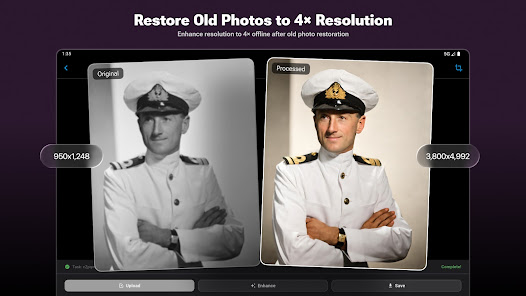
Turn black-and-white pictures into naturally colored photos, repair scratches and damage, sharpen blurry faces, and improve faded family photos. Colorize combines photo colorization, image repair, face enhancement, and 4× upscaling in one simple workflow.
Whether you are restoring a family album, preserving a historical photo, or improving an old portrait, the AI colorizer helps you create clear, vivid, and natural-looking results in just a few taps.
AI PHOTO COLORIZER
--------------------------------
• Colorize black-and-white photos automatically
• Add realistic color to family portraits, landscapes, and historical images
• Use AI models designed for natural skin tones, clothing, and backgrounds
• Preview the colorized photo and compare it with the original
OLD PHOTO RESTORATION
--------------------------------
• Repair scratched, cracked, stained, or faded photos
• Reduce noise and visible damage in vintage images
• Restore clarity while preserving the character of the original photo
• Colorize, repair, and enhance an image in one streamlined process
FACE & PORTRAIT ENHANCEMENT
--------------------------------
• Sharpen blurry faces and recover facial details
• Improve old portraits with natural-looking enhancement
• Refine low-quality family photos without complicated editing
• Create clearer pictures for sharing, archiving, or printing
4× IMAGE UPSCALER
--------------------------------
• Enlarge low-resolution photos by up to 4× with online AI processing
• Improve image resolution and detail for higher-quality output
• Upscale restored and colorized photos after enhancement
SIMPLE ALL-IN-ONE WORKFLOW
--------------------------------
1. Choose an old, damaged, or black-and-white photo.
2. Select Colorize, Repair, Enhance, or the combined restoration workflow.
3. Preview the restored image and compare it with the original.
4. Save or share your finished photo.
MADE FOR YOUR MEMORIES
--------------------------------
Colorize is ideal for:
• Restoring old family photos and photo albums
• Colorizing black-and-white portraits
• Repairing scratched, cracked, or faded pictures
• Enhancing blurry faces and low-resolution photos
• Preserving historical images and vintage photography
• Preparing restored photos for sharing and printing
PRIVATE PHOTO PROCESSING
--------------------------------
Your privacy matters. Images processed through cloud features are automatically deleted within 24 hours.
Colorize makes image colorization and old photo restoration accessible to everyone. Use the AI Colorizer to restore treasured memories, enhance damaged pictures, and give black-and-white photos a new life in color.
PREMIUM PLANS
--------------------------------
Unlock unlimited access to all AI features:
Monthly: $6.99
Yearly: $19.99 (Best value)
Lifetime: $29.99 (One-time purchase)
For feature requests or support, contact:
Support@imagecolorizer.com
LINKS
--------------------------------
Website: https://imagecolorizer.com
Privacy Policy: https://imagecolorizer.com/privacy
Terms of Service: https://imagecolorizer.com/terms
Turn black-and-white pictures into naturally colored photos, repair scratches and damage, sharpen blurry faces, and improve faded family photos. Colorize combines photo colorization, image repair, face enhancement, and 4× upscaling in one simple workflow.
Whether you are restoring a family album, preserving a historical photo, or improving an old portrait, the AI colorizer helps you create clear, vivid, and natural-looking results in just a few taps.
AI PHOTO COLORIZER
--------------------------------
• Colorize black-and-white photos automatically
• Add realistic color to family portraits, landscapes, and historical images
• Use AI models designed for natural skin tones, clothing, and backgrounds
• Preview the colorized photo and compare it with the original
OLD PHOTO RESTORATION
--------------------------------
• Repair scratched, cracked, stained, or faded photos
• Reduce noise and visible damage in vintage images
• Restore clarity while preserving the character of the original photo
• Colorize, repair, and enhance an image in one streamlined process
FACE & PORTRAIT ENHANCEMENT
--------------------------------
• Sharpen blurry faces and recover facial details
• Improve old portraits with natural-looking enhancement
• Refine low-quality family photos without complicated editing
• Create clearer pictures for sharing, archiving, or printing
4× IMAGE UPSCALER
--------------------------------
• Enlarge low-resolution photos by up to 4× with online AI processing
• Improve image resolution and detail for higher-quality output
• Upscale restored and colorized photos after enhancement
SIMPLE ALL-IN-ONE WORKFLOW
--------------------------------
1. Choose an old, damaged, or black-and-white photo.
2. Select Colorize, Repair, Enhance, or the combined restoration workflow.
3. Preview the restored image and compare it with the original.
4. Save or share your finished photo.
MADE FOR YOUR MEMORIES
--------------------------------
Colorize is ideal for:
• Restoring old family photos and photo albums
• Colorizing black-and-white portraits
• Repairing scratched, cracked, or faded pictures
• Enhancing blurry faces and low-resolution photos
• Preserving historical images and vintage photography
• Preparing restored photos for sharing and printing
PRIVATE PHOTO PROCESSING
--------------------------------
Your privacy matters. Images processed through cloud features are automatically deleted within 24 hours.
Colorize makes image colorization and old photo restoration accessible to everyone. Use the AI Colorizer to restore treasured memories, enhance damaged pictures, and give black-and-white photos a new life in color.
PREMIUM PLANS
--------------------------------
Unlock unlimited access to all AI features:
Monthly: $6.99
Yearly: $19.99 (Best value)
Lifetime: $29.99 (One-time purchase)
For feature requests or support, contact:
Support@imagecolorizer.com
LINKS
--------------------------------
Website: https://imagecolorizer.com
Privacy Policy: https://imagecolorizer.com/privacy
Terms of Service: https://imagecolorizer.com/terms
AI colorizer to colorize photos, repair damage, and restore old family pictures.
Updated on
Safety starts with understanding how developers collect and share your data. Data privacy and security practices may vary based on your use, region, and age. The developer provided this information and may update it over time.
- No data shared with third partiesLearn more about how developers declare sharing
- No data collectedLearn more about how developers declare collection
- Data isn’t encrypted
- Data can’t be deleted


Ratings and reviews
9.86K reviews

M J W
- Flag inappropriate
August 3, 2026
I signed up, downloaded the app, opened it, and it give me a choice of uploading a photo or a file. I chose to upload a photo, and quickly work through that process. And it still kept me on the upload option, although it showed and enhance and a save function, neither of which were selectable. I could not get out of this loop.

Boogie
- Flag inappropriate
January 4, 2024
The results are pretty amazing, but it takes FOREVER to load the camera roll. I have to sit the phone down for a couple hours just so it can load all my pictures up, even though I only need one. The ad credit system isn't responding for me, so I can't use this app anymore unless I want to fork over $$$ for something I and most people use only on occasion.
4 people found this review helpful

PrncDENZEL_254KE'
- Flag inappropriate
June 26, 2026
Perfect and easy to use; just select a photo, and with one click, it's generated and done. 💯 🔺️ Just an update for multiple photo selections. Also, after selecting a photo and going back, it takes you back to the recent photos, and you'll have to scroll down again.
1 person found this review helpful
What’s new
Minor improvements and optimizations.
Improved overall performance and stability for a smoother colorization experience.
Improved overall performance and stability for a smoother colorization experience.
Everyone
Learn moreApp support
About the developer
Vertexshare Limited
support@vertexshare.com
Rm 1503-09 15/F CAUSEWAY BAY CTR
15-23 SUGAR ST
銅鑼灣
香港島
Hong Kong
+61 478 516 669


