
Appcompanist: Vocal Training
In-app purchases

star
162 reviews

Everyone
info
10K+
Downloads

Everyone
Learn more


About this app
Appcompanist gives singers, voice teachers, and vocal studios full musical control over professional piano accompaniment recordings for classical and musical theater repertoire.
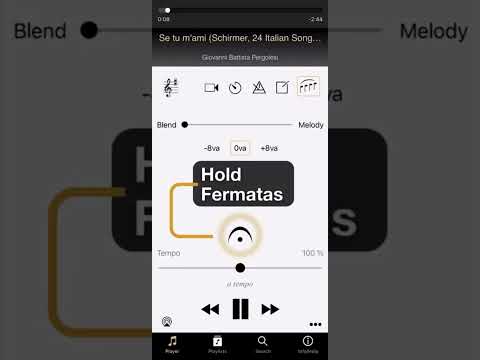
Practice, teach, rehearse, and perform with piano accompaniments you can actually control in real time. Change key instantly, control tempo during play, blend melody help in or out, hold fermatas, check pitches, add markers, create cuts and loops, and save your own Custom Versions.
Appcompanist puts a level of control in your hand that traditional accompaniment recordings simply do not offer. Transpose to the key that fits your voice, shape tempo and interpretation as you sing, and make musical choices in the moment without sacrificing piano quality.
The free version includes over 850 vocal exercises and warm-ups with full app functionality, plus 10 full-length sample songs so you can explore the app’s playback features. Repeating exercises also let you choose the direction of each repeat: up, down, or the same key.
The growing Appcompanist library includes thousands of high-quality, singer-sensitive piano accompaniments for opera arias, art songs, musical theater pieces, and more, recorded by top collaborative pianists from around the world.
Features:
• Instantly transpose any accompaniment up or down by as many as 11 half-steps with no loss of audio quality.
• Turn the melody guide on or off at any time during play, adjust the melody level against the accompaniment, and choose from three octaves.
• Use the Fermata Button to hold and sustain the accompaniment, then re-enter in perfect sync with the piano after pauses, fermatas, cadenzas, recitatives, and vocal pick-ups.
• Check the next melody pitch when stopped and start in sync with confidence.
• Control tempo during play to create ritardandos, accelerandos, rubato, and other interpretive changes.
• Add markers for quick navigation and create cuts and loop sections anywhere in a piece.
• Save your tempo and fermata changes as Custom Versions that still remain flexible during playback.
• Set a countdown timer to begin playback from any point in the accompaniment.
• Search, sort, and filter the library to quickly find the right piece.
• Create and edit playlists, and share songs and playlists with other users.
Appcompanist recordings are performed by some of the world’s top collaborative pianists and coaches.
Piano accompaniment for singers, opera, musical theatre, choir & vocal practice
Updated on
Safety starts with understanding how developers collect and share your data. Data privacy and security practices may vary based on your use, region, and age. The developer provided this information and may update it over time.
- No data shared with third partiesLearn more about how developers declare sharing
- This app may collect these data typesPersonal info, App info and performance, and Device or other IDs
- Data is encrypted in transit
- You can request that data be deleted


Ratings and reviews
156 reviews

Marc Abbott
- Flag inappropriate
April 24, 2022
Normally this app is great. However, there are a few key bugs - on Android, the search bar disappears when you lose focus on the app, and you have to close and re-open the app. Also, if you type the word "still" into the search bar on Android, the app crashes. "Stim" and "stick" don't crash it. Looks like some kind of string parser issue or integer overflow error. Please fix - a lot of English songs have "still" in their titles.
2 people found this review helpful
Appcompanist, LLC
April 25, 2022
Thanks for the heads up on the crash. There's an update now live (2.0.2) that fixes the problem. However we can't reproduce the search bar disappearing using pretty much the same config you have. Could you reach out to us at info@appcompanist.com and give us some more details? Thanks.

Bennett Spotts
- Flag inappropriate
- Show review history
September 29, 2020
An excellent idea, and potentially very helpful with the current crisis. I just downloaded the app and started a free trial for the full collection. However, I have already heard several mistakes (wrong notes) in the accompaniment tracks. It's hard to feel like I'm making music at a high level when the accompaniment contains very noticeable errors.
12 people found this review helpful
Appcompanist, LLC
December 15, 2020
I'm sorry to hear you found errors on a few of our recordings. We try to get everything right, but with over 5,000 live recordings and growing, even our incredible collaborative pianists and our QC team occasionally miss something. We're always happy to address anything that needs attention, or get new repertoire requests at info@appcompanist.com.

corinne walker
- Flag inappropriate
- Show review history
January 21, 2021
I must add to my review: I am a voice teacher who also studies voice. My teacher assigned a Schubert song to me last week. I never dreamed that Appcompanist would have it, but I looked and YAWOHL! Auf dem Wasser zu singen was there. I have been using Appcompanist with my students and now I am using it myself. If you have not tried it, jump in and join the gang, my students love it Since Covid I have been teaching only online. I bought a new phone so I could purchase the app; good excuse for retiring my dinasaur phone. I have my new Google phone and this App is a lifesaver for my students. It also helps me as I teach because my students can pull up the melody and I do not have to play it for them dealing with time delays. Plus, they can hear the melody with as much or as little of the rest of the accompaniment as they need, progressing to just singing to the accompaniment; or for those with trouble staying on pitch, they can keep the melody forever! The warm up exercises are useful and the ability to choose the pace is fabulous. I can use the exercises on Zoom with my students and they can continue with them during the week. The playlist option is fantastic. Changing keys is so easy and one thing I love is the easy of learning how to use it; very intuitive. I wish I could give this App 10 stars! I will leave my stamp of approvial and I will continue to use it when I teach face to face lessons again.
22 people found this review helpful
What’s new
What's New:
- Support for foldable devices, plus improved window resizing on Chromebooks
- Custom Versions now support undo/redo, and you can layer multiple edits on top of each other
- New Video feature
- New filters in the Contributor Library
Everyone
Learn moreApp support
About the developer
Appcompanist, LLC
info@appcompanist.com
477 Madison Ave Fl 6
New York, NY 10022
United States
+1 646-906-4743


