
AppFoyer


Everyone
info
1+
Downloads

Everyone
Learn more


About this app
Every app store listing asks for the same addresses: a privacy policy, terms of use, a support page and, on Google Play, a page where users can ask to delete their account. AppFoyer gives your app all of them on a hosted site of its own, in about a minute, with no domain, server or website builder to set up.
ADD YOUR APP IN A MINUTE
Type your app's name, pick iOS, Android or both, and say what the app collects. AppFoyer drafts the pages from templates filled in with your answers and puts them live at once on an address like yourapp.appfoyer.page:
• Home page for the app
• Privacy policy
• Terms of use
• Support page
• Account deletion page
COPY THE URLS INTO PLAY CONSOLE AND APP STORE CONNECT
Every page has its own address. Open it, copy it or share it straight from your phone, ready to paste into the store console.
ACCOUNT DELETION REQUESTS, RELAYED TO YOU
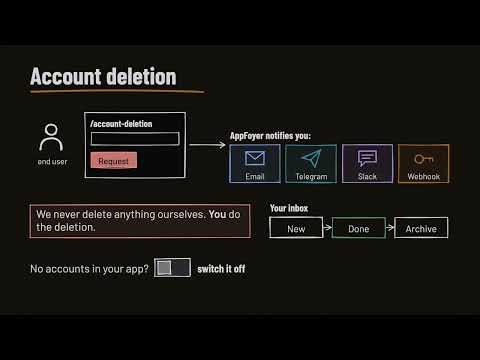
Google Play asks apps with accounts for a web page where users can request deletion. Your account deletion page collects the request and notifies you by email. You then delete the data in your own systems; AppFoyer never claims to do that for you.
SEE WHAT IS MISSING BEFORE REVIEW
A store checklist for each app shows what is done and what still needs attention, from the support email to the store listing link.
PUBLISH OR UNPUBLISH FROM YOUR PHONE
Take an app's pages live, or offline, with one tap. Detailed editing of page text, the app icon and settings happens in the AppFoyer web dashboard, one tap away.
ALSO INCLUDED
• app-ads.txt hosting for apps that show ads (Beta)
• A second address on appfoyer.app for networks where .page is blocked
• Light and dark mode
• Sign in with email, Google, Apple, GitHub or X
FREE TO START
Your first app's pages are free. No credit card, no in-app purchases.
AppFoyer provides templates, not legal advice. You are responsible for the accuracy of your pages; read them before you submit your app.
ADD YOUR APP IN A MINUTE
Type your app's name, pick iOS, Android or both, and say what the app collects. AppFoyer drafts the pages from templates filled in with your answers and puts them live at once on an address like yourapp.appfoyer.page:
• Home page for the app
• Privacy policy
• Terms of use
• Support page
• Account deletion page
COPY THE URLS INTO PLAY CONSOLE AND APP STORE CONNECT
Every page has its own address. Open it, copy it or share it straight from your phone, ready to paste into the store console.
ACCOUNT DELETION REQUESTS, RELAYED TO YOU
Google Play asks apps with accounts for a web page where users can request deletion. Your account deletion page collects the request and notifies you by email. You then delete the data in your own systems; AppFoyer never claims to do that for you.
SEE WHAT IS MISSING BEFORE REVIEW
A store checklist for each app shows what is done and what still needs attention, from the support email to the store listing link.
PUBLISH OR UNPUBLISH FROM YOUR PHONE
Take an app's pages live, or offline, with one tap. Detailed editing of page text, the app icon and settings happens in the AppFoyer web dashboard, one tap away.
ALSO INCLUDED
• app-ads.txt hosting for apps that show ads (Beta)
• A second address on appfoyer.app for networks where .page is blocked
• Light and dark mode
• Sign in with email, Google, Apple, GitHub or X
FREE TO START
Your first app's pages are free. No credit card, no in-app purchases.
AppFoyer provides templates, not legal advice. You are responsible for the accuracy of your pages; read them before you submit your app.
Check your app's privacy, support and account deletion pages from your phone.
Updated on
Safety starts with understanding how developers collect and share your data. Data privacy and security practices may vary based on your use, region, and age. The developer provided this information and may update it over time.
- No data shared with third partiesLearn more about how developers declare sharing
- This app may collect these data typesPersonal info and App activity
- Data is encrypted in transit
- You can request that data be deleted


Everyone
Learn moreApp support
About the developer
Hasanagha Mammadov
hasanaga.mammadov@gmail.com
Z.ƏLİYEVA KÜÇƏSİ, EV 1, MƏNZİL 7
Khirdalan 0100
Azerbaijan


