
Intruder Selfie Alert
Contains ads
4.5star
11.7K reviews
500K+
Downloads

Everyone
info
About this app
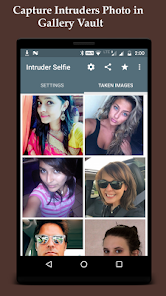
Use Intruder Selfie Alert to find out who tries to unlock your device, get notification alert, save and share the taken photo. In addition, hide captured photo from gallery so no other person can see it.
-- Saved Captured Intruders' Images to Your Google Drive.
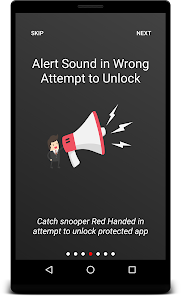
-- Ability to alert sound for wrong unlock attempts.
-- Know who touched your phone
-- Ability to capture successful and wrong PIN/Password attempts
-- Know Unlock Logs when your device has opened
-- And For how long your phone has been used by intruder (Usage times)
## Why to install Intruder Selfie Alert Lock Screen:-
- To find out who tries to unlock your mobile
- Catch all the mobile snoopers with ease
- Jealous partner. If you want to pay attention who try to look into your phone
- Easily figure out who has tried to unlock your device without your authorization
This app will alert you and ease your task of catching your friends and family red handed while they try to access your mobile. Intruder alert will take a photo while someone tries to access your mobile with wrong PIN, Pattern or Password. You can hide the captured photos from your gallery so that no person can see the pictured You can share the captured photo to your friends or family through social media.
## How to use Screen Lock Protector:-
# Activate Device Administrator:
- This app uses the Device Administrator Permission
- This permission is required to monitor any wrong attempts made by any intruder and notify the app to take the photo of the person who is trying to unlock your mobile.
# Allow below runtime permissions if your running over Android-23 (Marshmallow) or above:-
- Camera: to capture any intruder's image
- SD Card Storage: allow access to store the captured in your mobile.
- Drawing over other apps: This permission is required to capture the event and start camera to take the photo.
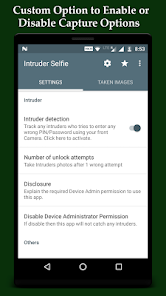
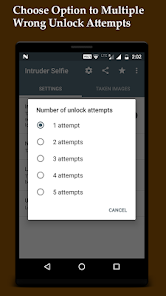
# You can set the photo to be taken after number of unlock attempts
## Main Features:-
- Intruder detection with photo alert
- Capture photo with multiple wrong attempts
- Set limits of wrong unlock attempts
- Hide captured photos from Gallery so that no one can notice
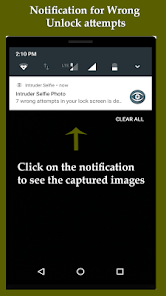
- Notification after unlocking the phone if there were intruder detection
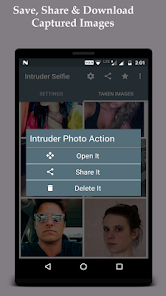
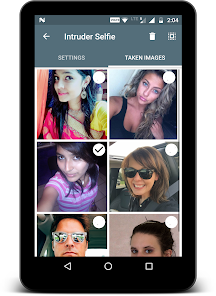
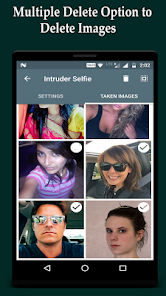
- Save, share and delete captured photos
- capture photo when screen lock open, take photo when wrong password, phone lost tracker, capture photo when phone pattern wrong
## Disclaimer:-
- We are not storing any of users' information in any form whatsoever
- If you think that this app violates any policy then please send notice to developer E-mail address, we will certainly take the action to resolve this issue.
- To make the development efforts free, this app is supported by mobile advertising.
## RATE US:
- Please do rate us with maximum stars and write your feedback, we appreciate your efforts.
THANK-YOU.
-- Saved Captured Intruders' Images to Your Google Drive.
-- Ability to alert sound for wrong unlock attempts.
-- Know who touched your phone
-- Ability to capture successful and wrong PIN/Password attempts
-- Know Unlock Logs when your device has opened
-- And For how long your phone has been used by intruder (Usage times)
## Why to install Intruder Selfie Alert Lock Screen:-
- To find out who tries to unlock your mobile
- Catch all the mobile snoopers with ease
- Jealous partner. If you want to pay attention who try to look into your phone
- Easily figure out who has tried to unlock your device without your authorization
This app will alert you and ease your task of catching your friends and family red handed while they try to access your mobile. Intruder alert will take a photo while someone tries to access your mobile with wrong PIN, Pattern or Password. You can hide the captured photos from your gallery so that no person can see the pictured You can share the captured photo to your friends or family through social media.
## How to use Screen Lock Protector:-
# Activate Device Administrator:
- This app uses the Device Administrator Permission
- This permission is required to monitor any wrong attempts made by any intruder and notify the app to take the photo of the person who is trying to unlock your mobile.
# Allow below runtime permissions if your running over Android-23 (Marshmallow) or above:-
- Camera: to capture any intruder's image
- SD Card Storage: allow access to store the captured in your mobile.
- Drawing over other apps: This permission is required to capture the event and start camera to take the photo.
# You can set the photo to be taken after number of unlock attempts
## Main Features:-
- Intruder detection with photo alert
- Capture photo with multiple wrong attempts
- Set limits of wrong unlock attempts
- Hide captured photos from Gallery so that no one can notice
- Notification after unlocking the phone if there were intruder detection
- Save, share and delete captured photos
- capture photo when screen lock open, take photo when wrong password, phone lost tracker, capture photo when phone pattern wrong
## Disclaimer:-
- We are not storing any of users' information in any form whatsoever
- If you think that this app violates any policy then please send notice to developer E-mail address, we will certainly take the action to resolve this issue.
- To make the development efforts free, this app is supported by mobile advertising.
## RATE US:
- Please do rate us with maximum stars and write your feedback, we appreciate your efforts.
THANK-YOU.
Updated on
Safety starts with understanding how developers collect and share your data. Data privacy and security practices may vary based on your use, region, and age. The developer provided this information and may update it over time.

This app may share these data types with third parties
App activity and Device or other IDs

No data collected
Learn more about how developers declare collection

Data is encrypted in transit

You can request that data be deleted
Ratings and reviews
4.5
11.5K reviews

Minja Bisnis
- Flag inappropriate
- Show review history
February 16, 2024
This app lets intruders bypass PIN lock. I installed it and was testing it out because another reviewer complained about it making an alert tone when it takes the picture. So I tried putting in the wrong pin and it unlocked my phone. Every time I try inputting wrong PINs it unlocks my phone. The opposite of security. AVOID!!!!

Daniel O'Connor
- Flag inappropriate
January 5, 2024
Because it's fee I expect the ads the only issue is the camera shutter sound.. no way to turn it off. Not exactly stealth if the snoop know they just got caught. There should be a way to silence the shutter sound. Otherwise, it's a good app and it's free. Thank u.
2 people found this review helpful

A Google user
- Flag inappropriate
- Show review history
September 26, 2018
Editor the app does not take the photo when the password is tried more than the selected times. Also it only alarmed once. After that it does not even alarm.??? If you can sort that out you can have a 5 star rating
52 people found this review helpful
What's new
# Android 12 supported
# Removed media storage permission
# More privacy feature added
# Backup added for captured intruders
# Removed media storage permission
# More privacy feature added
# Backup added for captured intruders


