Audio MP3 Cutter Mix Converter
Contains adsIn-app purchases
3.9star
424K reviews
10M+
Downloads

Everyone
info


About this app
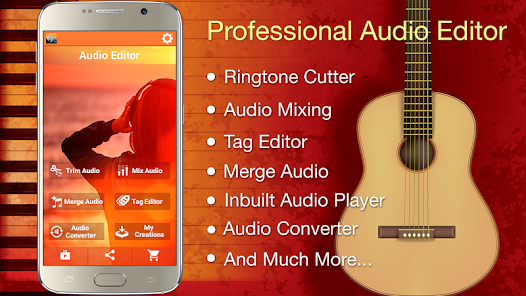
The most powerful and complete Audio Editor! It has all the features you would ever want in an Audio Editor!! Trim Audio – MP3 Cutter for Ringtones, Merge two or more audio files, Mix Audio Clips, Change Metadata fields like Art Cover, Music Album name etc, Convert from one format to another - MP3, AAC, WAV … and the list of app features goes on!!
App is completely FREE!! No limits!
>>>> Features <<<<
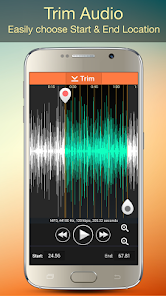
➜ MP3 Cutter: Select the best part from the Song then trim and cut the desired part of the song for using in Ringtone, Notification tones, Alarm tones. Inbuilt player for easy selection of ringtone cutter start location, end cut location and waveform support. Mp3 cutter supports cutting of MP3, AAC, WAV, M4A, AMR etc.
➜ Easily choose the Songs, other audio files from the list. You can search the list of songs. Also Music, Ringtones, Notifications, Alarms are marked separately so that one can choose easily. Also songs are listed alphabetically, so that one can choose by just browsing as well.
➜ Ringtone Setting: Set Trimmed audio as Ringtone, Notification Tone, Alarm Tone. Apart from default ringtone maker, you can also use ringtone cutter for a particular contact.
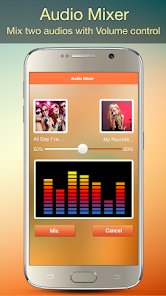
➜ Audio Mixing Tool: Mix Audio of two songs to create remixes. Same or any format songs can be remixed. You can also choose the Volume, for instance you can keep one song at low volume and another at high volume in your mashups.
➜ Merge Audio: Merge two or more Audio Clips. You can merge any number of Audio clips and make a unique tone with ringtone cutter. Merging of different formats is possible for eg. One MP3 file and another WAV music. . It also supports Fade In/ Fade Out support thus giving a professional output.
➜ Metadata Editor: You can change a number of metadata tags of a Song like – Song Title tag, Cover Art, Music Album name, Singer Name/ Artist, Genre, Composer, Year, Track number and more. This gives you enhanced control and professional audio editor features with mp3 cutter. You can choose a photo from your gallery for using in art cover in the tag editor.
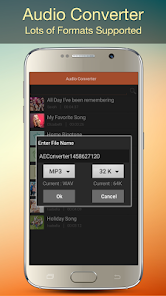
➜ MP3 Converter: Easily convert from one format to another. Supports a large number of formats like - MP3, AAC, WAV, M4A encoder etc. You can also choose the sample rate like 32 Kb, 64, 128, 192 etc in mp3 converter.
➜ Supports large number of formats in all the features - MP3 Cutter, Merge, Metadata Song Editor etc.
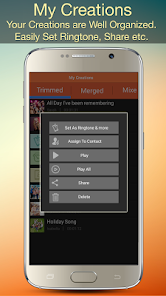
➜ Easily access your music creations. Music output list is well organized, stored in different tabs like Trimmed Audio has the cut mp3 files, Merged files, Metadata change files & Format Converter files. You can browse your music and search. You can play a particular file, set as default ringtone. You can also use ringtone cutter for a particular contact.
➜ Share your creations with the world! Share on Faceboook, Whatsapp, email and more.
➜ Mp3 Player: Inbuilt Mp3 player in the app.
➜ Recorder for recording your voice and music. Use these recordings in ringtone maker, remixes etc. .
➜ Super Fast processing & rendering!
➜ Intuitive & Modern UI
Get the most powerful Audio Editor with mp3 cutter app and see what you have been missing! Create best song tracks, ringtone cutter, remixes, shorten music, mashups, tag editor and much more with this tool!
App uses FFmpeg under permission of LGPL.
App is completely FREE!! No limits!
>>>> Features <<<<
➜ MP3 Cutter: Select the best part from the Song then trim and cut the desired part of the song for using in Ringtone, Notification tones, Alarm tones. Inbuilt player for easy selection of ringtone cutter start location, end cut location and waveform support. Mp3 cutter supports cutting of MP3, AAC, WAV, M4A, AMR etc.
➜ Easily choose the Songs, other audio files from the list. You can search the list of songs. Also Music, Ringtones, Notifications, Alarms are marked separately so that one can choose easily. Also songs are listed alphabetically, so that one can choose by just browsing as well.
➜ Ringtone Setting: Set Trimmed audio as Ringtone, Notification Tone, Alarm Tone. Apart from default ringtone maker, you can also use ringtone cutter for a particular contact.
➜ Audio Mixing Tool: Mix Audio of two songs to create remixes. Same or any format songs can be remixed. You can also choose the Volume, for instance you can keep one song at low volume and another at high volume in your mashups.
➜ Merge Audio: Merge two or more Audio Clips. You can merge any number of Audio clips and make a unique tone with ringtone cutter. Merging of different formats is possible for eg. One MP3 file and another WAV music. . It also supports Fade In/ Fade Out support thus giving a professional output.
➜ Metadata Editor: You can change a number of metadata tags of a Song like – Song Title tag, Cover Art, Music Album name, Singer Name/ Artist, Genre, Composer, Year, Track number and more. This gives you enhanced control and professional audio editor features with mp3 cutter. You can choose a photo from your gallery for using in art cover in the tag editor.
➜ MP3 Converter: Easily convert from one format to another. Supports a large number of formats like - MP3, AAC, WAV, M4A encoder etc. You can also choose the sample rate like 32 Kb, 64, 128, 192 etc in mp3 converter.
➜ Supports large number of formats in all the features - MP3 Cutter, Merge, Metadata Song Editor etc.
➜ Easily access your music creations. Music output list is well organized, stored in different tabs like Trimmed Audio has the cut mp3 files, Merged files, Metadata change files & Format Converter files. You can browse your music and search. You can play a particular file, set as default ringtone. You can also use ringtone cutter for a particular contact.
➜ Share your creations with the world! Share on Faceboook, Whatsapp, email and more.
➜ Mp3 Player: Inbuilt Mp3 player in the app.
➜ Recorder for recording your voice and music. Use these recordings in ringtone maker, remixes etc. .
➜ Super Fast processing & rendering!
➜ Intuitive & Modern UI
Get the most powerful Audio Editor with mp3 cutter app and see what you have been missing! Create best song tracks, ringtone cutter, remixes, shorten music, mashups, tag editor and much more with this tool!
App uses FFmpeg under permission of LGPL.
Updated on
Safety starts with understanding how developers collect and share your data. Data privacy and security practices may vary based on your use, region, and age. The developer provided this information and may update it over time.

No data shared with third parties
Learn more about how developers declare sharing

No data collected
Learn more about how developers declare collection

Data is encrypted in transit

Data can’t be deleted
Ratings and reviews
3.9
416K reviews

Lani Pounds
- Flag inappropriate
January 22, 2024
I LUVE this app. It does everything. I don't need a laptop or special knowledge and expensive editing software. The interface is easy to use. The recordings come out clear. The merged audio is merged accurately. It is fast as well. I have merged over 3 hours worth of audio with no long delays. The trim feature is easy to use as well. You can trim audio several times and merge it together how you want all in one app. The mix option let's you determine the volume and length of what you are mixing
11 people found this review helpful

A Google user
- Flag inappropriate
- Show review history
December 9, 2018
Excellent little app, does as the description states without fail. You can play trimmed audio through the same app and merge different tracks together. The newly saved files you create with this program do not have MP3 tag information attached so you'll need another app to change the values for "artist" or "album" etc but the audio trimming. Features are intuitive and functional beyond my expectation.
16 people found this review helpful
A Google user
- Flag inappropriate
May 29, 2019
The app is very easy to use, and my go-to for editing audio, but there is an issue. Whenever I cut audio with it, once it's named, I can't change the file name. At all. It bothers me because I name my music to be in a certain order, and when it does this I need to re-name it through the app (not cutting anything and just renaming it). Plus, there are WAY too many ads. There's an ad after every trimming; it gets very annoying. Otherwise, a great app!
66 people found this review helpful
What's new
Version 1.93: Fix for Filename in Trim, Merge etc. We recommend NOT to use special characters like &, !, / etc in Filename.


