
Quick Dial: Direct Chat & Call


Everyone
info
5+
Downloads

Everyone
Learn more


About this app
QuickDial (Quick Dial) lets you message any phone number without saving it as a contact, and turn an open chat into a normal phone call with one tap. QuickDial is a direct chat and click to chat helper with a one-tap call button for chats.
Works with WhatsApp and WhatsApp Business. QuickDial is an independent app and is not affiliated with, endorsed or sponsored by WhatsApp LLC or Meta.
Chat without saving the number
Paste or type any phone number, optionally prefill a message, and open a direct chat. No need to save a contact first. QuickDial never sends the message automatically.
One-tap call button in chats
When a personal chat is open, QuickDial shows a small call button. Tap it to open your phone's normal dialer with that person's number already filled in. For saved contacts, QuickDial matches the chat title with the contacts on your phone. For an unsaved business contact, tapping the call button can briefly open the visible contact-info screen, read the phone number shown there, return to the chat, and remember that match on your device.
Chat shortcut during and after calls
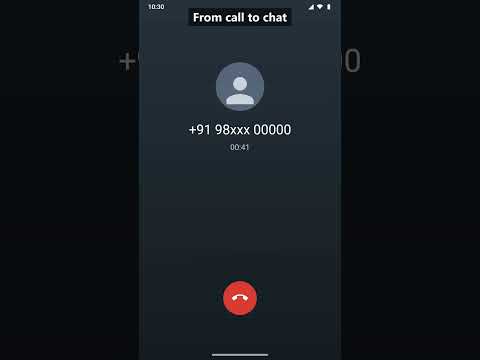
During a normal cellular call, and for a time you choose after it ends, QuickDial can show a chat shortcut for the caller, so you can follow up in chat with one tap.
International numbers, handled correctly
Numbers are formatted with the right country code for where you are, including while roaming, so a direct chat or call reaches the right person.
Features:
- Direct chat without saving the number (click to chat)
- One-tap call button in personal chats
- Quick dialer for unsaved business contacts
- Chat shortcut during and after cellular calls
- Personal and business chat app support
- Correct country codes for international numbers
- Adjustable bubble size, position, transparency and post-call duration
- Clear setup and reminders when required services are off
- Local, battery-conscious processing, with no ads
Accessibility Service disclosure:
QuickDial uses AccessibilityService for its core chat-to-call shortcut. It detects supported personal chat screens and reads the visible chat title. Only after you tap the call shortcut for an unresolved contact, it can open the visible contact-info screen, read the displayed phone number, and return. It does not read or store message content, take screenshots, send messages, or place calls automatically.
Notification access disclosure:
QuickDial uses notification access only to recognise an active cellular call's visible caller name or number so it can offer the chat shortcut during or shortly after that call.
Privacy:
Contact matching and remembered title-to-number matches stay on your device. QuickDial does not upload or sell this information and has no advertising SDK. QuickDial opens the system dialer or compatible chat app only after you tap.
Works with WhatsApp and WhatsApp Business. QuickDial is an independent app and is not affiliated with, endorsed or sponsored by WhatsApp LLC or Meta.
Chat without saving the number
Paste or type any phone number, optionally prefill a message, and open a direct chat. No need to save a contact first. QuickDial never sends the message automatically.
One-tap call button in chats
When a personal chat is open, QuickDial shows a small call button. Tap it to open your phone's normal dialer with that person's number already filled in. For saved contacts, QuickDial matches the chat title with the contacts on your phone. For an unsaved business contact, tapping the call button can briefly open the visible contact-info screen, read the phone number shown there, return to the chat, and remember that match on your device.
Chat shortcut during and after calls
During a normal cellular call, and for a time you choose after it ends, QuickDial can show a chat shortcut for the caller, so you can follow up in chat with one tap.
International numbers, handled correctly
Numbers are formatted with the right country code for where you are, including while roaming, so a direct chat or call reaches the right person.
Features:
- Direct chat without saving the number (click to chat)
- One-tap call button in personal chats
- Quick dialer for unsaved business contacts
- Chat shortcut during and after cellular calls
- Personal and business chat app support
- Correct country codes for international numbers
- Adjustable bubble size, position, transparency and post-call duration
- Clear setup and reminders when required services are off
- Local, battery-conscious processing, with no ads
Accessibility Service disclosure:
QuickDial uses AccessibilityService for its core chat-to-call shortcut. It detects supported personal chat screens and reads the visible chat title. Only after you tap the call shortcut for an unresolved contact, it can open the visible contact-info screen, read the displayed phone number, and return. It does not read or store message content, take screenshots, send messages, or place calls automatically.
Notification access disclosure:
QuickDial uses notification access only to recognise an active cellular call's visible caller name or number so it can offer the chat shortcut during or shortly after that call.
Privacy:
Contact matching and remembered title-to-number matches stay on your device. QuickDial does not upload or sell this information and has no advertising SDK. QuickDial opens the system dialer or compatible chat app only after you tap.
Quick dial: chat with any number without saving it, or call any chat in 1 tap
Updated on
Featured stories

Safety starts with understanding how developers collect and share your data. Data privacy and security practices may vary based on your use, region, and age. The developer provided this information and may update it over time.
- This app may share these data types with third partiesPersonal info
- No data collectedLearn more about how developers declare collection
- Data is encrypted in transit
- Data can’t be deleted


What’s new
Setup now takes you straight to QuickDial in Accessibility settings, with a short hint on what to tap. Shortcut switches show off until they are ready. Share or select any text with a phone number to open its chat.
Everyone
Learn moreApp support
About the developer
Ashwar Sadh
ashwarsadh@gmail.com
India