
PasswordPocket
3.0star
36 reviews
5K+
Downloads

Everyone
info




About this app
PasswordPocket is a Bluetooth-enabled portable password manager designed to securely store user account credentials and sensitive information. By connecting it to your computer or mobile device via Bluetooth, you can effortlessly achieve automatic password filling, effectively solving the problem of easily forgetting passwords.
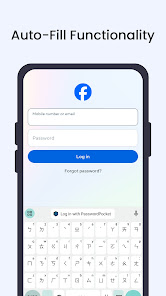
【Credential Auto-Fill Feature】: Say goodbye to the hassle of manually entering passwords! PasswordPocket automatically fills in your credentials with just a single click.
【Network-free data protection】: Use Bluetooth as the communication medium with your device, eliminating the need to access the internet and reducing the risk of unauthorized access.
【Military-Grade Encryption】: Utilizes advanced encryption techniques to safeguard your sensitive information, providing you with enhanced privacy and security.
【Centralized Account Management】: Store up to 1,000 sets of account credentials in PasswordPocket.
【Support for multiple devices and platforms】: PasswordPocket works seamlessly across multiple devices, including mobile phones, tablets, and computers.
【Master Key Exclusive Access】: From now on, you only need to remember one set of credentials!
【Credential Auto-Fill Feature】: Say goodbye to the hassle of manually entering passwords! PasswordPocket automatically fills in your credentials with just a single click.
【Network-free data protection】: Use Bluetooth as the communication medium with your device, eliminating the need to access the internet and reducing the risk of unauthorized access.
【Military-Grade Encryption】: Utilizes advanced encryption techniques to safeguard your sensitive information, providing you with enhanced privacy and security.
【Centralized Account Management】: Store up to 1,000 sets of account credentials in PasswordPocket.
【Support for multiple devices and platforms】: PasswordPocket works seamlessly across multiple devices, including mobile phones, tablets, and computers.
【Master Key Exclusive Access】: From now on, you only need to remember one set of credentials!
Updated on
Safety starts with understanding how developers collect and share your data. Data privacy and security practices may vary based on your use, region, and age. The developer provided this information and may update it over time.

No data shared with third parties
Learn more about how developers declare sharing

No data collected
Learn more about how developers declare collection

Committed to follow the Play Families Policy
Ratings and reviews
3.0
35 reviews

Red Scale
- Flag inappropriate
October 3, 2025
They say that they share your information with marketing partners on this supposedly offline password manager and the only way to create an account for this offline password manager on your phone is to accept their privacy terms and terms and conditions for what should be an offline password manager. In other words, it's not an offline password manager. It's a service pretending to be an offline password manager where you have to buy an expensive dongle to use it.
2 people found this review helpful

Ron Downs
- Flag inappropriate
- Show review history
June 17, 2025
Can confirm this program works correctly on my Samsung Galaxy S10 Plus (Android 12) and S20 Plus 5G phones. The software could use more polish, but I suppose that would require revised firmware or 2nd Gen hardware design. Just FYI - your mileage may vary ...

Richard Bosch
- Flag inappropriate
- Show review history
October 19, 2023
It is very difficult to set up. Does not work all the time. Concept is great. Needs a lot of work on the program. Returned.
1 person found this review helpful
What’s new
Fix crush error
App support
About the developer
涵容科技有限公司
support@atlancube.com
115010台湾台北市南港區
三重路19之11號10樓
+886 905 349 737