
Enluore PDF Reader
Contains ads


Everyone
info
5+
Downloads

Everyone
Learn more


About this app
This PDF reader features TTS (Text-to-Speech) and simple controls, allowing you to comfortably read and listen to your documents
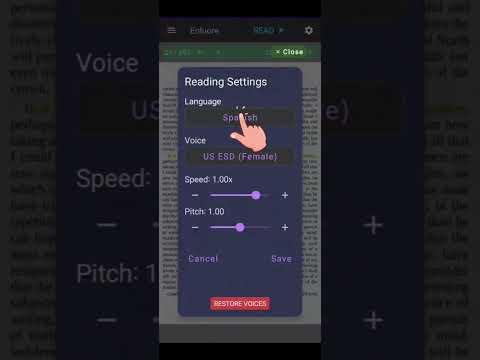
Open your PDF files, select the language and voice, press Play, and start listening to the content via the read-aloud feature
Reading Point Selection
Tap a line in the document to start reading from that point
Voice Selection
Choose from the voices available on your device for reading
Reading Speed
Adjust the voice speed to find the pace that is most comfortable for you
Voice Pitch
Adjust the voice pitch (when this option is supported by your device's TTS engine)
Background Playback
Keep listening to the document while using other apps on your device (subject to system capabilities)
Easy PDF Navigation
Use controls to move forward and backward between document pages
Read and Listen to Your PDFs
Use Enluore as a standard PDF reader or activate TTS read-aloud to listen to the content while following the text on screen
Text-to-Speech (TTS)
Enluore uses your device's Text-to-Speech (TTS) function to convert the text in your PDF documents into speech
Read-Aloud
Listen to your PDF documents using your selected voice and continue listening while performing other activities. Ideal for studying, reviewing documents, or listening to reading materials
Open your PDF files, select the language and voice, press Play, and start listening to the content via the read-aloud feature
Reading Point Selection
Tap a line in the document to start reading from that point
Voice Selection
Choose from the voices available on your device for reading
Reading Speed
Adjust the voice speed to find the pace that is most comfortable for you
Voice Pitch
Adjust the voice pitch (when this option is supported by your device's TTS engine)
Background Playback
Keep listening to the document while using other apps on your device (subject to system capabilities)
Easy PDF Navigation
Use controls to move forward and backward between document pages
Read and Listen to Your PDFs
Use Enluore as a standard PDF reader or activate TTS read-aloud to listen to the content while following the text on screen
Text-to-Speech (TTS)
Enluore uses your device's Text-to-Speech (TTS) function to convert the text in your PDF documents into speech
Read-Aloud
Listen to your PDF documents using your selected voice and continue listening while performing other activities. Ideal for studying, reviewing documents, or listening to reading materials
PDF reader with TTS, read-aloud functionality, and simple navigation
Updated on
Safety starts with understanding how developers collect and share your data. Data privacy and security practices may vary based on your use, region, and age. The developer provided this information and may update it over time.
- No data shared with third partiesLearn more about how developers declare sharing
- No data collectedLearn more about how developers declare collection


Everyone
Learn moreApp support
phone
Phone number
+573044005461
About the developer
MARCO JAVIER HINCAPIE CARDENAS
m697012@gmail.com
Colombia