Audio Converter (MP3 AAC OPUS)
Contains adsIn-app purchases
4.0star
19K reviews
5M+
Downloads

Everyone
info




About this app
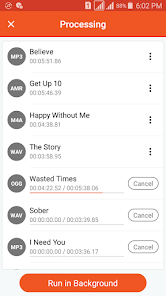
Audio Converter is a fast and powerful android application to convert and cut audio files.
Convert to mp3, format converter, convert video to mp3, cut audio and create your own ringtone for free.
Our Audio Converter allows you to convert music format with just a few clicks. You can save music with many different quality such as 8 kb/s, 16 kb/s, 128 kb/s, 320 kb/s, 64 kb/s, 192 kb/s, 256 kb/s. Now you can easily convert thousands of audio files and save them to your collection of favorite songs.
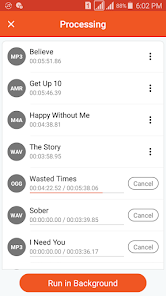
No register accounts needed. All you need to do is to select the audio that you wish to convert & save. Select the format then click "convert" to start the converting process.
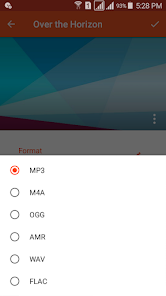
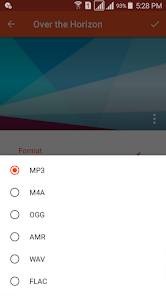
We support all audio formats conversion. You can easily convert audio to MP3, AAC, M4A, OGG, AMR (AMR-NB and AMR-WB), OPUS, WAV, FLAC, WMA, AC3 formats, etc. without any limitations or fees.
With Audio Converter, you can convert music with any format to other format and cut your music to extract preferred clips then you can share them with your friends.
With Audio Converter, you can create your own ringtones for your device, convert any audio then you can create your albums with your high quality audio clips to listen them any time you want, share them with your friends through social media including WhatsApp, Soundcloud and Facebook and more or even combine them with your video clips.
Audio Converter
● Convert any audio format to another easily.
● Extract music from video and convert video to audio
● Support various audio formats including MP3, AAC, M4A, OGG, AMR (AMR-NB and AMR-WB), OPUS, WAV, FLAC, WMA, etc.
● No duration limit.
● Support various audio formats as output including MP3, AAC, M4A, OGG, AMR (AMR-NB and AMR-WB), WAV, FLAC, WMA, OPUS, AC3.
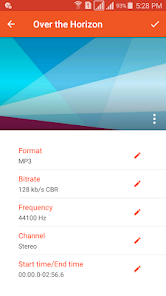
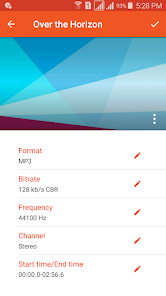
● Edit audio settings like bitrate, frequency, channel.
● Support many audio bitrate 8 kb/s, 16 kb/s, 24 kb/s, 32 kb/s, 64 kb/s, 128 kb/s, 160 kb/s, 192 kb/s, 256 kb/s and 320 kb/s.
● Support VBR, CBR and ABR.
● Change audio frequency to 8000 Hz, 16000 Hz, 22050 Hz, 44100 Hz, 48000 Hz.
● Support for Stereo, Mono, 3.1, 5.0, 5.1, 7.0 and 7.1 audio channels.
● Add music cover (MP3 format).
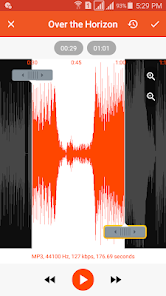
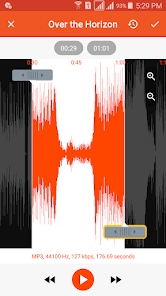
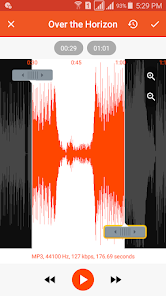
● Trimming the music before and after convert
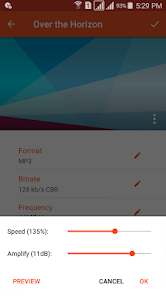
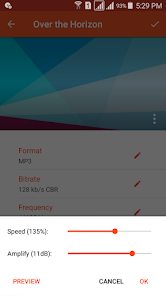
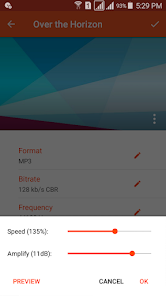
● Change speed of song before convert process.
● Amplify of audio file before convert process.
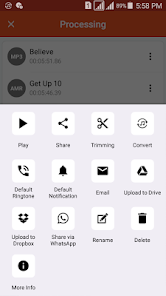
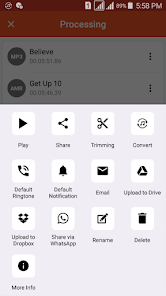
● You can share the converted music with your friends over the different social media.
● Support upload the songs to Google drive, Dropbox and Soundcloud.
● Edit music tags (Title, Artist and Album).
● With this feature, you can convert any unsupported audio like OPUS, WMA to any supported format by android like MP3, M4A and keep the original quality.
Audio Cutter
● Support unlimitted audio formats list MP3, AAC, OGG, OPUS, etc.
● Very fast and more accurate.
● No duration limit.
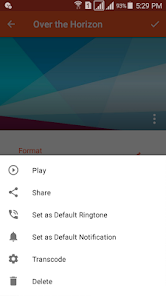
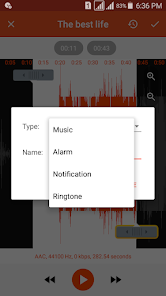
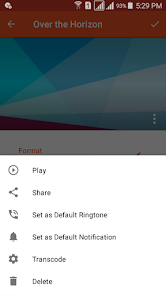
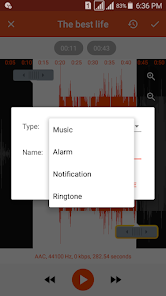
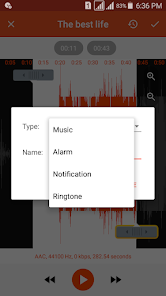
● Save the audio file as Music, Alarm, Notification or Ringtone.
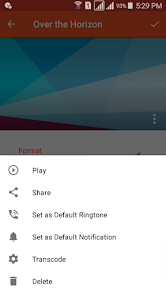
● Share and play the audio clip.
● You can set the audio clip as default notification for your device.
● You can set the audio clip as default tone for the incoming calls in your device.
● Simple and friendly interface.
Audio Converter is the best audio format converter for android. It's simple, powerful and free.
We hope you will find all your needs in our application to edit and convert your favorite music files.
Feel free to share with us any suggestions or questions which make our app great more and more.
Any suggestions or questions, please contact us through bdroid.791@gmail.com.
Convert to mp3, format converter, convert video to mp3, cut audio and create your own ringtone for free.
Our Audio Converter allows you to convert music format with just a few clicks. You can save music with many different quality such as 8 kb/s, 16 kb/s, 128 kb/s, 320 kb/s, 64 kb/s, 192 kb/s, 256 kb/s. Now you can easily convert thousands of audio files and save them to your collection of favorite songs.
No register accounts needed. All you need to do is to select the audio that you wish to convert & save. Select the format then click "convert" to start the converting process.
We support all audio formats conversion. You can easily convert audio to MP3, AAC, M4A, OGG, AMR (AMR-NB and AMR-WB), OPUS, WAV, FLAC, WMA, AC3 formats, etc. without any limitations or fees.
With Audio Converter, you can convert music with any format to other format and cut your music to extract preferred clips then you can share them with your friends.
With Audio Converter, you can create your own ringtones for your device, convert any audio then you can create your albums with your high quality audio clips to listen them any time you want, share them with your friends through social media including WhatsApp, Soundcloud and Facebook and more or even combine them with your video clips.
Audio Converter
● Convert any audio format to another easily.
● Extract music from video and convert video to audio
● Support various audio formats including MP3, AAC, M4A, OGG, AMR (AMR-NB and AMR-WB), OPUS, WAV, FLAC, WMA, etc.
● No duration limit.
● Support various audio formats as output including MP3, AAC, M4A, OGG, AMR (AMR-NB and AMR-WB), WAV, FLAC, WMA, OPUS, AC3.
● Edit audio settings like bitrate, frequency, channel.
● Support many audio bitrate 8 kb/s, 16 kb/s, 24 kb/s, 32 kb/s, 64 kb/s, 128 kb/s, 160 kb/s, 192 kb/s, 256 kb/s and 320 kb/s.
● Support VBR, CBR and ABR.
● Change audio frequency to 8000 Hz, 16000 Hz, 22050 Hz, 44100 Hz, 48000 Hz.
● Support for Stereo, Mono, 3.1, 5.0, 5.1, 7.0 and 7.1 audio channels.
● Add music cover (MP3 format).
● Trimming the music before and after convert
● Change speed of song before convert process.
● Amplify of audio file before convert process.
● You can share the converted music with your friends over the different social media.
● Support upload the songs to Google drive, Dropbox and Soundcloud.
● Edit music tags (Title, Artist and Album).
● With this feature, you can convert any unsupported audio like OPUS, WMA to any supported format by android like MP3, M4A and keep the original quality.
Audio Cutter
● Support unlimitted audio formats list MP3, AAC, OGG, OPUS, etc.
● Very fast and more accurate.
● No duration limit.
● Save the audio file as Music, Alarm, Notification or Ringtone.
● Share and play the audio clip.
● You can set the audio clip as default notification for your device.
● You can set the audio clip as default tone for the incoming calls in your device.
● Simple and friendly interface.
Audio Converter is the best audio format converter for android. It's simple, powerful and free.
We hope you will find all your needs in our application to edit and convert your favorite music files.
Feel free to share with us any suggestions or questions which make our app great more and more.
Any suggestions or questions, please contact us through bdroid.791@gmail.com.
Updated on
Safety starts with understanding how developers collect and share your data. Data privacy and security practices may vary based on your use, region, and age. The developer provided this information and may update it over time.


Ratings and reviews
4.0
18.4K reviews

David Pratt
- Flag inappropriate
- Show review history
June 9, 2023
I couldn't get to my computer...needed to convert and divide a whole album flac file into individual song mp3 files. I was dreading having to learn new software so I put it off for over a month. Tried this app and about an hour later I was done with all 15 songs, as if that weren't fast enough, next time I'll be even quicker. Outstanding app! A nice addition would be the ability to select by the hundredth of a second instead of a tenth.
115 people found this review helpful

A Google user
- Flag inappropriate
February 21, 2020
Wow! Super easy to use. So far so good, and it does everything it says it does in the description. I quickly converted a flac file (approximately 2 minutes long) and it did it in less than 10 seconds! Super cool & convenient. The only feedback I have is that I wish it were a little easier to press play and listen to each file instead of tapping the upper right corner menu and then pressing play. I hope this app continues to work and produce great content as an audio tool! Thank Bdroid Team!
90 people found this review helpful

Alexander Schmitt
- Flag inappropriate
- Show review history
May 21, 2022
This app is great, made converting a bunch of old audio files that were unplayable taking up room in my phone super fast and super easy. I do have two main, albeit very minor, issues with the app though: Firstly, can only convert 10 files at a time (which could be an understandable technical limit) Secondly, the app doesn't have a built in Tag editor, which is no big deal since they are a dime-a-dozen. Great app, if I am ever in need of audio conversion again I will be back.
121 people found this review helpful
What's new
* Fix some issues


