
Video Splitter & Trim Videos
Contains adsIn-app purchases
star
15.3K reviews

Everyone
info
1M+
Downloads




About this app
With Better Video Splitter, you can easily split long videos into smaller clips, accurately cut out unwanted parts, or compress videos in high quality — all fast and watermark-free!
Perfect for sharing long videos to WhatsApp, Instagram, TikTok, or any other social media platform.
FAST · HIGH QUALITY · NO WATERMARK!
🚀 Features
1. Split Video
Split long videos into shorter clips for WhatsApp status, Instagram stories, or social media posts.
Support multiple split modes:
#1 WhatsApp Split – Automatically split long videos into 60-second clips for WhatsApp Status.
#2 Quantity Split – Split a video into a specific number of parts.
#3 Duration Split – Customize the duration of each clip.
#4 File Size Split – Split videos based on file size.
#5 Custom Split (NEW) – Freely add split points on the video timeline to create clips exactly the way you want.
Support add clip sequence, can show the order on each video clip
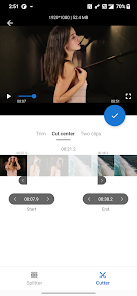
2. Trim & Cut Video
Trim the beginning or end of a video easily.
Custom Cut (NEW) – Remove multiple unwanted segments from your video and merge the remaining parts into one seamless video.
3. Compress Video
Reduce video file size with high-quality compression — perfect for saving storage or faster sharing.
4. Simple & Fast
Intuitive timeline editing.
Lightning-fast export without watermark.
Explanation of Permissions:
Read/Write External Storage – Needed to access and save video files.
Perfect for sharing long videos to WhatsApp, Instagram, TikTok, or any other social media platform.
FAST · HIGH QUALITY · NO WATERMARK!
🚀 Features
1. Split Video
Split long videos into shorter clips for WhatsApp status, Instagram stories, or social media posts.
Support multiple split modes:
#1 WhatsApp Split – Automatically split long videos into 60-second clips for WhatsApp Status.
#2 Quantity Split – Split a video into a specific number of parts.
#3 Duration Split – Customize the duration of each clip.
#4 File Size Split – Split videos based on file size.
#5 Custom Split (NEW) – Freely add split points on the video timeline to create clips exactly the way you want.
Support add clip sequence, can show the order on each video clip
2. Trim & Cut Video
Trim the beginning or end of a video easily.
Custom Cut (NEW) – Remove multiple unwanted segments from your video and merge the remaining parts into one seamless video.
3. Compress Video
Reduce video file size with high-quality compression — perfect for saving storage or faster sharing.
4. Simple & Fast
Intuitive timeline editing.
Lightning-fast export without watermark.
Explanation of Permissions:
Read/Write External Storage – Needed to access and save video files.
Easily split videos for WhatsApp and Instagram stories to the required length.
Updated on
Safety starts with understanding how developers collect and share your data. Data privacy and security practices may vary based on your use, region, and age. The developer provided this information and may update it over time.
- No data shared with third partiesLearn more about how developers declare sharing
- This app may collect these data typesApp activity, App info and performance, and Device or other IDs
- Data is encrypted in transit
- Data can’t be deleted


Ratings and reviews
15K reviews

Andrew Davis
- Flag inappropriate
December 15, 2023
Honestly, it took me way to long to find this. Many apps will say they "split" videos but this app truly does exactly what the name suggests and that's all I could have ever asked for. It has many varying options to choose when splitting such as by file size, number of videos needed, and amount of time per video, all while asking if you would like to make the video high quality or not. This all is WITHOUT A SUBSCRIPTION!!! Truly an app worth downloading.
25 people found this review helpful

Patrick Farrington
- Flag inappropriate
May 10, 2022
Best cutter and splitter. Even for pro or beginner. 3rd app and obly one i kept! Others you select an area to cut, and it keeps that selection. Its a cutter, duh. I didnt want to keep what i selected! No fine tune on others so you have to keep cutting the previous cut to select a very specific timeframe. This one has a toggle to fine tune both sides! A+++++
38 people found this review helpful

josh wanner
- Flag inappropriate
September 12, 2024
Would have had five stars for me if I wasn't trying to remove the ads. Here's what happened, so no one else makes the same mistake, it is quite shady. I paid to get the ads removed, tried to split another video. But after paying, a video that normally would work didn't. A message popped up telling me my video format wouldn't work and to download the professional app, which also cost money. I paid for the VIP version of this app, why are you telling me to get another one and pay again. Shady.
5 people found this review helpful
What’s new
Bug fixes and performance improvements.
App support
About the developer
程巧咏
mmedia-tech@hotmail.com
金榜路28号万林湖5栋706
惠城区, 惠州市, 广东省
China
516008


